
ButtonDefaults
object ButtonDefaults
Contains the default values used by Button
Summary
Public functions |
|
|---|---|
Unit |
@ComposableLays out the content of a |
ButtonColors |
Creates a |
ButtonColors |
@ComposableCreates a |
ButtonColors |
Creates a |
ButtonColors |
@ComposableCreates a |
ButtonColors |
Creates a |
ButtonColors |
@ComposableCreates a |
Painter |
@ComposableCreates a |
Painter |
disabledContainerPainter(containerPainter: Painter)Creates a |
ButtonColors |
Creates a |
ButtonColors |
@ComposableCreates a |
ButtonColors |
Creates a |
ButtonColors |
@ComposableCreates a |
BorderStroke |
@ComposableCreates a |
ButtonColors |
Creates a |
ButtonColors |
@ComposableCreates a |
Brush |
Creates a |
Public properties |
|
|---|---|
Dp |
The recommended start padding to be used with |
Dp |
The recommended horizontal content padding used by |
Dp |
The recommended start padding to be used with |
Dp |
The recommended vertical content padding used by |
PaddingValues |
The default content padding used by |
PaddingValues |
The default content padding used by |
PaddingValues |
This property is deprecated. Use CompactButtonDefaults.ContentPadding instead |
Dp |
This property is deprecated. Use CompactButtonDefaults.Height instead |
Dp |
This property is deprecated. Use CompactButtonDefaults.HorizontalPadding instead |
PaddingValues |
This property is deprecated. Use CompactButtonDefaults.TapTargetPadding instead |
Dp |
This property is deprecated. Use CompactButtonDefaults.VerticalPadding instead |
PaddingValues |
The default content padding used by |
Float |
The default alpha applied to the container when the button is disabled. |
Dp |
The recommended icon size when used in |
Dp |
This property is deprecated. Use CompactButtonDefaults.ExtraSmallIconSize instead |
Dp |
The default height applied for the |
Dp |
The recommended default size for icons when used inside a |
Dp |
The default size of the spacing between an icon and a text when they are used inside a |
Dp |
The recommended icon size when used in |
Dp |
This property is deprecated. Use CompactButtonDefaults.SmallIconSize instead |
RoundedCornerShape |
This property is deprecated. Use CompactButtonDefaults.shape instead |
Dp |
The minimum vertical content padding for the list when a |
Color |
The default gradient end color when drawing a scrim over an image to ensure that the text text drawn over the image is legible. |
Color |
The default gradient start color when drawing a scrim over an image to ensure that the text text drawn over the image is legible. |
RoundedCornerShape |
Recommended |
Public functions
Content
@Composable
fun Content(
    modifier: Modifier = Modifier,
    secondaryLabel: (@Composable RowScope.() -> Unit)? = null,
    icon: (@Composable BoxScope.() -> Unit)? = null,
    enabled: Boolean = true,
    colors: ButtonColors = buttonColors(),
    label: @Composable RowScope.() -> Unit
): Unit
Lays out the content of a Button with support for an icon, a label, and a secondary label.
While the standard Button overloads provide this layout out-of-the-box, ButtonDefaults.Content can be used inside the Button overload that takes a generic content to build custom button layouts (for example, to wrap the content in a gesture hint indicator like OneHandedGestureIndicator) while maintaining standard typography, colors, and spacing.
Example of a ButtonDefaults.Content layout with OneHandedGestureIndicator:
import androidx.compose.foundation.interaction.MutableInteractionSource
import androidx.compose.foundation.layout.Box
import androidx.compose.foundation.layout.fillMaxSize
import androidx.compose.foundation.layout.size
import androidx.compose.runtime.mutableStateOf
import androidx.compose.runtime.remember
import androidx.compose.runtime.rememberCoroutineScope
import androidx.compose.ui.Alignment
import androidx.compose.ui.Modifier
import androidx.compose.ui.graphics.Color
import androidx.compose.ui.res.painterResource
import androidx.compose.ui.semantics.onClick
import androidx.wear.compose.material3.Button
import androidx.wear.compose.material3.ButtonDefaults
import androidx.wear.compose.material3.Icon
import androidx.wear.compose.material3.MaterialTheme
import androidx.wear.compose.material3.Text
import androidx.wear.compose.material3.onehandedgesture.GestureAction
import androidx.wear.compose.material3.onehandedgesture.OneHandedGestureClickIndicator
import androidx.wear.compose.material3.onehandedgesture.OneHandedGestureClickIndicatorState
import androidx.wear.compose.material3.onehandedgesture.oneHandedGesture
import androidx.wear.compose.material3.onehandedgesture.rememberOneHandedGestureConfiguration

var label by remember { mutableStateOf("Filled Button") }
val onClick = remember { { label = "Gestured" } }
val interactionSource = remember { MutableInteractionSource() }
val gestureConfig = rememberOneHandedGestureConfiguration(action = GestureAction.Primary)
val indicatorState = remember { OneHandedGestureClickIndicatorState() }
val coroutineScope = rememberCoroutineScope()

Box(modifier = Modifier.fillMaxSize(), contentAlignment = Alignment.Center) {
    Button(
        onClick = onClick,
        interactionSource = interactionSource,
        modifier =
            Modifier.oneHandedGesture(
                gestureConfiguration = gestureConfig,
                onGestureLabel = "click",
                interactionSource = interactionSource,
                onGestureAvailable = {
                    coroutineScope.launch { indicatorState.showIndicator() }
                },
                onGesture = onClick,
            ),
        content = {
            OneHandedGestureClickIndicator(
                gestureConfiguration = gestureConfig,
                state = indicatorState,
                gestureIndicatorTint = MaterialTheme.colorScheme.onPrimary,
            ) {
                ButtonDefaults.Content(
                    secondaryLabel = { Text("Secondary Label") },
                    icon = {
                        Icon(
                            painter = painterResource(R.drawable.ic_favorite_rounded),
                            contentDescription = "Favorite icon",
                            modifier = Modifier.size(ButtonDefaults.IconSize),
                        )
                    },
                    colors = ButtonDefaults.buttonColors(),
                    label = { Text(label) },
                )
            }
        },
    )
}
| Parameters | |
|---|---|
modifier: Modifier = Modifier |
Modifier to be applied to the button content layout. |
secondaryLabel: (@Composable RowScope.() -> Unit)? = null |
A slot for providing the button's secondary label. By default, ButtonDefaults.Content applies Material3 UX guidelines, so that |
icon: (@Composable BoxScope.() -> Unit)? = null |
A slot for providing the button's icon. The contents are expected to be a horizontally and vertically center-aligned icon of size |
enabled: Boolean = true |
Controls the enabled state of the button content. When |
colors: ButtonColors = buttonColors() |
|
label: @Composable RowScope.() -> Unit |
A slot for providing the button's main label. By default, ButtonDefaults.Content applies Material3 UX guidelines, so that |
buttonColors
@Composable
fun buttonColors(): ButtonColors
Creates a ButtonColors that represents the default background and content colors used in a Button.
buttonColors
@Composable
fun buttonColors(
    containerColor: Color = Color.Unspecified,
    contentColor: Color = Color.Unspecified,
    secondaryContentColor: Color = Color.Unspecified,
    iconColor: Color = Color.Unspecified,
    disabledContainerColor: Color = Color.Unspecified,
    disabledContentColor: Color = Color.Unspecified,
    disabledSecondaryContentColor: Color = Color.Unspecified,
    disabledIconColor: Color = Color.Unspecified
): ButtonColors
Creates a ButtonColors that represents the default background and content colors used in a Button.
| Parameters | |
|---|---|
containerColor: Color = Color.Unspecified |
The background color of this |
contentColor: Color = Color.Unspecified |
The content color of this |
secondaryContentColor: Color = Color.Unspecified |
The content color of this |
iconColor: Color = Color.Unspecified |
The content color of this |
disabledContainerColor: Color = Color.Unspecified |
The background color of this |
disabledContentColor: Color = Color.Unspecified |
The content color of this |
disabledSecondaryContentColor: Color = Color.Unspecified |
The content color of this |
disabledIconColor: Color = Color.Unspecified |
The content color of this |
buttonWithContainerPainterColors
@Composable
fun buttonWithContainerPainterColors(): ButtonColors
Creates a ButtonColors for the content in a Button with an image container painter.
buttonWithContainerPainterColors
@Composable
fun buttonWithContainerPainterColors(
    contentColor: Color = Color.Unspecified,
    secondaryContentColor: Color = Color.Unspecified,
    iconColor: Color = Color.Unspecified,
    disabledContentColor: Color = Color.Unspecified,
    disabledSecondaryContentColor: Color = Color.Unspecified,
    disabledIconColor: Color = Color.Unspecified
): ButtonColors
Creates a ButtonColors for the content in a Button with an image container painter.
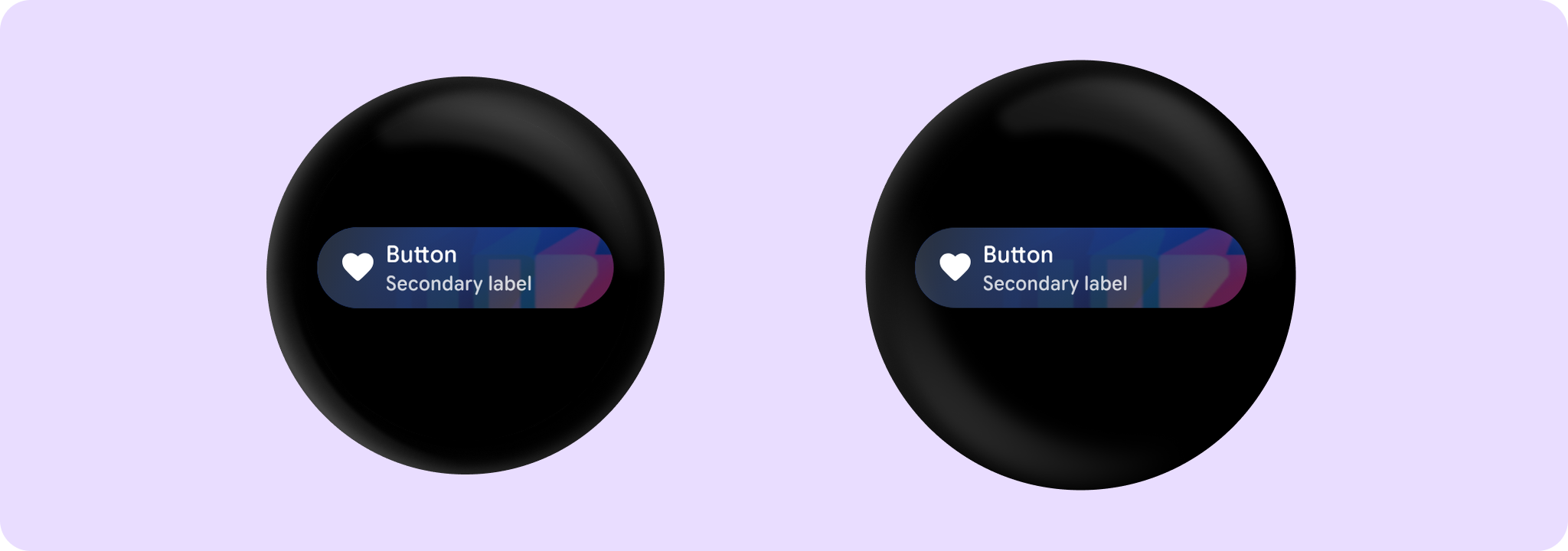
Example of a Button with an image background:
import androidx.compose.foundation.background
import androidx.compose.foundation.layout.fillMaxWidth
import androidx.compose.ui.Modifier
import androidx.compose.ui.res.painterResource
import androidx.compose.ui.semantics.onClick
import androidx.wear.compose.material3.Button
import androidx.wear.compose.material3.ButtonDefaults
import androidx.wear.compose.material3.Icon
import androidx.wear.compose.material3.Text

Button(
    onClick = { /* Do something */ },
    containerPainter =
        ButtonDefaults.containerPainter(
            image = painterResource(id = R.drawable.backgroundimage)
        ),
    enabled = enabled,
    label = { Text("Button") },
    secondaryLabel = { Text("Secondary label") },
    icon = {
        Icon(
            painter = painterResource(R.drawable.ic_favorite_rounded),
            contentDescription = "Favorite icon",
        )
    },
    modifier = Modifier.fillMaxWidth(),
)
| Parameters | |
|---|---|
contentColor: Color = Color.Unspecified |
The content color of this |
secondaryContentColor: Color = Color.Unspecified |
The secondary content color of this |
iconColor: Color = Color.Unspecified |
The icon color of this |
disabledContentColor: Color = Color.Unspecified |
The content color of this |
disabledSecondaryContentColor: Color = Color.Unspecified |
The secondary content color of this |
disabledIconColor: Color = Color.Unspecified |
The icon color of this |
childButtonColors
@Composable
fun childButtonColors(): ButtonColors
Creates a ButtonColors with transparent background, the defaults for low emphasis buttons like ChildButton. Use childButtonColors for optional or supplementary actions with the least amount of prominence.
If a button is disabled then the content will have an alpha(DisabledContentAlpha) value applied and container will have an alpha(DisabledContainerAlpha) value applied.
childButtonColors
@Composable
fun childButtonColors(
    contentColor: Color = Color.Unspecified,
    secondaryContentColor: Color = Color.Unspecified,
    iconColor: Color = Color.Unspecified,
    disabledContentColor: Color = Color.Unspecified,
    disabledSecondaryContentColor: Color = Color.Unspecified,
    disabledIconColor: Color = Color.Unspecified
): ButtonColors
Creates a ButtonColors with transparent background, the defaults for low emphasis buttons like ChildButton. Use childButtonColors for optional or supplementary actions with the least amount of prominence.
If a button is disabled then the content will have an alpha(DisabledContentAlpha) value applied and container will have an alpha(DisabledContainerAlpha) value applied.
| Parameters | |
|---|---|
contentColor: Color = Color.Unspecified |
The content color of this |
secondaryContentColor: Color = Color.Unspecified |
The secondary content color of this |
iconColor: Color = Color.Unspecified |
The icon color of this |
disabledContentColor: Color = Color.Unspecified |
The content color of this |
disabledSecondaryContentColor: Color = Color.Unspecified |
The secondary content color of this |
disabledIconColor: Color = Color.Unspecified |
The content color of this |
containerPainter
@Composable
fun containerPainter(
    image: Painter,
    scrim: Brush? = scrimBrush(),
    sizeToIntrinsics: Boolean = false,
    alignment: Alignment = Alignment.Center,
    contentScale: ContentScale = ContentScale.Fit,
    alpha: Float = DefaultAlpha
): Painter
Creates a Painter for the background of a Button with container painter, that displays an image with a scrim on top to make sure that any content above the background will be legible.
An Image background is a means to reinforce the meaning of information in a Button. Buttons should have a content color that contrasts with the background image and scrim.
Example of a Button with an image background:
import androidx.compose.foundation.background
import androidx.compose.foundation.layout.fillMaxWidth
import androidx.compose.ui.Modifier
import androidx.compose.ui.res.painterResource
import androidx.compose.ui.semantics.onClick
import androidx.wear.compose.material3.Button
import androidx.wear.compose.material3.ButtonDefaults
import androidx.wear.compose.material3.Icon
import androidx.wear.compose.material3.Text

Button(
    onClick = { /* Do something */ },
    containerPainter =
        ButtonDefaults.containerPainter(
            image = painterResource(id = R.drawable.backgroundimage)
        ),
    enabled = enabled,
    label = { Text("Button") },
    secondaryLabel = { Text("Secondary label") },
    icon = {
        Icon(
            painter = painterResource(R.drawable.ic_favorite_rounded),
            contentDescription = "Favorite icon",
        )
    },
    modifier = Modifier.fillMaxWidth(),
)
| Parameters | |
|---|---|
image: Painter |
The |
scrim: Brush? = scrimBrush() |
The |
sizeToIntrinsics: Boolean = false |
When false (the default), fills the available space within the container. Pass true to retain the size of the image. |
alignment: Alignment = Alignment.Center |
Specifies alignment of the container image painter relative to the container. |
contentScale: ContentScale = ContentScale.Fit |
Strategy for scaling the painter if its size does not match the container. |
alpha: Float = DefaultAlpha |
Opacity of the container image painter and scrim. |
disabledContainerPainter
fun disabledContainerPainter(containerPainter: Painter): Painter
Creates a Painter for the disabled background of a Button with container painter - draws the containerPainter with an alpha applied to achieve a disabled effect.
An Image background is a means to reinforce the meaning of information in a Button. Buttons should have a content color that contrasts with the background image and scrim.
filledTonalButtonColors
@Composable
fun filledTonalButtonColors(): ButtonColors
Creates a ButtonColors with a muted background and contrasting content color, the defaults for medium emphasis buttons like FilledTonalButton. Use filledTonalButtonColors for important actions that don't distract from other onscreen elements, such as final or unblocking actions in a flow with less emphasis than buttonColors.
If a button is disabled then the content will have an alpha(DisabledContentAlpha) value applied and container will have alpha (DisabledContainerAlpha) value applied.
filledTonalButtonColors
@Composable
fun filledTonalButtonColors(
    containerColor: Color = Color.Unspecified,
    contentColor: Color = Color.Unspecified,
    secondaryContentColor: Color = Color.Unspecified,
    iconColor: Color = Color.Unspecified,
    disabledContainerColor: Color = Color.Unspecified,
    disabledContentColor: Color = Color.Unspecified,
    disabledSecondaryContentColor: Color = Color.Unspecified,
    disabledIconColor: Color = Color.Unspecified
): ButtonColors
Creates a ButtonColors with a muted background and contrasting content color, the defaults for medium emphasis buttons like FilledTonalButton. Use filledTonalButtonColors for important actions that don't distract from other onscreen elements, such as final or unblocking actions in a flow with less emphasis than buttonColors.
If a button is disabled then the content will have an alpha(DisabledContentAlpha) value applied and container will have alpha (DisabledContainerAlpha) value applied.
| Parameters | |
|---|---|
containerColor: Color = Color.Unspecified |
The background color of this |
contentColor: Color = Color.Unspecified |
The content color of this |
secondaryContentColor: Color = Color.Unspecified |
The secondary content color of this |
iconColor: Color = Color.Unspecified |
The icon color of this |
disabledContainerColor: Color = Color.Unspecified |
The background color of this |
disabledContentColor: Color = Color.Unspecified |
The content color of this |
disabledSecondaryContentColor: Color = Color.Unspecified |
The secondary content color of this |
disabledIconColor: Color = Color.Unspecified |
The content color of this |
filledVariantButtonColors
@Composable
fun filledVariantButtonColors(): ButtonColors
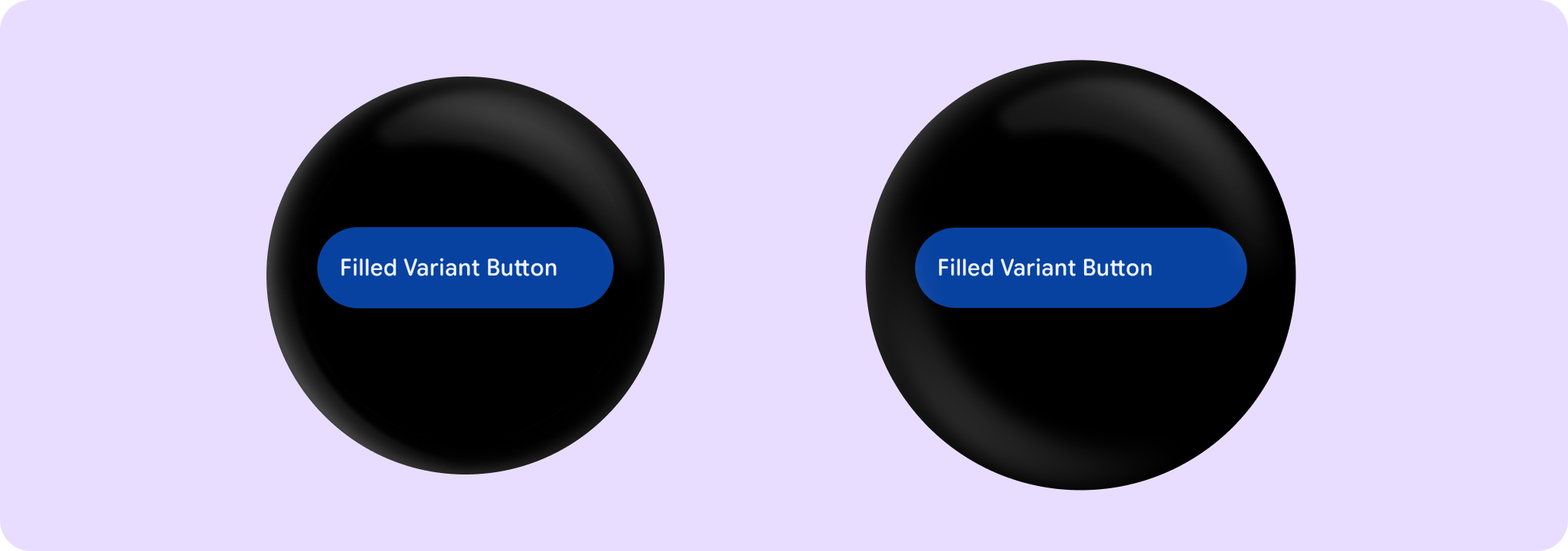
Creates a ButtonColors as an alternative to the filledTonalButtonColors, giving a surface with more chroma to indicate selected or highlighted states that are not primary calls-to-action. If the icon button is disabled then the colors will default to the MaterialTheme onSurface color with suitable alpha values applied.
If a button is disabled then the content will have an alpha(DisabledContentAlpha) value applied and container will have alpha (DisabledContainerAlpha) value applied.
Example of a Button with filledVariantButtonColors:
import androidx.compose.foundation.layout.fillMaxWidth
import androidx.compose.ui.Modifier
import androidx.compose.ui.graphics.Color
import androidx.compose.ui.semantics.onClick
import androidx.wear.compose.material3.Button
import androidx.wear.compose.material3.ButtonDefaults
import androidx.wear.compose.material3.Text

Button(
    onClick = { /* Do something */ },
    colors = ButtonDefaults.filledVariantButtonColors(),
    label = { Text("Filled Variant Button") },
    modifier = Modifier.fillMaxWidth(),
)
filledVariantButtonColors
@Composable
fun filledVariantButtonColors(
    containerColor: Color = Color.Unspecified,
    contentColor: Color = Color.Unspecified,
    secondaryContentColor: Color = Color.Unspecified,
    iconColor: Color = Color.Unspecified,
    disabledContainerColor: Color = Color.Unspecified,
    disabledContentColor: Color = Color.Unspecified,
    disabledSecondaryContentColor: Color = Color.Unspecified,
    disabledIconColor: Color = Color.Unspecified
): ButtonColors
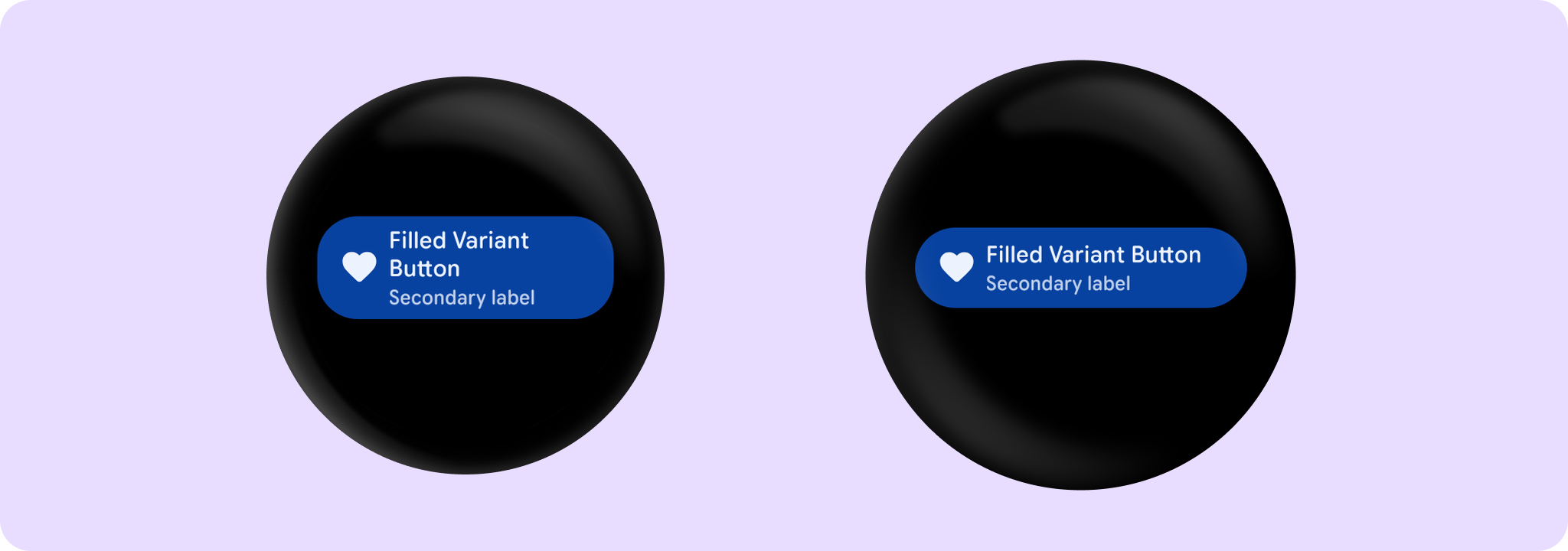
Creates a ButtonColors as an alternative to the filledTonalButtonColors, giving a surface with more chroma to indicate selected or highlighted states that are not primary calls-to-action. If the icon button is disabled then the colors will default to the MaterialTheme onSurface color with suitable alpha values applied.
If a button is disabled then the content will have an alpha(DisabledContentAlpha) value applied and container will have alpha (DisabledContainerAlpha) value applied.
Example of a Button with filledVariantButtonColors:
import androidx.compose.foundation.layout.fillMaxWidth
import androidx.compose.foundation.layout.size
import androidx.compose.ui.Modifier
import androidx.compose.ui.graphics.Color
import androidx.compose.ui.res.painterResource
import androidx.compose.ui.semantics.onClick
import androidx.wear.compose.material3.Button
import androidx.wear.compose.material3.ButtonDefaults
import androidx.wear.compose.material3.Icon
import androidx.wear.compose.material3.Text

Button(
    onClick = { /* Do something */ },
    colors = ButtonDefaults.filledVariantButtonColors(),
    label = { Text("Filled Variant Button") },
    secondaryLabel = { Text("Secondary label") },
    icon = {
        Icon(
            painter = painterResource(R.drawable.ic_favorite_rounded),
            contentDescription = "Favorite icon",
            modifier = Modifier.size(ButtonDefaults.IconSize),
        )
    },
    modifier = Modifier.fillMaxWidth(),
)
| Parameters | |
|---|---|
containerColor: Color = Color.Unspecified |
The background color of this |
contentColor: Color = Color.Unspecified |
The content color of this |
secondaryContentColor: Color = Color.Unspecified |
The secondary content color of this |
iconColor: Color = Color.Unspecified |
The icon color of this |
disabledContainerColor: Color = Color.Unspecified |
The background color of this |
disabledContentColor: Color = Color.Unspecified |
The content color of this |
disabledSecondaryContentColor: Color = Color.Unspecified |
The secondary content color of this |
disabledIconColor: Color = Color.Unspecified |
The content color of this |
outlinedButtonBorder
@Composable
fun outlinedButtonBorder(
    enabled: Boolean,
    borderColor: Color = OutlinedButtonTokens.ContainerBorderColor.value,
    disabledBorderColor: Color = OutlinedButtonTokens.DisabledContainerBorderColor.value.toDisabledColor(
                disabledAlpha = OutlinedButtonTokens.DisabledContainerBorderOpacity
            ),
    borderWidth: Dp = OutlinedButtonTokens.ContainerBorderWidth
): BorderStroke
Creates a BorderStroke, such as for an OutlinedButton
| Parameters | |
|---|---|
enabled: Boolean |
Controls the color of the border based on the enabled/disabled state of the button |
borderColor: Color = OutlinedButtonTokens.ContainerBorderColor.value |
The color to use for the border for this outline when enabled |
disabledBorderColor: Color = OutlinedButtonTokens.DisabledContainerBorderColor.value.toDisabledColor(
                disabledAlpha = OutlinedButtonTokens.DisabledContainerBorderOpacity
) |
The color to use for the border for this outline when disabled |
borderWidth: Dp = OutlinedButtonTokens.ContainerBorderWidth |
The width to use for the border for this outline. It is strongly recommended to use the default width as this outline is a key characteristic of Wear Material3. |
outlinedButtonColors
@Composable
fun outlinedButtonColors(): ButtonColors
Creates a ButtonColors with a transparent background (typically paired with ButtonDefaults.outlinedButtonBorder), the defaults for medium emphasis buttons like OutlinedButton, for important, non-primary actions that need attention.
If a button is disabled then the content will have an alpha(DisabledContentAlpha) value applied and container will have an alpha(DisabledContainerAlpha) applied.
outlinedButtonColors
@Composable
fun outlinedButtonColors(
    contentColor: Color = Color.Unspecified,
    secondaryContentColor: Color = Color.Unspecified,
    iconColor: Color = Color.Unspecified,
    disabledContentColor: Color = Color.Unspecified,
    disabledSecondaryContentColor: Color = Color.Unspecified,
    disabledIconColor: Color = Color.Unspecified
): ButtonColors
Creates a ButtonColors with a transparent background (typically paired with ButtonDefaults.outlinedButtonBorder), the defaults for medium emphasis buttons like OutlinedButton, for important, non-primary actions that need attention.
If a button is disabled then the content will have an alpha(DisabledContentAlpha) value applied and container will have an alpha(DisabledContainerAlpha) applied.
| Parameters | |
|---|---|
contentColor: Color = Color.Unspecified |
The content color of this |
secondaryContentColor: Color = Color.Unspecified |
The secondary content color of this |
iconColor: Color = Color.Unspecified |
The icon color of this |
disabledContentColor: Color = Color.Unspecified |
The content color of this |
disabledSecondaryContentColor: Color = Color.Unspecified |
The secondary content color of this |
disabledIconColor: Color = Color.Unspecified |
The content color of this |
scrimBrush
@Composable
fun scrimBrush(): Brush
Creates a Brush for the recommended scrim drawn on top of image container backgrounds.
Public properties
ButtonExtraLargeIconStartPadding
val ButtonExtraLargeIconStartPadding: Dp
The recommended start padding to be used with Button with an extra large icon
ButtonHorizontalPadding
val ButtonHorizontalPadding: Dp
The recommended horizontal content padding used by Button by default
ButtonLargeIconStartPadding
val ButtonLargeIconStartPadding: Dp
The recommended start padding to be used with Button with a large icon
ButtonVerticalPadding
val ButtonVerticalPadding: Dp
The recommended vertical content padding used by Button by default
ButtonWithExtraLargeIconContentPadding
val ButtonWithExtraLargeIconContentPadding: PaddingValues
The default content padding used by Button with an extra large icon
ButtonWithLargeIconContentPadding
val ButtonWithLargeIconContentPadding: PaddingValues
The default content padding used by Button with a large icon
CompactButtonHeight
val CompactButtonHeight: Dp
The height applied for the CompactButton. This includes a visible button height of 32.dp and 8.dp of padding above and below the button in order to meet accessibility guidelines that request a minimum of 48.dp height and width of tappable area.
Note that you can override it by adjusting Modifier.height and Modifier.padding directly on CompactButton.
val CompactButtonTapTargetPadding: PaddingValues
The default padding to be provided around a CompactButton in order to ensure that its tappable area meets minimum UX guidance.
ContentPadding
val ContentPadding: PaddingValues
The default content padding used by Button
DisabledContainerAlpha
val DisabledContainerAlpha: Float
The default alpha applied to the container when the button is disabled.
ExtraLargeIconSize
val ExtraLargeIconSize: Dp
The recommended icon size when used in Buttons for icons such as an avatar icon
ExtraSmallIconSize
val ExtraSmallIconSize: Dp
The recommended icon size when used in CompactButtons containing both icon and text.
Height
val Height: Dp
The default height applied for the Button. Note that you can override it by applying Modifier.heightIn directly on Button.
IconSpacing
val IconSpacing: Dp
The default size of the spacing between an icon and a text when they are used inside a Button or CompactButton.
LargeIconSize
val LargeIconSize: Dp
The recommended icon size when used in Buttons for icons such as an app icon
SmallIconSize
val SmallIconSize: Dp
The recommended icon size when used in CompactButtons containing icon-only content.
compactButtonShape
val compactButtonShape: RoundedCornerShape
Recommended RoundedCornerShape for CompactButton.
minimumVerticalListContentPadding
val minimumVerticalListContentPadding: Dp
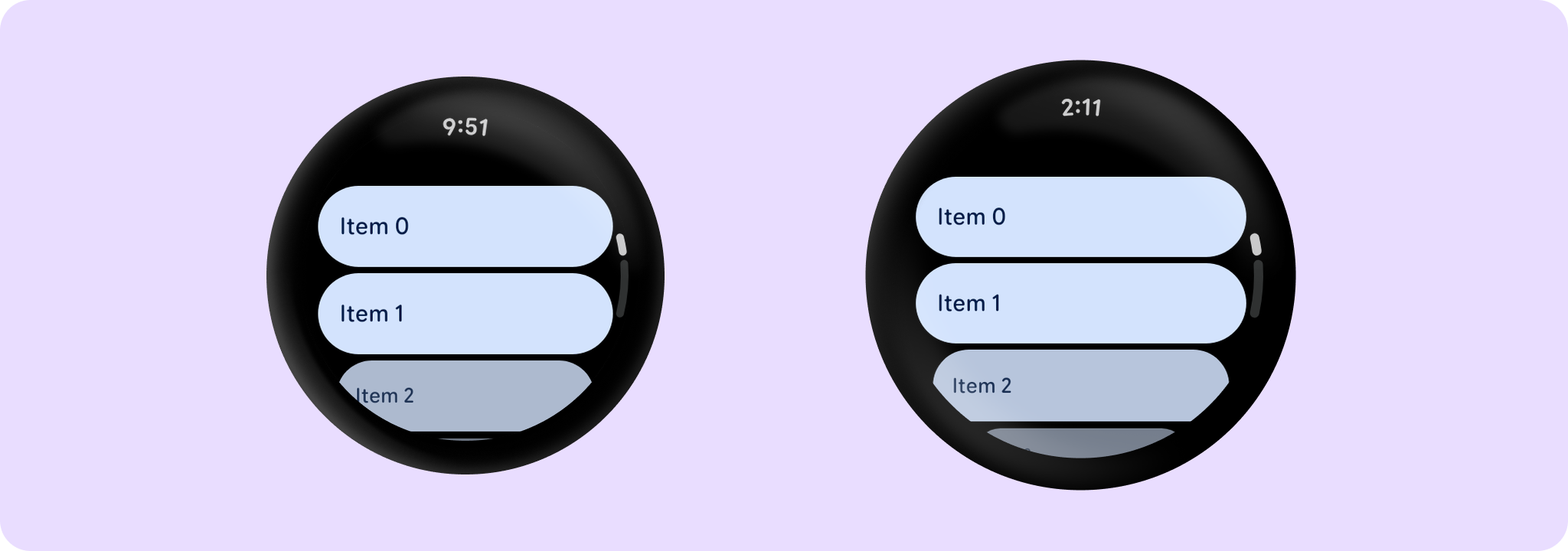
The minimum vertical content padding for the list when a Button is placed at the top or bottom edge. Recommended for use with androidx.wear.compose.foundation.lazy.TransformingLazyColumnItemScope's androidx.wear.compose.foundation.lazy.TransformingLazyColumnItemScope.minimumVerticalContentPadding, which allows items to choose a preferred content padding for the list. TransformingLazyColumn takes its contentPadding as the maximum of the preferred content padding values and its own contentPadding parameter.
import androidx.compose.foundation.layout.fillMaxWidth
import androidx.compose.runtime.remember
import androidx.compose.ui.Modifier
import androidx.wear.compose.foundation.lazy.TransformingLazyColumn
import androidx.wear.compose.foundation.lazy.rememberTransformingLazyColumnState
import androidx.wear.compose.material3.AppScaffold
import androidx.wear.compose.material3.Button
import androidx.wear.compose.material3.ButtonDefaults
import androidx.wear.compose.material3.ScreenScaffold
import androidx.wear.compose.material3.SurfaceTransformation
import androidx.wear.compose.material3.Text
import androidx.wear.compose.material3.lazy.rememberTransformationSpec
import androidx.wear.compose.material3.lazy.transformedHeight

val state = rememberTransformingLazyColumnState()
val transformationSpec = rememberTransformationSpec()
AppScaffold {
    ScreenScaffold(state) { contentPadding ->
        TransformingLazyColumn(state = state, contentPadding = contentPadding) {
            items(count = 50) {
                Button(
                    onClick = {},
                    modifier =
                        Modifier.minimumVerticalContentPadding(
                                ButtonDefaults.minimumVerticalListContentPadding
                            )
                            .fillMaxWidth()
                            .transformedHeight(this, transformationSpec),
                    transformation = SurfaceTransformation(transformationSpec),
                ) {
                    Text("Item $it")
                }
            }
        }
    }
}
scrimGradientEndColor
val scrimGradientEndColor: Color
The default gradient end color when drawing a scrim over an image to ensure that the text text drawn over the image is legible.
scrimGradientStartColor
val scrimGradientStartColor: Color
The default gradient start color when drawing a scrim over an image to ensure that the text text drawn over the image is legible.