Numbers User Guide for iPhone
- Welcome
- What’s new
-
- Get started with Numbers
- Intro to images, charts, and other objects
- Create a spreadsheet
- Open spreadsheets
- Prevent accidental editing
- Personalize templates
- Use sheets
- Undo or redo changes
- Save your spreadsheet
- Find a spreadsheet
- Delete a spreadsheet
- Print a spreadsheet
- Change the sheet background
- Copy text and objects between apps
- Touchscreen basics
- Change Numbers privacy and analytics settings
- Copyright

Refresh a pivot table in Numbers on iPhone
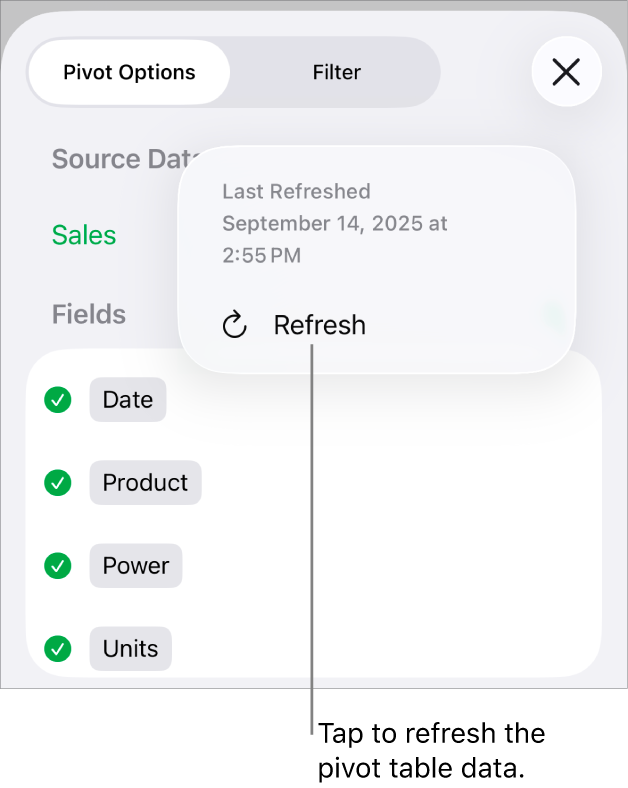
If you make changes to the source data for a pivot table, you need to refresh the pivot table to see the changes reflected.
Go to the Numbers app
 on your iPhone.
Open a spreadsheet, then select the pivot table you want to refresh.
Tap
 , tap
, tap  next to Source Data, then tap
  .
.You can also see when the pivot table was last refreshed.
See alsoIntro to pivot tables in Numbers on iPhoneCreate a pivot table in Numbers on iPhoneAdd and arrange pivot table data in Numbers on iPhoneChange how pivot table data is sorted, grouped, and more in Numbers on iPhoneCreate a snapshot of a table in Numbers on iPhoneFilter data in Numbers on iPhoneSelect cells in a pivot table to create a pivot chartAdd column, bar, line, area, pie, donut, and radar charts in Numbers on iPhone
Thanks for your feedback.