Before you can make a PACT Act Report online, you must register a Cigarette and Tobacco account in myVTax. This guide takes you through the account registration process step by step. If you need help with this registration, please email tax.myVTax@vermont.gov or call 802-828-6802. We are here to help!
How to Register for PACT Act Reporting in myVTax
-
Create myVTax Account
Go to myVTax. Click Sign Up in the login area.

-
Business Access Type
Select the type of access you need. Select the link under For Businesses and Corporations.

-
Information You Will Need
Review the information you will need to complete the registration process.
To continue, you will need:
- Your taxpayer ID (e,g. FEIN, SSN)
- Your name
- Your mailing and location address(es)
- Your account name
- Account mailing and location address(es)
- Account start date and other relevant attributes
- Location information (for Sales and Use and Meals and Rooms only)
- Names, addresses, and identification numbers of your business principals
Click Next when you have gathered all the information.

-
Select Option
Select I know what tax accounts I need to register or add myVTax access for. Click Next.

-
Enter Your Taxpayer Information
Complete all required fields. A red asterisk indicates a required entry.
Business or Individual: Use the dropdown to make a selection
ID Type: Use the dropdown to select FEIN or SSN. Below that, enter the number.
Physical address: Provide your physical address. If your mailing address is the same as your physical address, select Yes. The mailing address will prefill.
If your mailing address is different, select No and enter it in the appropriate spaces
The address(es) entered must be valid U.S. Postal addresses. Click Validate Address. Follow the prompts. If you need more help with this step, see the myVTax User Basics page
Click Next when done.

-
Select Tax Type
Select Cigarette and Tobacco from the Tax Type list. Click Next.

-
Register for a Cigarette and Tobacco Tax Account
Select No for the question, "Is your Cigarette and Tobacco Tax account already registered with the Department?"
You will be prompted to enter a start date for your business. Be sure to select Yes to the question, "Are You a PACT Act Registrant?"
Select whether or not you are also applying for a Vermont Wholesale Distributor License.

-
Authorized Agent Information
Enter and Validate Address information for the Cigarette and Tobacco Tax Authorized Agent. Click Next when done.

-
Upload Federal Registration
Click Attach Pact Act Registration. Locate your federal PACT Act Registration document file on your computer and upload it using the prompts.

When the file is attached, click Next.

-
Compliance Check and Verification
Answer the compliance questions accurately, then e-sign with your name and select a business title from the drop-down.
Click Next.

-
Set Up Your Web Account
Create a new Username and Password. Your username must be unique in the myVTax system.
Select a Security Question and Answer.
Enter a valid email address for your business.
Click Submit.

-
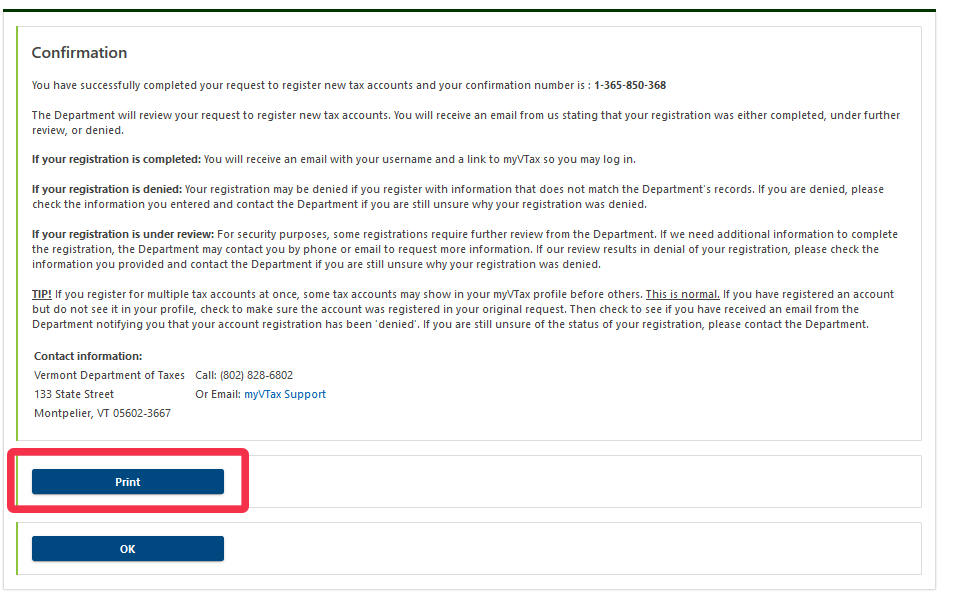
Confirmation
You have completed your application. It will be reviewed by the Vermont Department of Taxes. If approved, myVTax will send an email to the address provided in Step 11 with instructions for your online account.
You may want to print or save this page showing your confirmation number for your records.
To finish, click OK or simply close your browser.