

Start listening for free.
Compare plans-
Family Plan
One month free
Share Apple Music
Try it free3
with up to five people with a Family Plan. -
Student Plan
Apple Music
and Apple TVStudents get one month of Apple Music free, plus access to Apple TV.
Try it free5
Listening Experience
Music at its most immersive.
Kacey Musgraves


Enjoy the best possible listening experience with features that make the most of your favourite music. Spatial Audio with Dolby Atmos2 meets AutoMix7 to envelop you in multidimensional sound while crafting unique transitions with beat matching and time stretching. Lossless audio preserves every detail of the original recordings, just as the artist intended.1 And now Music Haptics reaches even more senses with taps, textures and vibrations when you listen on iPhone.8

Music Discovery
Where your new favourites find you.
Explore a world of genres and get personalised artist and album suggestions based on your listening history. And you’ll never miss a beat with automatic notifications about your favourite artists.

Exclusive Content
Get closer to
your favourite artists.
Live at Apple Music Radio
Die On This Hill
by SIENNA SPIRO


Find upcoming tour dates in your area with Concerts Near You. Catch exclusive interviews and intimate performances on Apple Music Live, or keep a pulse on music scenes around the world with live local, global and artist-led radio shows and stations.

Apple Music Sing
It’s not karaoke.
It’s way better.


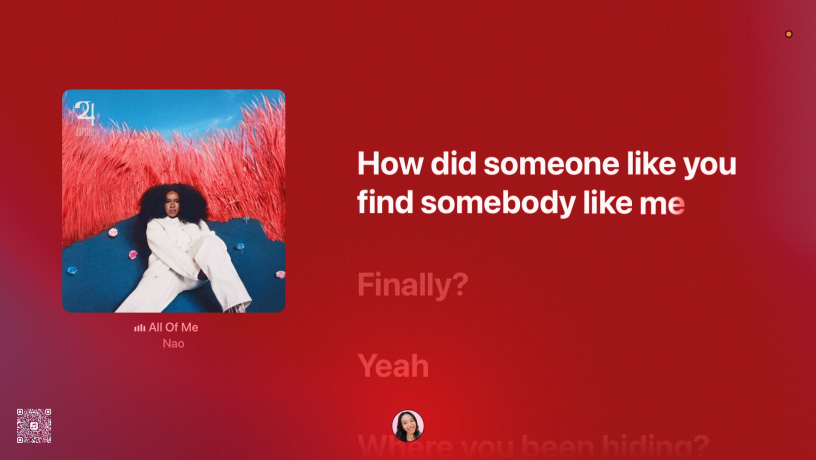
With Apple Music Sing, you and your friends can sing along to millions of songs.10 Real-time lyrics animate to the rhythm of the music — and translations with pronunciations let you belt out songs in their original language.11 Adjustable vocals let you take the lead or sing backup. Duet view shows the vocalists’ verses on opposite sides of the screen, so it’s easy to stay in sync. And now your iPhone doubles as a microphone12 — pair it with Apple TV to bring the party to the big screen.

Shared Listening
Get your friends in
the mix.

Enjoy listening to music with friends no matter where you are. Collaborative playlists let you invite them to add, remove, reorder and react to songs — so you can stay connected, even miles apart.13 And CarPlay with SharePlay makes sharing DJ duties on the road easier than ever.

Shazam Music Discovery
Never miss a beat.


The Shazam app works seamlessly with Apple Music, making it easy to identify and add songs in seconds. Use the app to identify music playing around you or on your favourite apps and websites. You can even use Shazam to search for artists and find out who’s on tour.

Listen to Apple Music
on all your devices.
-

iPhone
-

iPad
-

Apple Watch
-

Mac
-

Apple TV
-

HomePod
-

CarPlay
-

Android
-

PC
Even more places
to get Apple Music.






Choose the plan
that’s right for you.
No commitment. Cancel at any time.
-
Individual
RM 17.90/month,
first month free for new subscribers.-
Over 100 million songs, ad‑free and available to download for offline listening
-
Spatial Audio and lossless audio quality
-
Exclusive artist access and curated playlists
-
Works on iOS, Android, Windows, Sonos, smart TVs and more
-
-
Family
RM 27.90/month, one month free for new subscribers.
-
Access to everything in the Individual Plan
-
Share with up to five people via Family Sharing
-
Each person gets their own library, recommendations and playlists
-
-
Student
Extra savings at just RM 9.50/month, first month free for new subscribers.
-
Special pricing for verified students
-
Access to everything in the Individual Plan
-
Comes with Apple TV
at no extra cost
-
-
Apple One
Apple Music with up to four other services for one low monthly price.
-
Bundle your Apple Music plan with Apple TV, Apple Arcade, Apple Fitness+ and iCloud+
-
One simple subscription, one monthly bill
-
Great value if you’re already using multiple Apple services
-
Questions? Answers.
-
Apple Music is a streaming service that allows you to listen to over 100 million songs. Its features include the ability to download your favourite tracks and play them offline, lyrics in real time, listening across all your favourite devices, new music personalised just for you, curated playlists from our editors and much more. All this in addition to exclusive and original content.
Your iTunes library is still yours. You can access your entire collection from Apple Music or from iTunes for macOS or Windows.
-
Apple Music is already on your iPhone, iPad, Apple Watch, Apple TV 4K, Mac and HomePod speakers — and you can listen with CarPlay or online at music.apple.com/my. Apple Music is also available on Windows and Android devices, Sonos speakers, Google Nest, smart TVs and more.
-
That all depends on which offer you choose. (1) Students can choose the Apple Music Student Plan at RM 9.50 per month. (2) An individual monthly subscription is just RM 17.90 per month after your free trial. (3) The Apple Music Family Plan, which allows you to share your account with up to five people and gives each member a personal account, is just RM 27.90 per month. (4) The Apple Music Individual Plan and the Apple Music Family Plan are also included in Apple One, which bundles up to four other Apple services into a single monthly subscription. Apple One plans start at RM 34.90 per month.
-
Students get the same Apple Music features and benefits as individual members. Once your student status with your university is verified, you get student membership pricing for up to four years, as long as you remain a student. After four years, your membership will continue at the individual member price.
-
Yes. With a Siri-enabled device and any Apple Music plan, you can enjoy all the features of Apple Music and Siri. All plans also support Type to Siri.
-
Dolby Atmos is an audio technology that creates an immersive listening experience in which sound comes from all around you.
Apple Music subscribers using the latest version of Apple Music on iPhone, iPad, Mac or Apple TV 4K can listen to thousands of Dolby Atmos music tracks using any headphones. When you listen with compatible Apple or Beats headphones or most Bluetooth headphones, Dolby Atmos music plays back automatically when available for a song. For other headphones, go to Settings > Music > Audio and set Dolby Atmos to Always On. You can also hear Dolby Atmos music using the built‑in speakers on a compatible iPhone, iPad, MacBook Pro, MacBook Air or iMac, or by connecting your Apple TV 4K to one of the following: HomePod speakers set up as the default speakers, a Dolby Atmos–compatible sound bar, a Dolby Atmos–enabled AV receiver or a television that supports Dolby Atmos audio. For the full list of compatible devices, please see support.apple.com/en-my/HT212182.
-
Lossless audio compression reduces the original file size of a song while preserving all of the data perfectly. Apple Music is making its entire catalogue of more than 100 million songs available in lossless audio at different resolutions. In Apple Music, “Lossless” refers to lossless audio up to 48kHz, and “Hi-Res Lossless” refers to lossless audio from 48kHz to 192kHz. Lossless and Hi-Res Lossless files are very large and use much more bandwidth and storage space than standard AAC files.
You can listen to lossless audio using the latest Apple Music app on an iPhone, iPad, Mac or Apple TV 4K. Turn on lossless audio in Settings > Music > Audio Quality. You can choose between Lossless and Hi-Res Lossless for mobile data or Wi‑Fi connections. Note that Hi-Res Lossless requires external equipment such as a USB digital to analogue converter.
For the full list of compatible devices, please see support.apple.com/en-my/HT212183.
-
Yes. With an Apple Music Family Plan, up to six people in the family can enjoy all the features and the full catalogue of Apple Music. To get started, just set up Family Sharing on your iOS or iPadOS device, Android phone or Mac and invite family members to join.
-
Apple Music has zero ads.
-
New subscribers can get three months of Apple Music free with an eligible device. To redeem the offer for iPhone, iPad, Mac or Apple TV, set up your new device. To redeem the offer for AirPods, HomePod, or Beats headphones or speakers, connect or pair your eligible device to an iPhone or iPad running the latest version of iOS or iPadOS. To redeem the offer for Apple Watch, connect or pair your eligible device to an iPhone running the latest version of iOS. You’ll have three months to redeem the offer after the first activation of the eligible device.4
Working with Apple Music.
Apple Music supports artists with tools to create, release, promote and measure music across a global stage. Celebrate big moments with your fans with unique Shareable Milestones for plays, Shazam count and playlist adds. Discover all the ways to showcase content on Apple Music — including MusicKit, RSS feeds, widgets, brand guidelines, badge art and more.