


Tutorial 20: CSS Floats, Part I
|
| ||||
| ||||
|
|
Multiple Floats
You can have more than one float in the same horizontal space, on the same side of the document or on both sides. The way this works is like this: The first float is floated to the edge of the container. Then, if the second can fit, it will be placed next the first one, otherwise it will be placed underneath it.
Let's say we change our style sheet so that the second paragraph is also floated:
BODY {
 background: #000000;
}
DIV {
 margin: 1em;
 padding: 1em;
 background: #00CC99;
}
P {
 margin: 1em;
}
#one {
 float: left;
 width: 25%;
 margin: 0.5em;
 background: #003399;
 border: solid thin #D7040B;
 color: #FFFFFF;
}
#two {
 float: left;
 width: 45%;
 margin: 0.5em;
 background: #003399;
 border: solid thin #D7040B;
 color: #FFFFFF;
}
The result will be something like the following diagram:
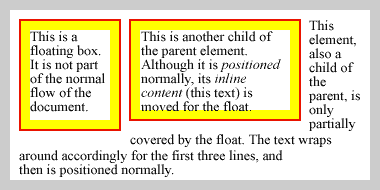
Two floats on the same side of the containing box. In this case, the floats can be placed side-by-side, so they are.
Now, let's say we change the style sheet to make the second float a bit wider than 45%:
BODY {
 background: #000000;
}
DIV {
 margin: 1em;
 padding: 1em;
 background: #00CC99;
}
P {
 margin: 1em;
}
#one {
 float: left;
 width: 25%;
 margin: 0.5em;
 background: #003399;
 border: solid thin #D7040B;
 color: #FFFFFF;
}
#two {
 float: left;
 width: 70%;
 margin: 0.5em;
 background: #003399;
 border: solid thin #D7040B;
 color: #FFFFFF;
}
The second float will no longer fit alongside the first one, so it is placed underneath it, along the left edge, as can be seen in the diagram below.

Two floats on the same side of the containing box. Here the second float is too wide to be placed next to the first one, so it is shifted down..


