


Tutorial 20: CSS Floats, Part I
|
| ||||
| ||||
|
|
The float property
Floats are boxes that are removed from the normal flow of the document and are moved to either the left or right of the containing block, while other text wraps around them.
Floats are created with the float property, which accepts three values: left, right and none, with none being the default.
When you set the float property for an element, you must also set the width property. This overrides the default of making the element wide enough to fit in its containing block, and sets the width to a particular length value.
Let's see how floats work; consider the following document (only the body is shown).
<BODY>
 <DIV>
  <P ID="one">This is a floating box. It is
  not part of normal flow of the document.</P>
  <P ID="two">This is another child of the parent
  element. Although it is <I>positioned</I> normally
  its <I>inline content</I> (this text)
  is moved for the float.</P>
  <P ID="three">This element, also a child of the parent,
  is only partially covered by the float. The text wraps
  around accordingly for the first three lines, and then
  is positioned normally.</P>
 </DIV>
</BODY>
Now let's use the float property in a style sheet and attach it to this document.
BODY {
 background: #000000;
}
DIV {
 margin: 1em;
 padding: 1em;
 background: #00CC99;
}
P {
 margin: 1em;
}
#one {
 float: left;
 width: 40%;
 margin: 0.5em;
 background: #003399;
 border: solid thin #D7040B;
 color: #FFFFFF;
}
The diagram would look something like this:
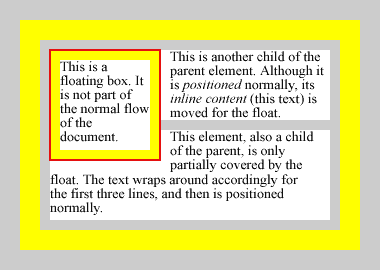
A DIV element containing three paragraphs, the first of which is floated to the left
What happens to floats such as the first paragraph above is this: They are completely removed from the normal document flow (similar to absolutely positioned elements), and are moved to the left or right edge of their containing block, where they are rendered next to the edge of the block. In this case, our paragraph snuggles up against the left edge of the parent DIV element's content area and squeezes itself to 40% of the width of this area.
Other block boxes are rendered as if the float did not exist at all. The difference is that all inline boxes are always rendered outside the float's margin, and are moved to the right (for a left-floating box) or left (for a right-floating box) and squeezed to fit the available space. This is the case with all of the inline text of the second paragraph in our example, and for the first three lines of the third paragraph. In a browser, our example would look something like the following:
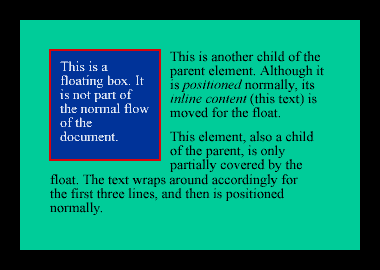
A DIV element containing three paragraphs, the first of which is floated to the left, as rendered by browser.


