iPhone User Guide
- iPhone User Guide
- What’s new in iOS 13
- Supported iPhone models
-
- Wake and unlock
- Adjust the volume
- Change sounds and vibrations
- Access features from the Lock screen
- Open apps on the Home screen
- Take a screenshot or screen recording
- Change or lock the screen orientation
- Change the wallpaper
- Make screen items more reachable
- Search with iPhone
- Use AirDrop to send items
- Perform quick actions
- Use and customize Control Center
- View and organize Today View
- Charge and monitor the battery
- Learn the meaning of the status icons
- Travel with iPhone
-
- Calculator
- Compass
-
- View photos and videos
- Edit photos and videos
- Edit Live Photos
- Edit Portrait mode photos
- Organize photos in albums
- Search in Photos
- Share photos and videos
- View Memories
- Find people in Photos
- Browse photos by location
- Use iCloud Photos
- Share photos with iCloud Shared Albums
- Use My Photo Stream
- Import photos and videos
- Print photos
- Shortcuts
- Stocks
- Tips
- Weather
-
- Intro to CarPlay
- Connect to CarPlay
- Use Siri
- Use your car’s built-in controls
- Get turn-by-turn directions
- Change the map view
- Make phone calls
- Play music
- View your calendar
- Send and receive text messages
- Play podcasts
- Play audiobooks
- Listen to news stories
- Control your home
- Use other apps with CarPlay
- Rearrange icons on CarPlay Home
- Change settings in CarPlay
-
-
- Restart iPhone
- Force restart iPhone
- Update iOS
- Back up iPhone
- Return iPhone settings to their defaults
- Restore all content from a backup
- Restore purchased and deleted items
- Sell or give away your iPhone
- Erase all content and settings
- Restore iPhone to factory settings
- Install or remove configuration profiles
-
- Get started with accessibility features
-
-
- Turn on and practice VoiceOver
- Change your VoiceOver settings
- Learn VoiceOver gestures
- Operate iPhone using VoiceOver gestures
- Control VoiceOver using the rotor
- Use the onscreen keyboard
- Write with your finger
- Use VoiceOver with Magic Keyboard
- Type onscreen braille using VoiceOver
- Use a braille display
- Customize gestures and keyboard shortcuts
- Use VoiceOver with a pointer device
- Use VoiceOver in apps
- Zoom
- Magnifier
- Display & Text Size
- Motion
- Spoken Content
- Audio Descriptions
-
-
- Important safety information
- Important handling information
- Get information about your iPhone
- View or change cellular settings
- Find more resources for software and service
- FCC compliance statement
- ISED Canada compliance statement
- Ultra Wideband information
- Class 1 Laser information
- Apple and the environment
- Disposal and recycling information
- Copyright
Read stories in News on iPhone
You can read and share the stories in the News app  on iPhone.
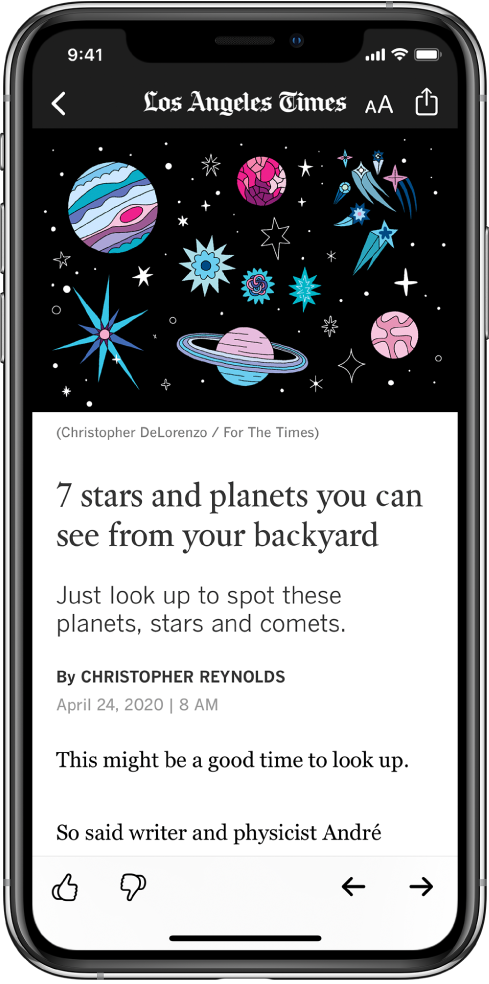
Read a story
Tap a story to read it. While viewing a story, you have these options:
Read the next story: Tap
 in the lower right of the screen or swipe left.
Read the previous story: Tap
 in the lower right of the screen or swipe right.
Return to the list of stories: Swipe from the left edge.
Tell News what stories you prefer: When viewing a story that’s not part of a News+ issue, tap
 or
or  at the bottom of the story. Your feedback is taken into account for future recommendations.
If you’re reading a story in a News+ issue, tap
 , then tap Suggest More Like This or Suggest Less Like This.
Change the text size: Tap
 , then tap the smaller or larger letter to change the text size in the story and all other stories in the channel. (Not available in all channels.)
Share a story: Tap
, then choose a sharing option, such as Messages or Mail.Report a concern: If you believe that a story you’re viewing is mislabeled, inappropriate, offensive, or doesn’t display properly, tap
, swipe up, then tap Report a Concern.
In Apple News+ issues in PDF format, the Suggest More Like This, Suggest Less Like This, Save Story, and Report a Concern options aren’t available. See Browse and read Apple News+ stories and issues on iPhone.
Web stories delivered through an RSS feed show a preview. To view an RSS story in full, swipe up. To always view the full story, go to Settings  , tap News, then turn off Show Story Previews.