Organize apps on Apple Watch
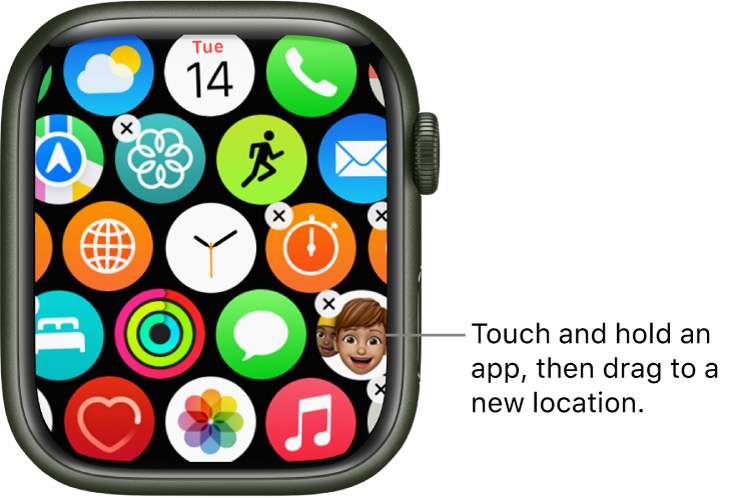
Rearrange your apps in grid view
On your Apple Watch, press the Digital Crown to go to the Home Screen.
If the screen is in list view, touch and hold the Home Screen, then tap Grid View. Or open the Settings app
 on your Apple Watch, tap App View, then tap Grid View.
Touch and hold an app, then tap Edit Apps.
Drag the app to a new location.
Press the Digital Crown when you’re done.
Or open the Apple Watch app on your iPhone, tap My Watch, tap App View, then tap Arrangement. Touch and hold an app icon, then drag it to a new location.
Note: In list view, apps are always arranged in alphabetical order.

Remove an app from Apple Watch
Touch and hold the Home Screen, tap Edit Apps, then tap the X to remove the app from your Apple Watch. It remains on your paired iPhone, unless you delete it there, too.
In list view, you can also swipe the app left, then tap  to remove it from your Apple Watch.
Note: Not all apps can be removed from your Apple Watch.
Adjust app settings
Open the Apple Watch app on your iPhone.
Tap My Watch, then scroll down to see apps you installed.
Tap an app to change its settings.
Some restrictions you set on your iPhone in Settings > Screen Time > Content & Privacy Restrictions affect your Apple Watch also. For example, if you disable Camera on your iPhone, the Camera Remote icon is removed from the Apple Watch Home Screen.
Check storage used by apps
You can learn how the storage space is being used on your Apple Watch—the total amount of storage used, the amount remaining, and how much storage each app uses.
Open the Settings app
on your Apple Watch.Go to General > Storage.
You can also open the Apple Watch app on your iPhone, tap My Watch, then go to General > Storage.
Download this guide: Apple Books | PDF