注意
Copilot SDK 当前处于 技术预览版. 功能和可用性可能会发生更改。
考虑 CLI 会话的不同隔离模式,以及如何在实现应用程序时管理并发会话和资源。
**最适合:** 平台开发人员、SaaS 构建者和任何为多个并发用户提供服务的部署。
会话隔离模式
在选择模式之前,请考虑三个维度:
-
**隔离**:谁可以查看哪些会话? -
**并发**:可以同时运行多少个会话? -
**持久性**:会话持续多长时间?
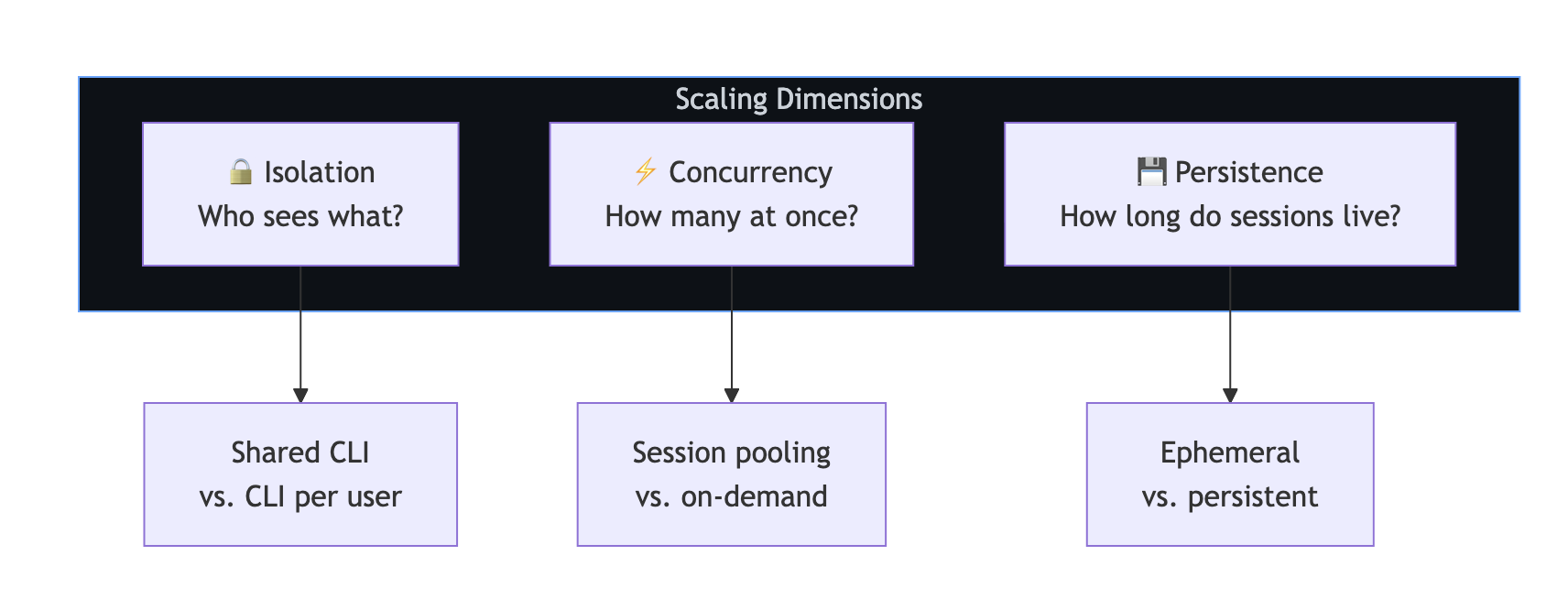
模式 1:每个用户的独立 CLI
每个用户获取自己的 CLI 服务器实例。 这是最强的隔离 - 用户的会话、内存和进程完全分离。
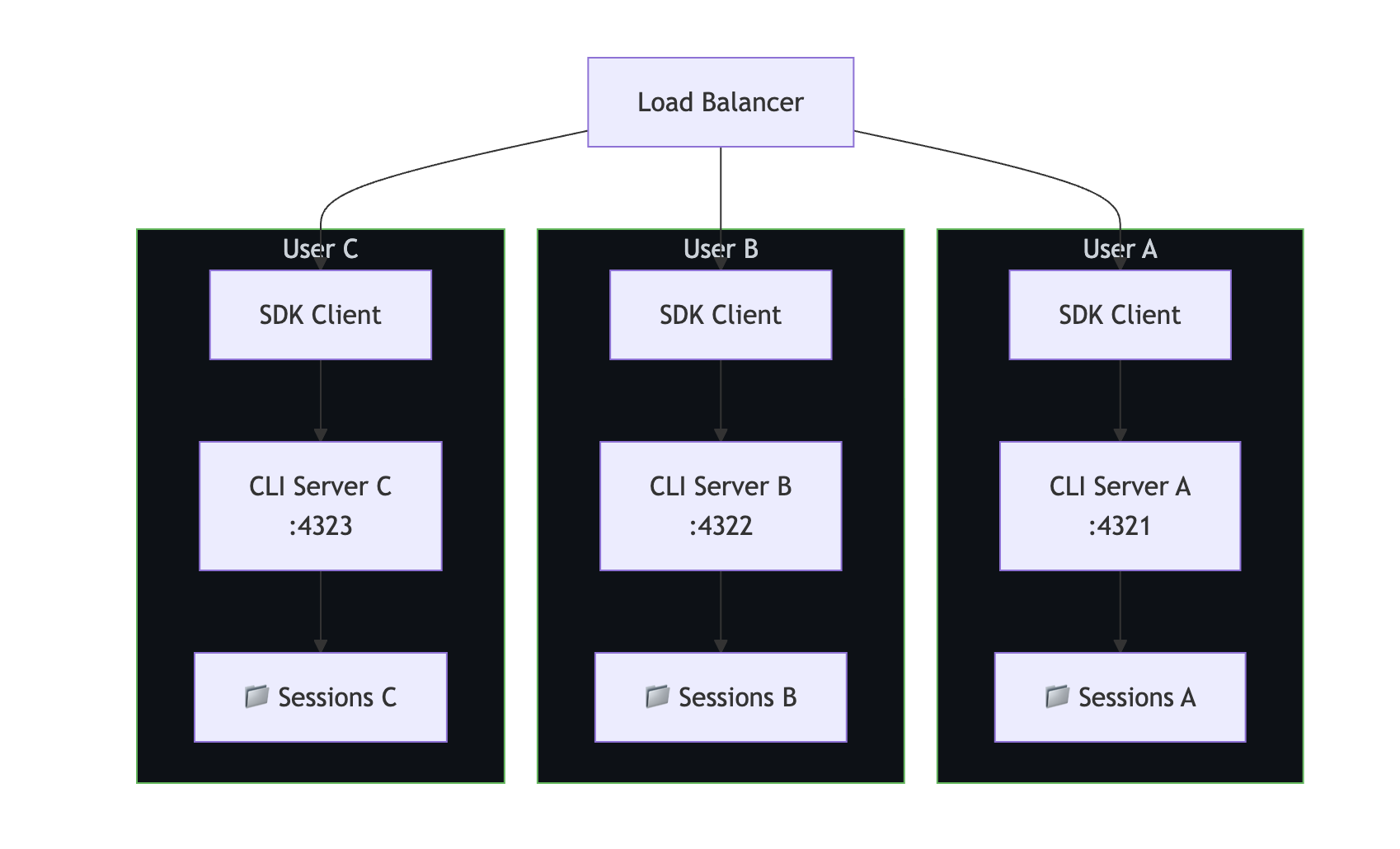
**何时使用**:
- 在多租户 SaaS 中,数据隔离至关重要。
- 具有不同身份验证凭据的用户。
- 符合性要求,如 SOC 2 或 HIPAA。
// CLI pool manager—one CLI per user
class CLIPool {
    private instances = new Map<string, { client: CopilotClient; port: number }>();
    private nextPort = 5000;

    async getClientForUser(userId: string, token?: string): Promise<CopilotClient> {
        if (this.instances.has(userId)) {
            return this.instances.get(userId)!.client;
        }

        const port = this.nextPort++;

        // Spawn a dedicated CLI for this user
        await spawnCLI(port, token);

        const client = new CopilotClient({
            cliUrl: `localhost:${port}`,
        });

        this.instances.set(userId, { client, port });
        return client;
    }

    async releaseUser(userId: string): Promise<void> {
        const instance = this.instances.get(userId);
        if (instance) {
            await instance.client.stop();
            this.instances.delete(userId);
        }
    }
}
模式 2:共享 CLI,带有会话隔离
多个用户共享一个 CLI 服务器,但通过唯一会话 ID 隔离会话。 它对资源的需求较低,但提供的隔离较弱。

**何时使用**:
- 具有受信任用户的内部工具。
- 资源约束的环境。
- 降低隔离要求。
const sharedClient = new CopilotClient({
    cliUrl: "localhost:4321",
});

// Enforce session isolation through naming conventions
function getSessionId(userId: string, purpose: string): string {
    return `${userId}-${purpose}-${Date.now()}`;
}

// Access control: ensure users can only access their own sessions
async function resumeSessionWithAuth(
    sessionId: string,
    currentUserId: string
): Promise<Session> {
    const [sessionUserId] = sessionId.split("-");
    if (sessionUserId !== currentUserId) {
        throw new Error("Access denied: session belongs to another user");
    }
    return sharedClient.resumeSession(sessionId);
}
模式 3:共享会话(协作)
多个用户与同一会话进行交互,例如与 Copilot 的共享聊天室。 此模式需要应用程序级会话锁定。
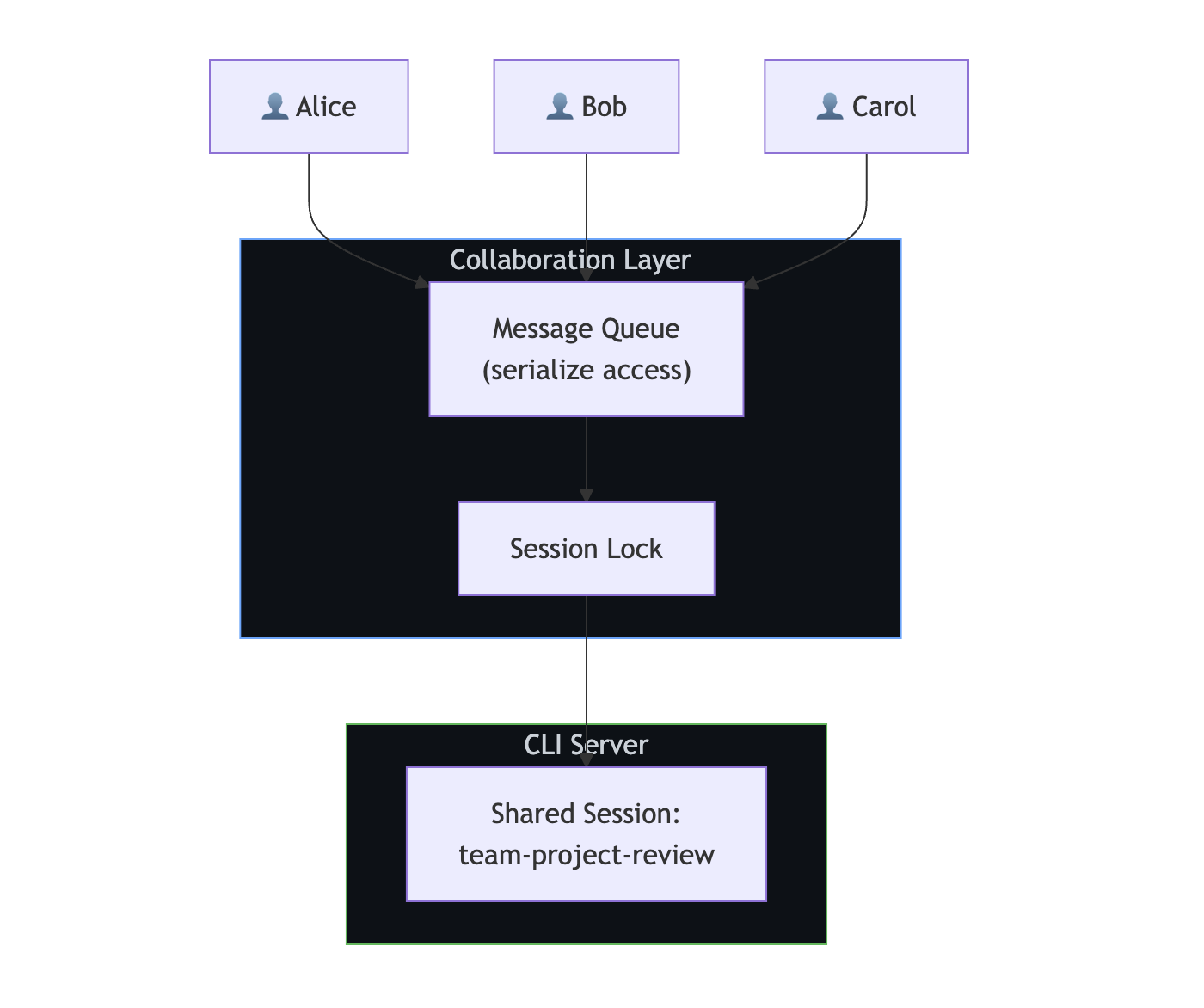
**何时使用**:
- 团队协作工具。
- 共享代码评审会话。
- 配对编程助手。
注意
SDK 不提供内置会话锁定。 必须序列化访问权限,以防止并发写入同一会话。
import Redis from "ioredis";

const redis = new Redis();

async function withSessionLock<T>(
    sessionId: string,
    fn: () => Promise<T>,
    timeoutSec = 300
): Promise<T> {
    const lockKey = `session-lock:${sessionId}`;
    const lockId = crypto.randomUUID();

    // Acquire lock
    const acquired = await redis.set(lockKey, lockId, "NX", "EX", timeoutSec);
    if (!acquired) {
        throw new Error("Session is in use by another user");
    }

    try {
        return await fn();
    } finally {
        // Release lock only if we still own it
        const currentLock = await redis.get(lockKey);
        if (currentLock === lockId) {
            await redis.del(lockKey);
        }
    }
}

// Serialize access to a shared session
app.post("/team-chat", authMiddleware, async (req, res) => {
    const result = await withSessionLock("team-project-review", async () => {
        const session = await client.resumeSession("team-project-review");
        return session.sendAndWait({ prompt: req.body.message });
    });

    res.json({ content: result?.data.content });
});
隔离模式比较
| 每个用户一个独立的 CLI | 共享 CLI + 会话隔离 | 共享会话 |
|---|
**隔离** | 已完成 | Logical | 共享 |
| 资源使用情况 | 高(每个用户的命令行界面) | 低(一个 CLI) | 低(一个命令行接口 (CLI) 和会话) | | 复杂性 | 中等 | 低 | 高 (需要锁定) | | 身份验证灵活性 | 每用户令牌 | 服务令牌 | 服务令牌 | | 最适用于 | 多租户软件即服务 | 内部工具 | 协作 |
水平缩放
负载均衡器后面的多个 CLI 服务器
若要为更多并发用户提供服务,请在负载均衡器后面运行多个 CLI 服务器实例。 会话状态必须位于 共享存储 上,因此任何 CLI 服务器都可以恢复任何会话。

// Route sessions across CLI servers
class CLILoadBalancer {
    private servers: string[];
    private currentIndex = 0;

    constructor(servers: string[]) {
        this.servers = servers;
    }

    // Round-robin selection
    getNextServer(): string {
        const server = this.servers[this.currentIndex];
        this.currentIndex = (this.currentIndex + 1) % this.servers.length;
        return server;
    }

    // Sticky sessions: same user always hits same server
    getServerForUser(userId: string): string {
        const hash = this.hashCode(userId);
        return this.servers[hash % this.servers.length];
    }

    private hashCode(str: string): number {
        let hash = 0;
        for (let i = 0; i < str.length; i++) {
            hash = (hash << 5) - hash + str.charCodeAt(i);
            hash |= 0;
        }
        return Math.abs(hash);
    }
}

const lb = new CLILoadBalancer([
    "cli-1:4321",
    "cli-2:4321",
    "cli-3:4321",
]);

app.post("/chat", async (req, res) => {
    const server = lb.getServerForUser(req.user.id);
    const client = new CopilotClient({ cliUrl: server });

    const session = await client.createSession({
        sessionId: `user-${req.user.id}-chat`,
        model: "gpt-4.1",
    });

    const response = await session.sendAndWait({ prompt: req.body.message });
    res.json({ content: response?.data.content });
});
粘滞会话与共享存储
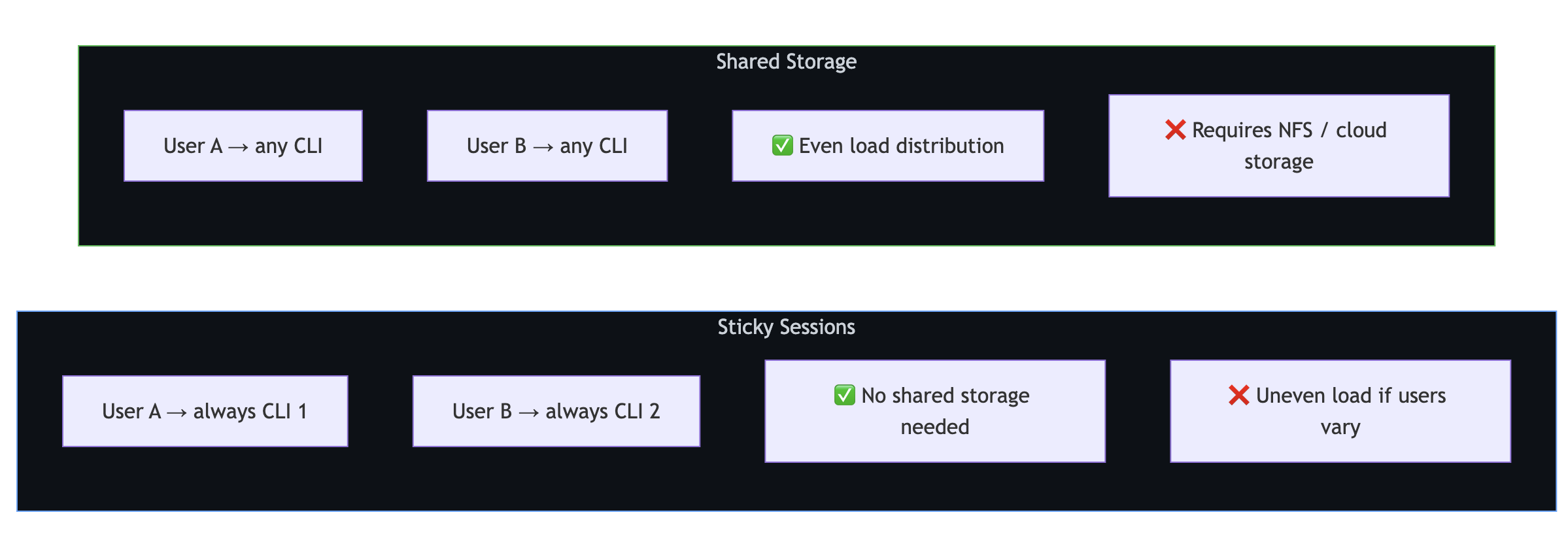
          **粘性会话** 将每个用户绑定到特定的 CLI 服务器。 不需要共享存储,但如果用户流量显著变化,负载分布可能会不均衡。

          **共享存储** 允许任何 CLI 处理任何会话。 负载分布更均匀,但需要网络存储。`~/.copilot/session-state/`
纵向扩展
优化单个 CLI 服务器
单个 CLI 服务器可以处理多个并发会话。 关键是管理会话生命周期,以避免资源耗尽:

// Limit concurrent active sessions
class SessionManager {
    private activeSessions = new Map<string, Session>();
    private maxConcurrent: number;

    constructor(maxConcurrent = 50) {
        this.maxConcurrent = maxConcurrent;
    }

    async getSession(sessionId: string): Promise<Session> {
        // Return existing active session
        if (this.activeSessions.has(sessionId)) {
            return this.activeSessions.get(sessionId)!;
        }

        // Enforce concurrency limit
        if (this.activeSessions.size >= this.maxConcurrent) {
            await this.evictOldestSession();
        }

        // Create or resume
        const session = await client.createSession({
            sessionId,
            model: "gpt-4.1",
        });

        this.activeSessions.set(sessionId, session);
        return session;
    }

    private async evictOldestSession(): Promise<void> {
        const [oldestId] = this.activeSessions.keys();
        const session = this.activeSessions.get(oldestId)!;
        // Session state is persisted automatically—safe to disconnect
        await session.disconnect();
        this.activeSessions.delete(oldestId);
    }
}
临时会话与永久性会话
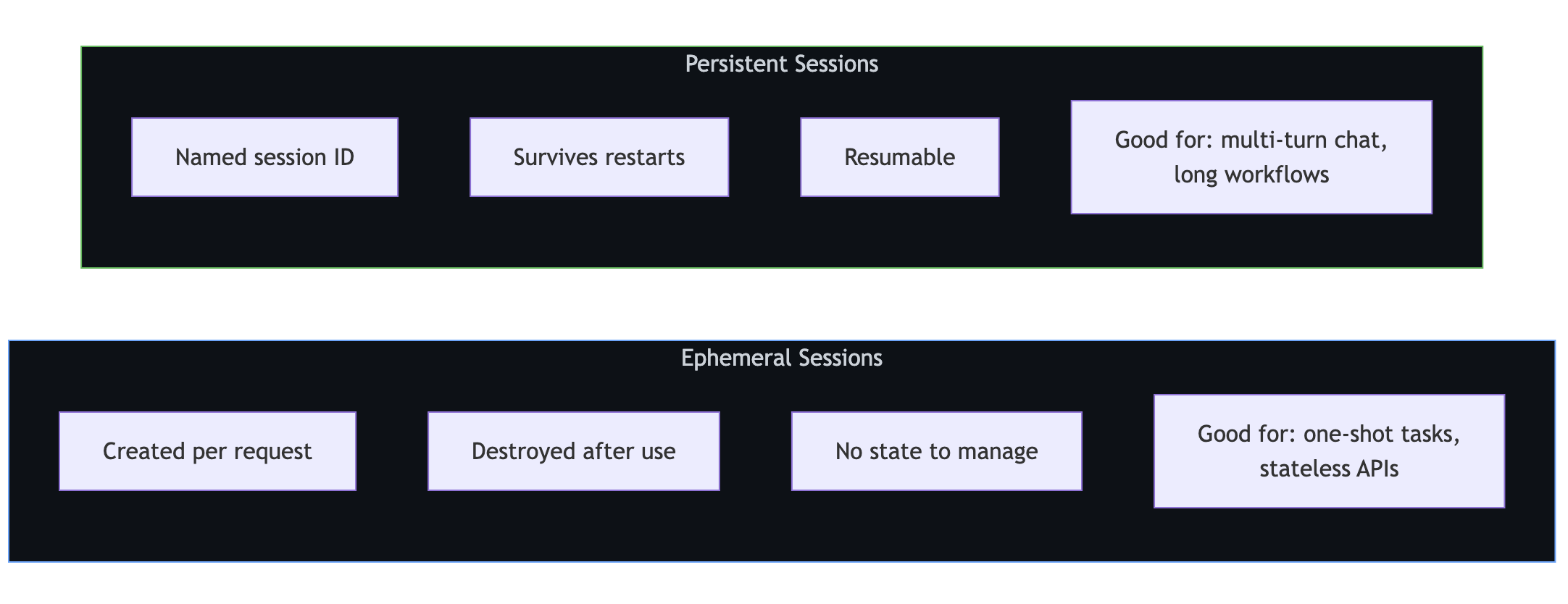
          **临时会话** 按请求创建,并在使用后销毁。 它们非常适合一次性任务和无状态 API。

          **持久会话** 是可以命名的,在重启后能够继续存在,并且可以恢复。 它们非常适合多轮对话和长工作流。
临时会话
app.post("/api/analyze", async (req, res) => {
    const session = await client.createSession({
        model: "gpt-4.1",
    });

    try {
        const response = await session.sendAndWait({
            prompt: req.body.prompt,
        });
        res.json({ result: response?.data.content });
    } finally {
        await session.disconnect();
    }
});
持久会话
// Start a conversation
app.post("/api/chat/start", async (req, res) => {
    const sessionId = `user-${req.user.id}-${Date.now()}`;

    const session = await client.createSession({
        sessionId,
        model: "gpt-4.1",
        infiniteSessions: {
            enabled: true,
            backgroundCompactionThreshold: 0.80,
        },
    });

    res.json({ sessionId });
});

// Continue the conversation
app.post("/api/chat/message", async (req, res) => {
    const session = await client.resumeSession(req.body.sessionId);
    const response = await session.sendAndWait({ prompt: req.body.message });

    res.json({ content: response?.data.content });
});

// Clean up when done
app.post("/api/chat/end", async (req, res) => {
    await client.deleteSession(req.body.sessionId);
    res.json({ success: true });
});
容器部署
具有持久性存储的 Kubernetes
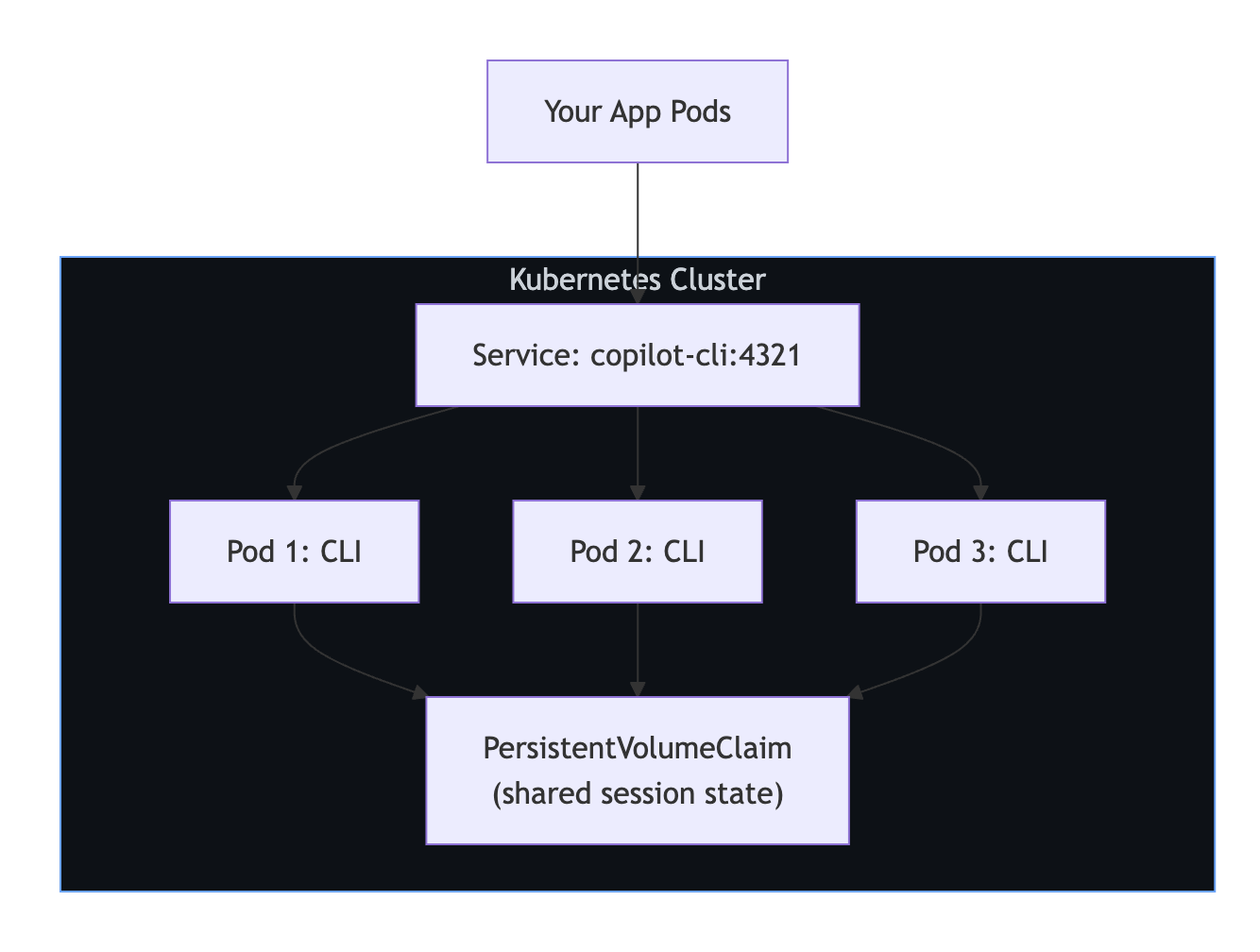
以下示例部署三个共享 CLI PersistentVolumeClaim 副本,以便任何副本可以恢复任何会话。
apiVersion: apps/v1
kind: Deployment
metadata:
  name: copilot-cli
spec:
  replicas: 3
  selector:
    matchLabels:
      app: copilot-cli
  template:
    metadata:
      labels:
        app: copilot-cli
    spec:
      containers:
        - name: copilot-cli
          image: ghcr.io/github/copilot-cli:latest
          args: ["--headless", "--port", "4321"]
          env:
            - name: COPILOT_GITHUB_TOKEN
              valueFrom:
                secretKeyRef:
                  name: copilot-secrets
                  key: github-token
          ports:
            - containerPort: 4321
          volumeMounts:
            - name: session-state
              mountPath: /root/.copilot/session-state
      volumes:
        - name: session-state
          persistentVolumeClaim:
            claimName: copilot-sessions-pvc
---
apiVersion: v1
kind: Service
metadata:
  name: copilot-cli
spec:
  selector:
    app: copilot-cli
  ports:
    - port: 4321
      targetPort: 4321
生产核对清单
| 关注 | 建议 |
|---|
**会话清理** | 运行定期清理以删除早于 TTL 的会话。 |
|
运行状况检查 | 定期 Ping CLI 服务器;如果无响应,请重启。 |
|
存储 | 装载持久卷~/.copilot/session-state/。 |
|
机密 | 使用平台的机密管理器(保管库、Kubernetes Secrets 等)。 |
|
监控 | 跟踪活动会话计数、响应延迟和错误率。 |
|
Locking | 使用 Redis 或类似工具访问共享会话。 |
|
关机**** | 停止 CLI 服务器之前,请清空活动会话。 |
局限性
| 限度 | 详细信息 |
|---|
**无内置会话锁定** | 实现并发访问的应用程序级锁定。 |
| 无内置负载均衡 | 使用外部负载均衡器或服务网格。 | | 会话状态基于文件 | 多服务器设置需要一个共享文件系统。 | | 30 分钟空闲超时 | 不带活动的会话由 CLI 自动清除。 | | CLI 是单进程 | 通过添加更多 CLI 服务器实例而不是线程进行缩放。 |
后续步骤
- 有关核心服务器端设置,请参阅 为后端服务设置 Copilot SDK。
- 有关多用户身份验证,请参阅 将 GitHub OAuth 与 Copilot SDK 配合使用。
- 有关安装和第一条消息,请参阅 开始使用 Copilot SDK。