注意
Copilot SDK 当前处于 技术预览版. 功能和可用性可能会发生更改。
由于 Azure 部署通常使用 托管标识 (Entra ID),而不是长期使用的密钥,因此需要采取额外的步骤以使用 Copilot SDK 的 BYOK 模式。 由于 SDK 本身不支持 Entra ID 身份验证,因此可以通过提供程序配置的持有者令牌字段bearer_token (在 Python bearerToken 中,Node.js/TypeScript 和 .NET)使用生存期较短的持有者令牌。
本指南演示如何使用
工作原理
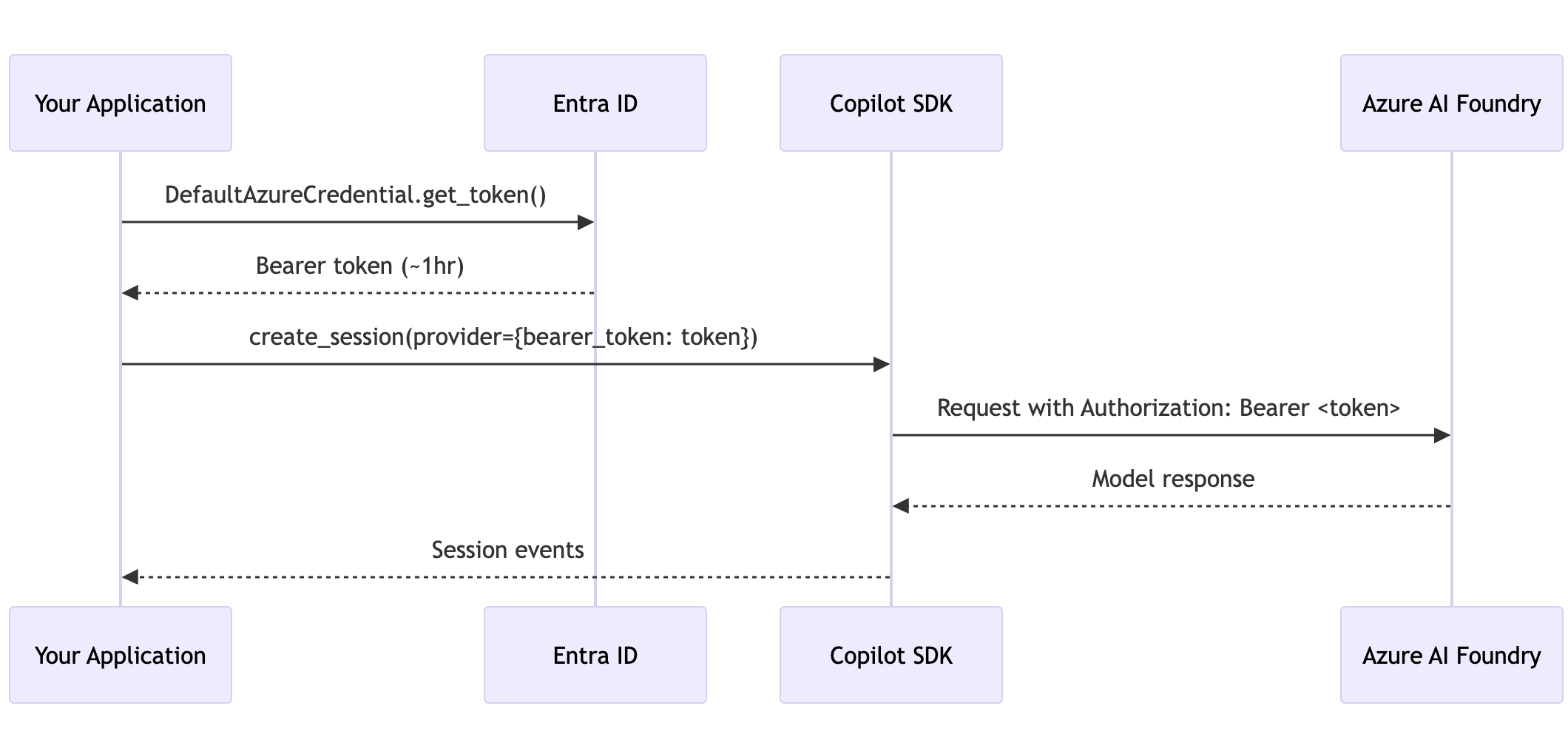
Azure AI Foundry 的 OpenAI 兼容终结点接受来自 Entra ID 的持有者令牌,以取代静态 API 密钥。 模式为:
- 使用
DefaultAzureCredential来获取https://cognitiveservices.azure.com/.default的令牌。 - 在 BYOK 提供程序配置的持票人令牌字段中传递令牌(在 Python 中为
bearer_token,在 Node.js、TypeScript 和 .NET 中为bearerToken)。 - 在令牌过期之前刷新令牌。 令牌通常有效期约为一小时。
先决条件
- 部署了 Azure AI Foundry 资源的 Azure 订阅。
- 已安装的 Azure 标识库(
azure-identity适用于 Python、@azure/identityNode.js或Azure.Identity.NET)。 -
Copilot SDK 已安装。 有关详细信息,请参阅“[AUTOTITLE](/copilot/how-tos/copilot-sdk/sdk-getting-started)”。
Python示例
安装依赖项
pip install github-copilot-sdk azure-identity
基本用法
import asyncio
import os

from azure.identity import DefaultAzureCredential
from copilot import CopilotClient, PermissionHandler

COGNITIVE_SERVICES_SCOPE = "https://cognitiveservices.azure.com/.default"

async def main():
    # Get a token using Managed Identity, Azure CLI, or other credential chain
    credential = DefaultAzureCredential()
    token = credential.get_token(COGNITIVE_SERVICES_SCOPE).token

    foundry_url = os.environ["AZURE_AI_FOUNDRY_RESOURCE_URL"]

    client = CopilotClient()
    await client.start()

    session = await client.create_session(
        on_permission_request=PermissionHandler.approve_all,
        model="gpt-4.1",
        provider={
            "type": "openai",
            "base_url": f"{foundry_url.rstrip('/')}/openai/v1/",
            "bearer_token": token,  # Short-lived bearer token
            "wire_api": "responses",
        },
    )

    response = await session.send_and_wait({"prompt": "Hello from Managed Identity!"})
    print(response.data.content)

    await client.stop()

asyncio.run(main())
将 AZURE_AI_FOUNDRY_RESOURCE_URL 替换为保存 Azure AI Foundry 资源 URL 的环境变量(例如 https://myresource.openai.azure.com)。
长时间运行应用程序的令牌刷新
持有者令牌在大约一小时后过期。 对于服务器或长时间运行的代理,请在创建每个会话之前刷新令牌:
from azure.identity import DefaultAzureCredential
from copilot import CopilotClient, PermissionHandler

COGNITIVE_SERVICES_SCOPE = "https://cognitiveservices.azure.com/.default"

class ManagedIdentityCopilotAgent:
    """Copilot agent that refreshes Entra ID tokens for Azure AI Foundry."""

    def __init__(self, foundry_url: str, model: str = "gpt-4.1"):
        self.foundry_url = foundry_url.rstrip("/")
        self.model = model
        self.credential = DefaultAzureCredential()
        self.client = CopilotClient()

    def _get_provider_config(self) -> dict:
        """Build a provider config dict with a fresh bearer token."""
        token = self.credential.get_token(COGNITIVE_SERVICES_SCOPE).token
        return {
            "type": "openai",
            "base_url": f"{self.foundry_url}/openai/v1/",
            "bearer_token": token,
            "wire_api": "responses",
        }

    async def chat(self, prompt: str) -> str:
        """Send a prompt and return the response text."""
        # Fresh token for each session
        provider = self._get_provider_config()
        session = await self.client.create_session(
            on_permission_request=PermissionHandler.approve_all,
            model=self.model,
            provider=provider,
        )

        response = await session.send_and_wait({"prompt": prompt})
        await session.disconnect()

        return response.data.content if response else ""
Node.js/TypeScript 示例
import { DefaultAzureCredential } from "@azure/identity";
import { CopilotClient } from "@github/copilot-sdk";

const credential = new DefaultAzureCredential();
const tokenResponse = await credential.getToken(
    "https://cognitiveservices.azure.com/.default"
);

const client = new CopilotClient();

const session = await client.createSession({
    model: "gpt-4.1",
    provider: {
        type: "openai",
        baseUrl: `${process.env.AZURE_AI_FOUNDRY_RESOURCE_URL}/openai/v1/`,
        bearerToken: tokenResponse.token,
        wireApi: "responses",
    },
});

const response = await session.sendAndWait({ prompt: "Hello!" });
console.log(response?.data.content);

await client.stop();
.NET 示例
using Azure.Identity;
using GitHub.Copilot;

var credential = new DefaultAzureCredential();
var token = await credential.GetTokenAsync(
    new Azure.Core.TokenRequestContext(
        new[] { "https://cognitiveservices.azure.com/.default" }));

await using var client = new CopilotClient();
var foundryUrl = Environment.GetEnvironmentVariable("AZURE_AI_FOUNDRY_RESOURCE_URL");

await using var session = await client.CreateSessionAsync(new SessionConfig
{
    Model = "gpt-4.1",
    Provider = new ProviderConfig
    {
        Type = "openai",
        BaseUrl = $"{foundryUrl!.TrimEnd('/')}/openai/v1/",
        BearerToken = token.Token,
        WireApi = "responses",
    },
});

var response = await session.SendAndWaitAsync(
    new MessageOptions { Prompt = "Hello from Managed Identity!" });
Console.WriteLine(response?.Data.Content);
环境配置
需要以下环境变量:
| Variable | 说明 | 示例 |
|---|---|---|
AZURE_AI_FOUNDRY_RESOURCE_URL | 您的 Azure AI Foundry 资源网址 | https://myresource.openai.azure.com |
不需要 API 密钥环境变量——身份验证由 DefaultAzureCredential 处理,并自动支持:
- Azure 托管应用的托管标识(系统分配或用户分配)。
- 用于本地开发的 Azure CLI (
az login)。 - 服务主体的环境变量 (
AZURE_CLIENT_ID、AZURE_TENANT_ID、AZURE_CLIENT_SECRET) 。 - Kubernetes 的工作负荷标识。
有关完整凭据链,请参阅 DefaultAzureCredential 文档。
何时使用此模式
| 情景 | 建议 |
|---|---|
| 使用托管标识的 Azure 应用程序 | 使用此模式。 |
| 具有现有 Azure AD 服务主体的应用 | 使用此模式。 |
使用 az login 进行本地开发 | 使用此模式。 |
| 具有静态 API 密钥的非 Azure 环境 | 使用标准 BYOK。 有关详细信息,请参阅存储库中的 github/copilot-sdk。 |
GitHub Copilot 订阅可用 | 使用 GitHub OAuth。 有关详细信息,请参阅存储库中的 [](https://github.com/github/copilot-sdk/blob/main/docs/setup/github-oauth.md)`github/copilot-sdk`。 |
延伸阅读
- 有关静态 API 密钥配置,请参阅存储库中的
github/copilot-sdk。 - 有关服务器端部署,请参阅 为后端服务设置 Copilot SDK。
- 有关 Azure 标识库文档,请参阅 Azure 标识客户端库概述。