참고
코필로트 SDK가 현재 기술 미리 보기에 있습니다. 기능 및 가용성은 변경될 수 있습니다.
CLI 세션에 대한 다양한 격리 패턴과 애플리케이션을 구현할 때 동시 세션 및 리소스를 관리하는 방법을 고려합니다.
**최적 대상:** 플랫폼 개발자, SaaS 작성기 및 여러 동시 사용자를 제공하는 모든 배포.
세션 격리 패턴
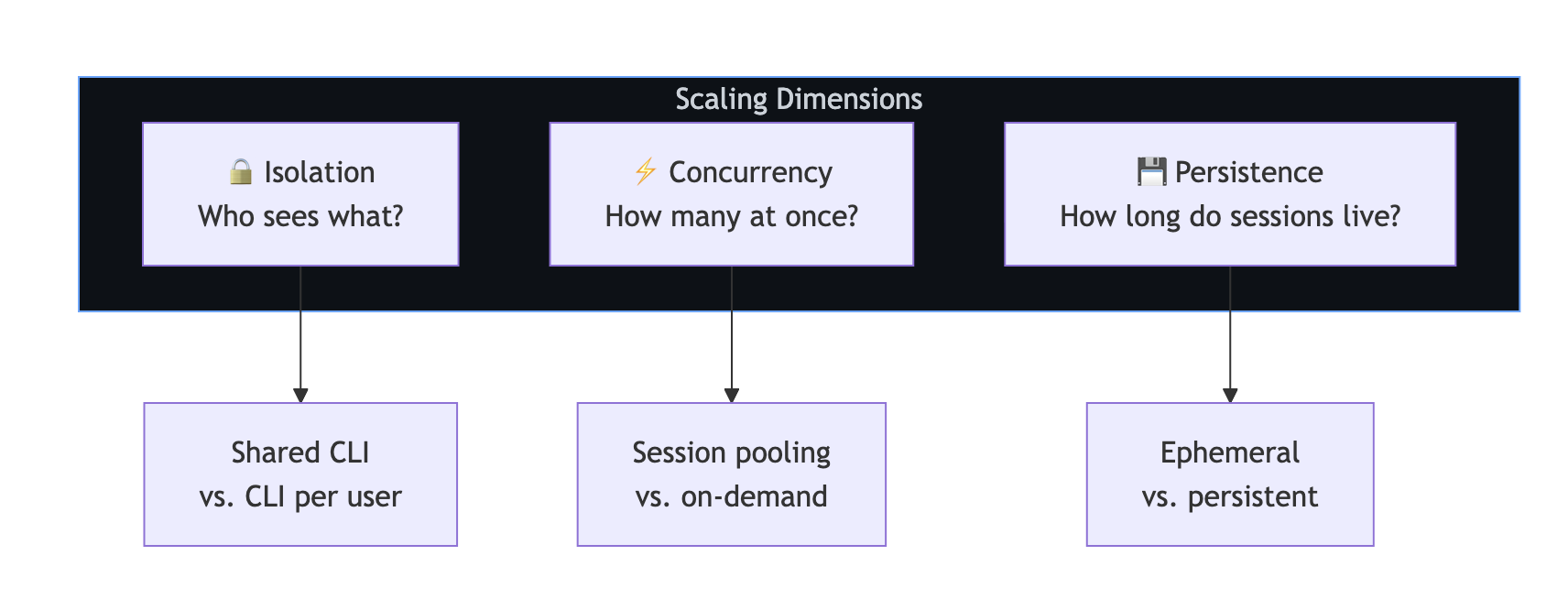
패턴을 선택하기 전에 다음 세 가지 차원을 고려합니다.
-
**격리**: 누가 어떤 세션을 볼 수 있나요? -
**동시성**: 동시에 실행할 수 있는 세션 수는 몇 개입니까? -
**지속성**: 세션은 얼마나 오래 유지됩니까?
패턴 1: 사용자당 격리된 CLI
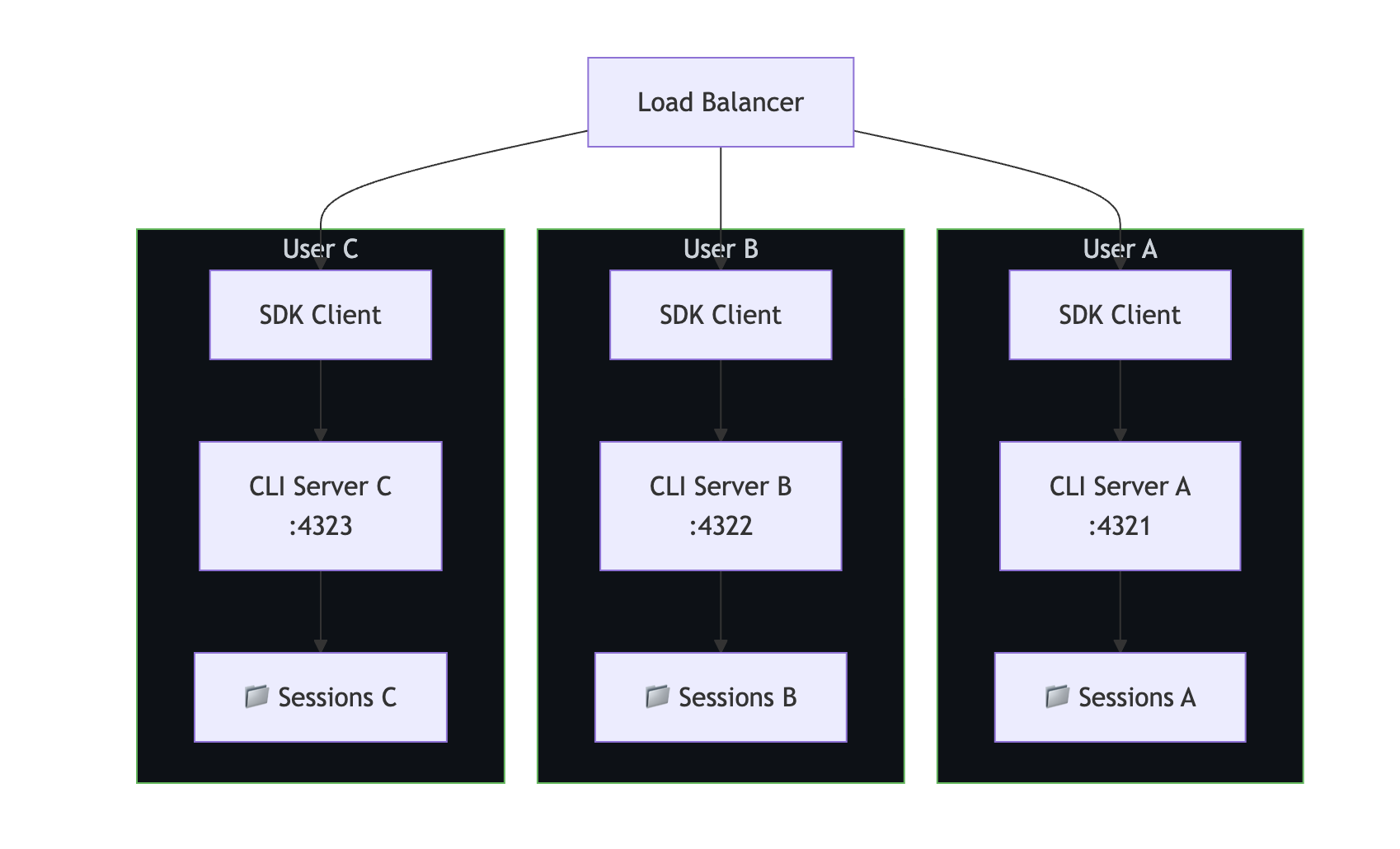
각 사용자는 자체 CLI 서버 인스턴스를 가져옵니다. 이는 가장 강력한 격리입니다. 사용자의 세션, 메모리 및 프로세스는 완전히 분리됩니다.
**사용 시기:**
- 데이터 격리가 중요한 다중 테넌트 SaaS입니다.
- 다른 인증 자격 증명을 가진 사용자입니다.
- SOC 2 또는 HIPAA와 같은 규정 준수 요구 사항
// CLI pool manager—one CLI per user
class CLIPool {
    private instances = new Map<string, { client: CopilotClient; port: number }>();
    private nextPort = 5000;

    async getClientForUser(userId: string, token?: string): Promise<CopilotClient> {
        if (this.instances.has(userId)) {
            return this.instances.get(userId)!.client;
        }

        const port = this.nextPort++;

        // Spawn a dedicated CLI for this user
        await spawnCLI(port, token);

        const client = new CopilotClient({
            cliUrl: `localhost:${port}`,
        });

        this.instances.set(userId, { client, port });
        return client;
    }

    async releaseUser(userId: string): Promise<void> {
        const instance = this.instances.get(userId);
        if (instance) {
            await instance.client.stop();
            this.instances.delete(userId);
        }
    }
}
패턴 2: 세션 격리를 사용하는 공유 CLI
여러 사용자가 하나의 CLI 서버를 공유하지만 고유한 세션 ID를 통해 격리된 세션이 있습니다. 이는 자원을 덜 소모하지만, 격리 수준은 더 낮습니다.

**사용 시기:**
- 신뢰할 수 있는 사용자가 있는 내부 도구입니다.
- 리소스가 제한된 환경.
- 격리 요구 사항을 낮춥니다.
const sharedClient = new CopilotClient({
    cliUrl: "localhost:4321",
});

// Enforce session isolation through naming conventions
function getSessionId(userId: string, purpose: string): string {
    return `${userId}-${purpose}-${Date.now()}`;
}

// Access control: ensure users can only access their own sessions
async function resumeSessionWithAuth(
    sessionId: string,
    currentUserId: string
): Promise<Session> {
    const [sessionUserId] = sessionId.split("-");
    if (sessionUserId !== currentUserId) {
        throw new Error("Access denied: session belongs to another user");
    }
    return sharedClient.resumeSession(sessionId);
}
패턴 3: 공유 세션(공동 작업)
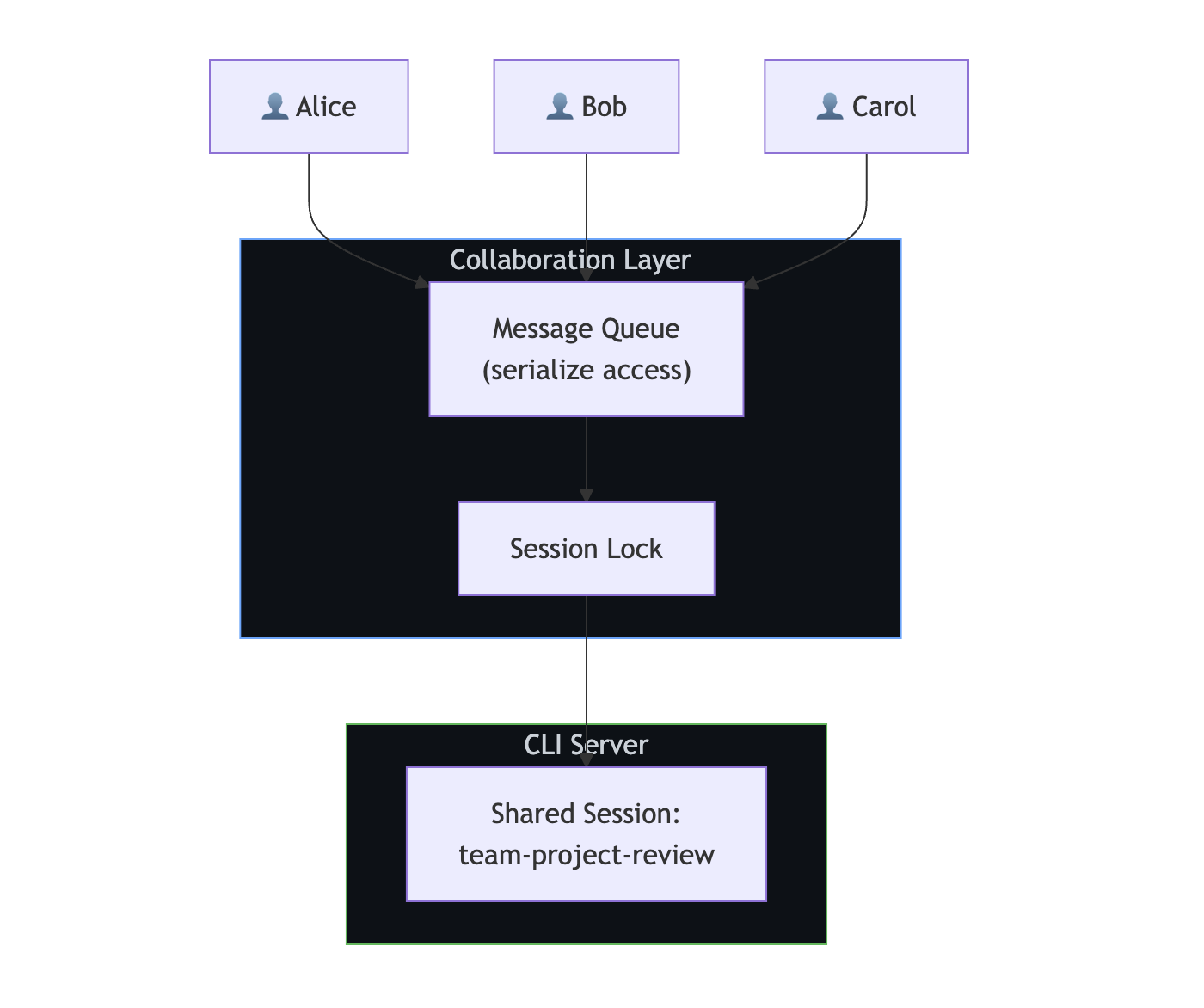
여러 사용자가 코필로트와 공유 채팅방과 같은 동일한 세션과 상호 작용합니다. 이 패턴을 사용하려면 애플리케이션 수준 세션 잠금이 필요합니다.
**사용 시기:**
- 팀 공동 작업 도구.
- 공유 코드 검토 세션.
- 프로그래밍 도우미를 페어링합니다.
참고
SDK는 기본 제공 세션 잠금을 제공하지 않습니다. 동일한 세션에 대한 동시 쓰기를 방지하려면 액세스를 직렬화해야 합니다.
import Redis from "ioredis";

const redis = new Redis();

async function withSessionLock<T>(
    sessionId: string,
    fn: () => Promise<T>,
    timeoutSec = 300
): Promise<T> {
    const lockKey = `session-lock:${sessionId}`;
    const lockId = crypto.randomUUID();

    // Acquire lock
    const acquired = await redis.set(lockKey, lockId, "NX", "EX", timeoutSec);
    if (!acquired) {
        throw new Error("Session is in use by another user");
    }

    try {
        return await fn();
    } finally {
        // Release lock only if we still own it
        const currentLock = await redis.get(lockKey);
        if (currentLock === lockId) {
            await redis.del(lockKey);
        }
    }
}

// Serialize access to a shared session
app.post("/team-chat", authMiddleware, async (req, res) => {
    const result = await withSessionLock("team-project-review", async () => {
        const session = await client.resumeSession("team-project-review");
        return session.sendAndWait({ prompt: req.body.message });
    });

    res.json({ content: result?.data.content });
});
격리 패턴 비교
| 사용자당 격리된 CLI | 공유 CLI (명령줄 인터페이스) + 세션 격리 | 공유 세션 |
|---|
**격리** | 완료됨 | Logical | 공유됨 |
| 리소스 사용량 | 높음(사용자당 CLI) | 낮음(하나의 명령줄 인터페이스) | 낮음(하나의 CLI 및 하나의 세션) | | 복잡성 | 중간 | Low | 높음(잠금 필요) | | 인증 유연성 | 사용자별 토큰 | 서비스 토큰 | 서비스 토큰 | | 최적입니다 | 다중 사용자 SaaS | 내부 도구 | 협업 |
수평 크기 조정
부하 분산 장치 뒤에 여러 CLI 서버
더 많은 동시 사용자를 제공하려면 부하 분산 장치 뒤에서 여러 CLI 서버 인스턴스를 실행합니다. 모든 CLI 서버가 세션을 다시 시작할 수 있도록 세션 상태는 공유 스토리지 에 있어야 합니다.

// Route sessions across CLI servers
class CLILoadBalancer {
    private servers: string[];
    private currentIndex = 0;

    constructor(servers: string[]) {
        this.servers = servers;
    }

    // Round-robin selection
    getNextServer(): string {
        const server = this.servers[this.currentIndex];
        this.currentIndex = (this.currentIndex + 1) % this.servers.length;
        return server;
    }

    // Sticky sessions: same user always hits same server
    getServerForUser(userId: string): string {
        const hash = this.hashCode(userId);
        return this.servers[hash % this.servers.length];
    }

    private hashCode(str: string): number {
        let hash = 0;
        for (let i = 0; i < str.length; i++) {
            hash = (hash << 5) - hash + str.charCodeAt(i);
            hash |= 0;
        }
        return Math.abs(hash);
    }
}

const lb = new CLILoadBalancer([
    "cli-1:4321",
    "cli-2:4321",
    "cli-3:4321",
]);

app.post("/chat", async (req, res) => {
    const server = lb.getServerForUser(req.user.id);
    const client = new CopilotClient({ cliUrl: server });

    const session = await client.createSession({
        sessionId: `user-${req.user.id}-chat`,
        model: "gpt-4.1",
    });

    const response = await session.sendAndWait({ prompt: req.body.message });
    res.json({ content: response?.data.content });
});
고정 세션 및 공유 스토리지
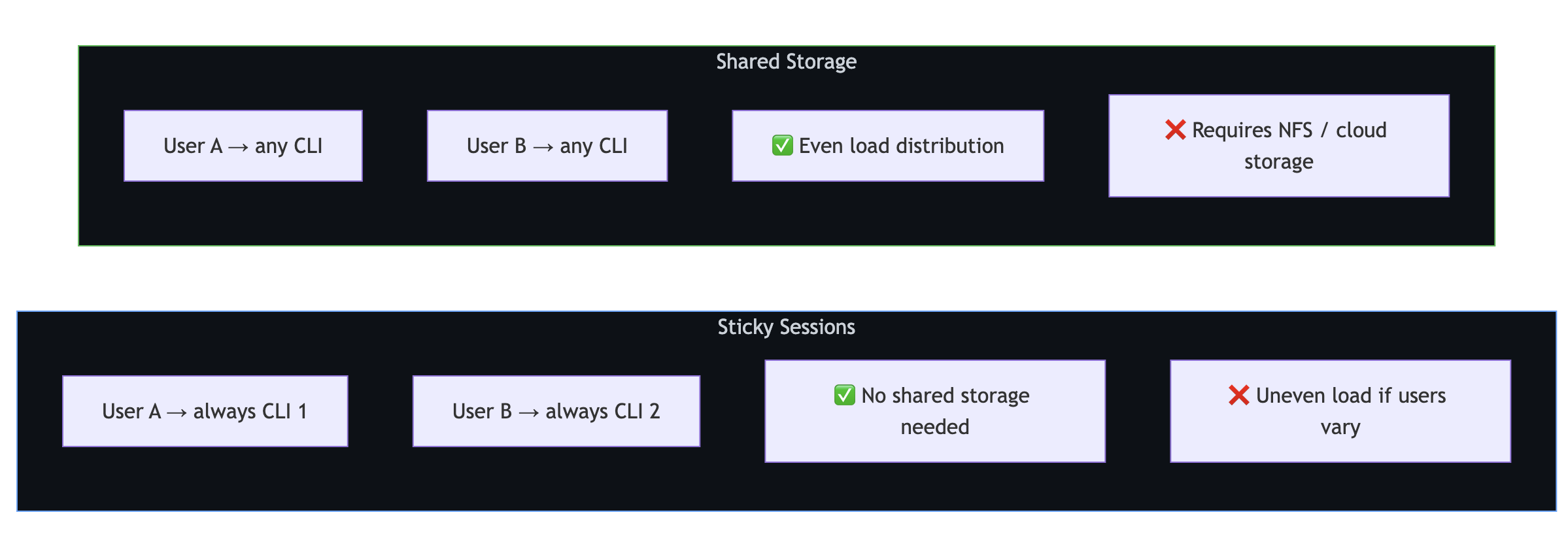
          **스티키 세션은** 각 사용자를 특정 CLI 서버에 연결합니다. 공유 스토리지는 필요하지 않지만 사용자 트래픽이 크게 달라지면 부하 분산이 고르지 않을 수 있습니다.

          **공유 스토리지** 를 사용하면 모든 CLI에서 모든 세션을 처리할 수 있습니다. 부하 분산은 더 균등하지만 , 에 대한 `~/.copilot/session-state/`네트워크 스토리지가 필요합니다.
수직 크기 조정
단일 CLI 서버 튜닝
단일 CLI 서버는 여러 동시 세션을 처리할 수 있습니다. 핵심은 리소스 소모를 방지하기 위해 세션 수명 주기를 관리하는 것입니다.

// Limit concurrent active sessions
class SessionManager {
    private activeSessions = new Map<string, Session>();
    private maxConcurrent: number;

    constructor(maxConcurrent = 50) {
        this.maxConcurrent = maxConcurrent;
    }

    async getSession(sessionId: string): Promise<Session> {
        // Return existing active session
        if (this.activeSessions.has(sessionId)) {
            return this.activeSessions.get(sessionId)!;
        }

        // Enforce concurrency limit
        if (this.activeSessions.size >= this.maxConcurrent) {
            await this.evictOldestSession();
        }

        // Create or resume
        const session = await client.createSession({
            sessionId,
            model: "gpt-4.1",
        });

        this.activeSessions.set(sessionId, session);
        return session;
    }

    private async evictOldestSession(): Promise<void> {
        const [oldestId] = this.activeSessions.keys();
        const session = this.activeSessions.get(oldestId)!;
        // Session state is persisted automatically—safe to disconnect
        await session.disconnect();
        this.activeSessions.delete(oldestId);
    }
}
임시 세션과 영구 세션 비교
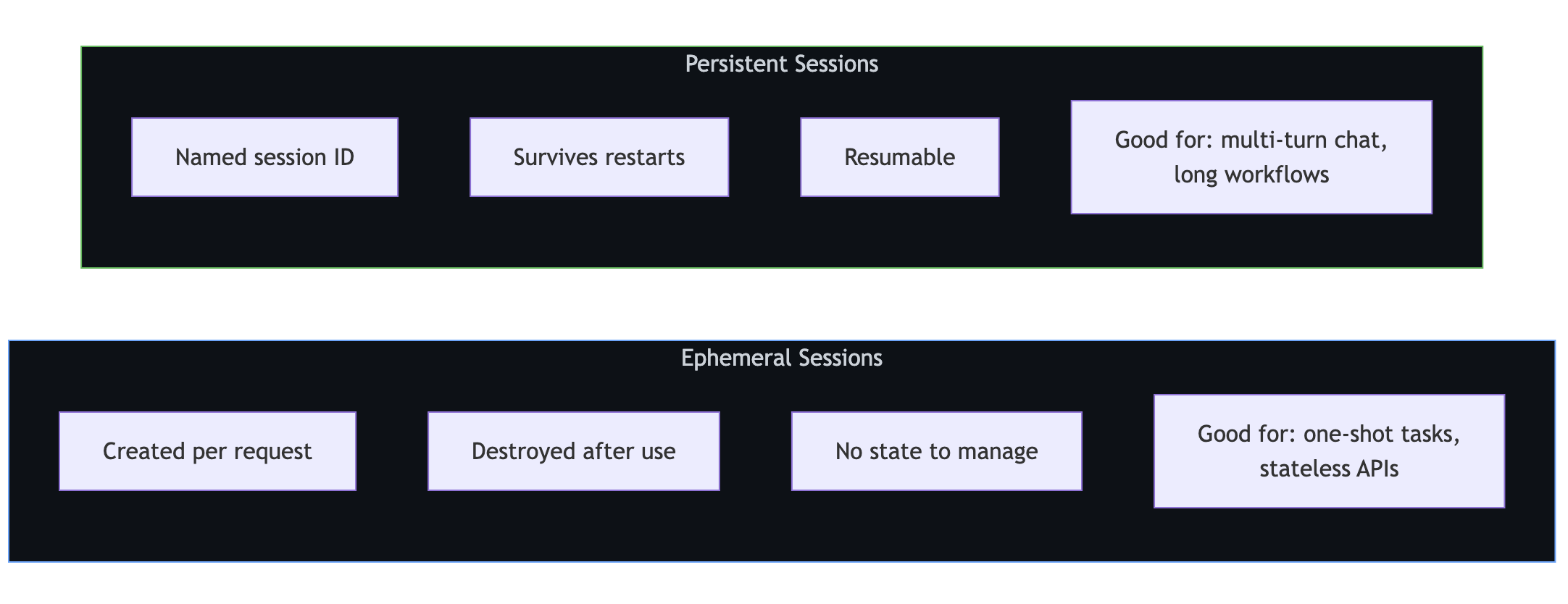
          **임시 세션은** 요청당 생성되고 사용 후 삭제됩니다. 단발성 작업 및 상태 비보존 API에 적합합니다.

          **영구 세션**은 이름이 지정되고, 재시작 후에도 유지되며, 계속할 수 있습니다. 멀티 턴 채팅 및 긴 워크플로에 이상적입니다.
임시 세션
app.post("/api/analyze", async (req, res) => {
    const session = await client.createSession({
        model: "gpt-4.1",
    });

    try {
        const response = await session.sendAndWait({
            prompt: req.body.prompt,
        });
        res.json({ result: response?.data.content });
    } finally {
        await session.disconnect();
    }
});
영구 세션
// Start a conversation
app.post("/api/chat/start", async (req, res) => {
    const sessionId = `user-${req.user.id}-${Date.now()}`;

    const session = await client.createSession({
        sessionId,
        model: "gpt-4.1",
        infiniteSessions: {
            enabled: true,
            backgroundCompactionThreshold: 0.80,
        },
    });

    res.json({ sessionId });
});

// Continue the conversation
app.post("/api/chat/message", async (req, res) => {
    const session = await client.resumeSession(req.body.sessionId);
    const response = await session.sendAndWait({ prompt: req.body.message });

    res.json({ content: response?.data.content });
});

// Clean up when done
app.post("/api/chat/end", async (req, res) => {
    await client.deleteSession(req.body.sessionId);
    res.json({ success: true });
});
컨테이너 배포
영구 스토리지가 있는 Kubernetes
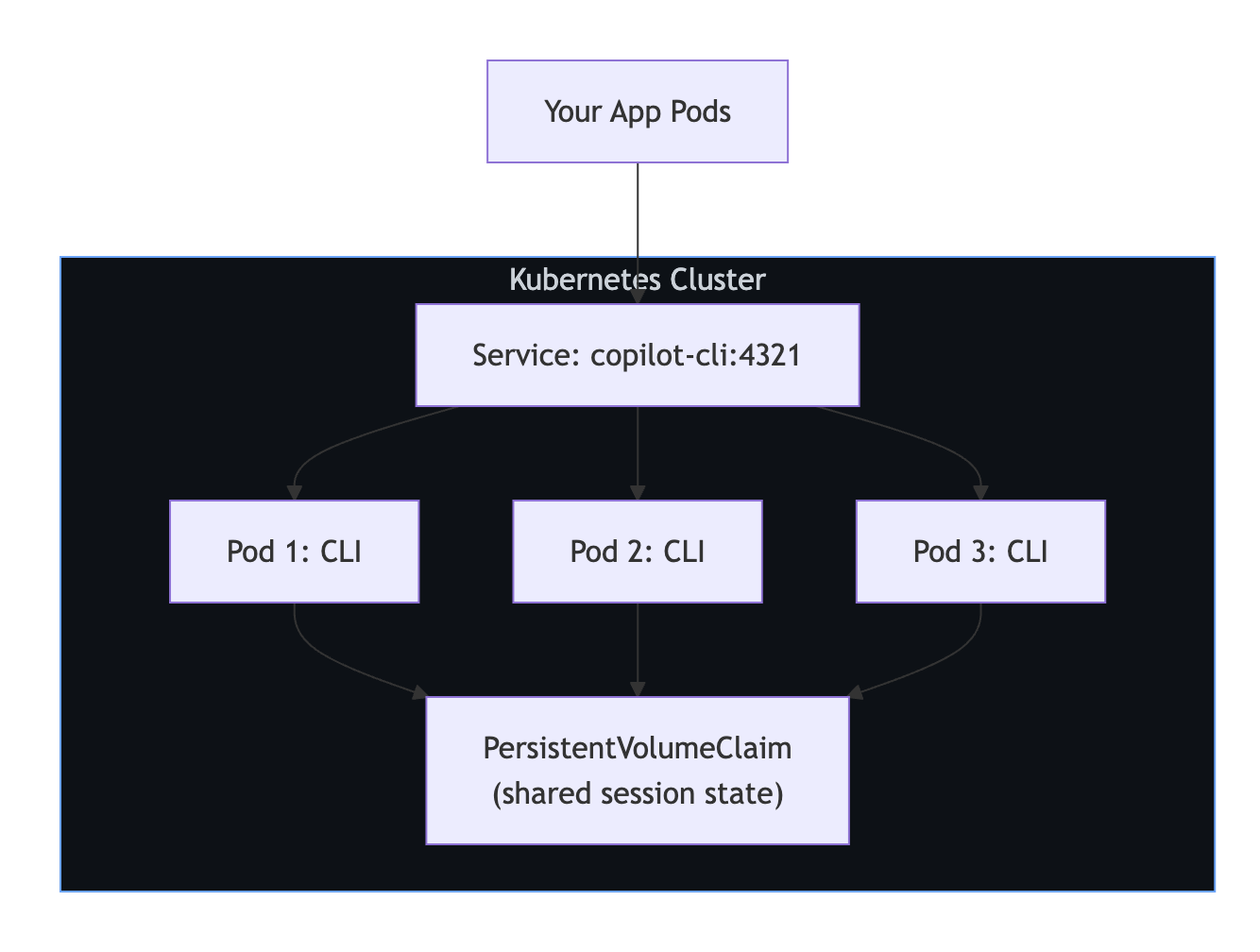
다음 예제에서는 모든 복제본이 세션을 다시 시작할 수 있도록 공유되는 PersistentVolumeClaim 3개의 CLI 복제본을 배포합니다.
apiVersion: apps/v1
kind: Deployment
metadata:
  name: copilot-cli
spec:
  replicas: 3
  selector:
    matchLabels:
      app: copilot-cli
  template:
    metadata:
      labels:
        app: copilot-cli
    spec:
      containers:
        - name: copilot-cli
          image: ghcr.io/github/copilot-cli:latest
          args: ["--headless", "--port", "4321"]
          env:
            - name: COPILOT_GITHUB_TOKEN
              valueFrom:
                secretKeyRef:
                  name: copilot-secrets
                  key: github-token
          ports:
            - containerPort: 4321
          volumeMounts:
            - name: session-state
              mountPath: /root/.copilot/session-state
      volumes:
        - name: session-state
          persistentVolumeClaim:
            claimName: copilot-sessions-pvc
---
apiVersion: v1
kind: Service
metadata:
  name: copilot-cli
spec:
  selector:
    app: copilot-cli
  ports:
    - port: 4321
      targetPort: 4321
프로덕션 체크리스트
| 관심사 | 권장 사항 |
|---|
**세션 정리** | 주기적 정리를 실행하여 TTL보다 오래된 세션을 삭제합니다. |
|
상태 검사 | 주기적으로 CLI 서버 Ping; 응답하지 않으면 다시 시작합니다. |
|
스토리지 |
~/.copilot/session-state/에 대한 영구 볼륨을 탑재하십시오. |
|
비밀 | 플랫폼의 시크릿 관리자(Vault, Kubernetes 시크릿 등)를 사용합니다. |
|
모니터링 | 활성 세션 수, 응답 대기 시간 및 오류 비율을 추적합니다. |
|
Locking | 공유 세션 액세스에 Redis 또는 이와 유사한 것을 사용합니다. |
|
종료 | CLI 서버를 중지하기 전에 활성 세션을 드레이닝합니다. |
제한점
| Limitation | 세부 정보 |
|---|
**기본 제공 세션 잠금 없음** | 동시 액세스를 위한 애플리케이션 수준 잠금을 구현합니다. |
| 기본 제공 부하 분산 없음 | 외부 부하 분산 장치 또는 서비스 메시를 사용합니다. | | 세션 상태는 파일 기반입니다. | 다중 서버 설치를 위해 공유 파일 시스템이 필요합니다. | | 30분 유휴 시간 제한 | 활동이 없는 세션은 CLI에서 자동으로 정리됩니다. | | CLI는 단일 프로세스입니다. | 스레드가 아닌 CLI 서버 인스턴스를 더 추가하여 크기를 조정합니다. |
다음 단계
- 핵심 서버 쪽 설정은 백 엔드 서비스에 대한 Copilot SDK 설정을 참조하세요.
- 다중 사용자 인증은 Copilot SDK와 함께 GitHub OAuth 사용을 참조하세요.
- 설치 및 첫 번째 메시지는 Copilot SDK 사용 시작하기을 참조하세요.