


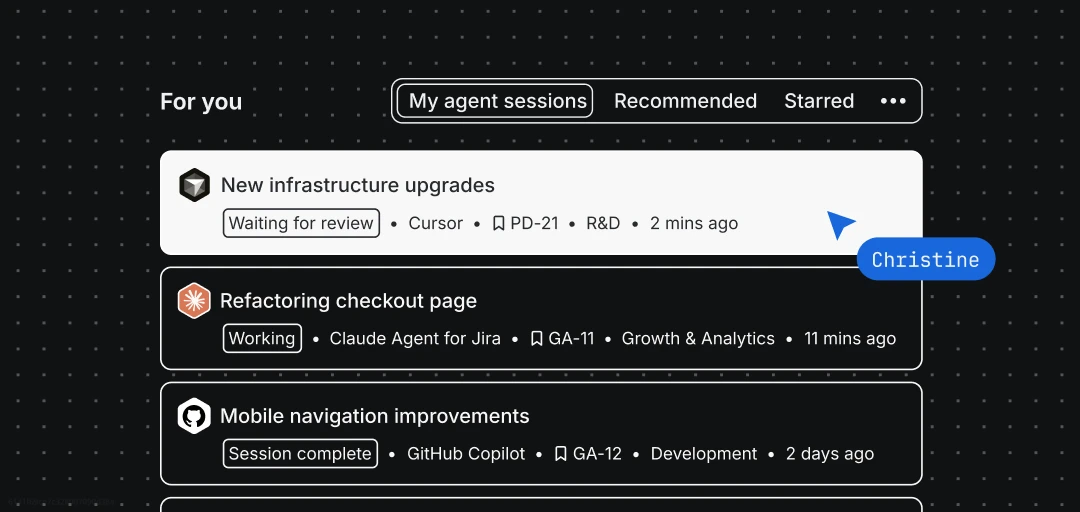
See what’s stuck, what’s shipping, and what’s complete. All in one place.
Starting today, every software team working in Jira can get visibility into agents they’re running across their spaces and repos in a single view, grouped by what needs attention first.
Validating agent output at scale
Engineering orgs are rapidly scaling from working manually with agents in their IDE or terminal to supervising agent loops running concurrently in the background, increasingly triggered by automation rules and workflow transitions that invoke agents across dozens of work items at once.
The bottleneck isn’t just assigning the work. It’s validating the output at scale: knowing what’s ready for review, what’s blocked, and what needs additional context.
Now, Atlassian is giving you a single view of all your agent sessions in one place – surfacing what needs your attention first so nothing falls through the cracks, and the time you saved by using agents in the first place stays saved.
How it works
My agent sessions puts the full agent lifecycle in one place. Here’s what you can do:
- Start agent sessions from your Jira home page. Invoke an agent on one of your assigned work items through quick actions on the For You page. No need to navigate to a board or backlog first.
- Respond when agents need you. If a session gets stuck or needs your input, the work item surfaces in your recommended feed the next time you open For You – so you can unblock it, redirect the agents approach, or give new instructions.
- See everything at a glance. Switch to the My agent sessions tab for a full list of every session: what needs input, what’s actively working, and what’s finished. Sessions are sorted by recency so the most recent activity is always on top.
- Review and act in place. Click a session card and the work item panel opens with the full context – agent outputs, current state, and next steps. Unblock, approve, or redirect without switching tabs.
Availability
My agent sessions on the Jira For You page is now generally available for Jira Cloud customers on Standard, Premium, or Enterprise plans. Just make sure Rovo is activated on your site and that you have agent sessions running (by either assigning work items to agents, using them in workflows or automations, or mentioning them in comments).
Getting started
Open your Jira For You page. The new My agent sessions section will appear automatically if you’re running agents.
Don’t have agents set up yet? Check out this guide on how to get started.


