


Tutorial 20: CSS Floats, Part I
|
| ||||
| ||||
|
|
The clear property
As you saw in some of the diagrams above, if a float happens to cover only part of another element, the text will wrap, and sometimes this is not the effect you would want - in fact it is often downright ugly. The solution is to use the clear property on other elements.
The clear property accepts four possible values: left, right, both and none. If this property is set to anything but none on an element, it will be moved down to "clear" any floating elements on the left, right or both sides of it. This is done by increasing this element's top margin by just enough so that the top of its border is up against the edge of the offending float's bottom margin.
This effect can be shown by modifying our initial style sheet so that the third paragraph clears the floating one, as follows:
BODY {
 background: #000000;
}
DIV {
 margin: 1em;
 padding: 1em;
 background: #00CC99;
}
P {
 margin: 1em;
}
#one {
 float: left;
 width: 40%;
 margin: 0.5em;
 background: #003399;
 border: solid thin #D7040B;
 color: #FFFFFF;
}
#three {
 clear: left;
}
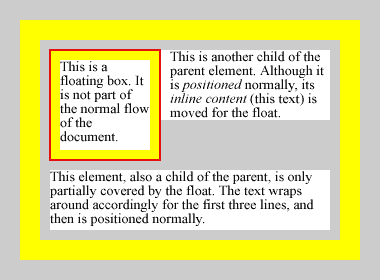
In this diagram, the first paragraph is floated to the left, the second has its contents displaced accordingly, while the third one is pushed down to clear the float.
The third paragraph's margin is increased so that the border (which doesn't actually make an appearance here, but is squished to nothing between the margin and the content area) of the paragraph lines up with the float's bottom margin.
This trick is very useful if you don't use percentage widths, like we did here. In our case, the layout will look roughly the same no matter what the size of the viewport, but if we set the float's width to something like 2 inches and expected the third paragraph to begin below the float in the first place, on a very wide viewport it would not. Setting the clear property insures this.


