


Boxing with CSS, Part I: The Theory
What Boxes Do when they Come Together
|
| ||||
| ||||
|
|
There are actually two kinds of boxes: block-level boxes and inline boxes. In Tutorial 2 we mentioned that there are block-level and inline elements. The reason for this will be made obvious soon enough. In this tutorial, we will concern ourselves only with block-level boxes. This is good, because (a) they're a simple concept, and (b) this is probably the only type of box you'll ever concern yourself with.
Where Little Boxes Come From
Normally, every block-level element creates a block-level box. So a
paragraph (P), a heading (H1 etc.) and a
division (DIV) all create a block-level box when they
are displayed.
If an element is contained within another box, then its box will be displayed within the parent element's box. Quite a simple concept, really. Elements within elements, boxes within boxes.
Containing blocks
A containing block is a rectangular piece of the page in which one or more boxes live together. Boxes are displayed within a containing block, and are normally restricted to the confines of this block. The most important containing block is the viewport, which is that part of the browser in which the document is displayed. Every box on the screen is displayed within a containing block.
If there are many boxes within a containing block, they are placed one below the other. The only trick is that their vertical margins collapse. What this means is that if two boxes are placed one after the other, the distance between their two borders will be either the bottom margin of the top box, or the top margin of the bottom box, depending on which is the largest. Here is an example to illustrate this:
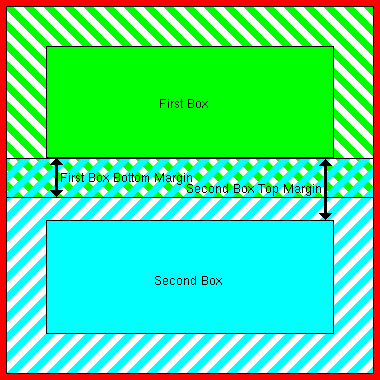
Figure 5: Collapsing Margins
In figure 5, two boxes are placed in a containing block. The thick red line shows the limits of the containing block. The first box is placed with its margins touching the edges of the containing block. The top margin of the second box is larger than the bottom margin of the first box, so that is the distance between the two boxes' borders (the opaque areas indicate the border, padding and content areas of the boxes).
Collapsing vertical margins make a lot of sense if you think about it. This way, all you do is specify the smallest margin an element should have, and not worry about what elements precede or follow it, and you can be sure that it will have enough space to breathe. Now let's see where containing blocks come from.


