Apple Watch User Guide
- Welcome
- What’s new
- Run with Apple Watch
-
- Alarms
- Audiobooks
- Blood Oxygen
- Calculator
- Calendar
- Camera Remote
- ECG
- Medications
- Memoji
- Music Recognition
- News
- Now Playing
- Remote
- Shortcuts
- Siren
- Stocks
- Stopwatch
- Tides
- Timers
- Use the Tips app
- Translate
- Vitals
- Voice Memos
- Walkie-Talkie
- World Clock
- Copyright and trademarks
Start a workout on Apple Watch
The Workout app offers a variety of fitness options—from cardio-focused workouts such as High Intensity Interval Training (HIIT), Outdoor Run, and Outdoor Cycle, to strength-based workouts like Functional Strength Training, Core Training, and Kickboxing. During your workout, you can pause and resume at any time. And on Apple Watch Ultra models, you can assign a favorite workout to the Action button.
Siri: Ask Siri something like, “Start a 30-minute outdoor run.” See Keep track of your health and fitness with Siri.
Start a workout
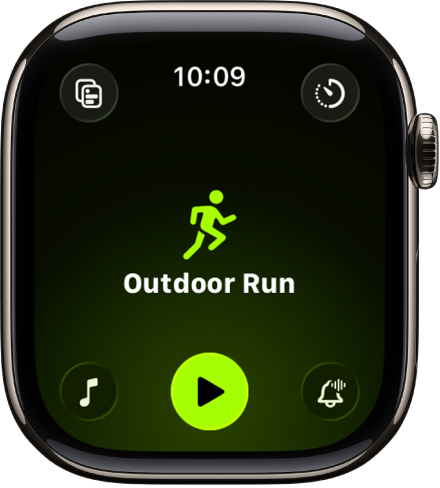
Go to the Workout app
 on your Apple Watch.
Turn the Digital Crown to the workout you want to do.
To view all workouts, scroll down, then tap
 at the bottom of the workout list.
When you’re ready to start your workout, tap
 .
.Tip: You can also tap the center of the screen to quickly start your workout.
As you use the app and choose workouts, the order of workouts reflects your preferences.
Tip: You can add a workout widget to your Smart Stack that shows your three most recent workout types. See Use the Smart Stack to show timely widgets.
For more information about the types of workouts you can do with Apple Watch, see the Apple Support article Workout types on Apple Watch.
Start a workout with the Action button on Apple Watch Ultra models
You can assign a favorite workout to the Action button.
Go to the Settings app
 on your Apple Watch Ultra.
Tap Action Button, tap Action, tap Workout, then tap
 to return to the list of actions.
Tap First Press, then tap Start a Workout.
When you’re ready to begin your workout, press the Action button.
Press the Action and Side buttons at the same time to pause the workout.
Pause and resume a workout
To pause the workout at any time, press the side button and the Digital Crown at the same time. For all workouts except swimming workouts you can also swipe right on the workout screen, then tap Pause. To continue, tap Resume.