Apple Watch User Guide
- Welcome
- What’s new
-
- Apple Watch gestures
- Use double tap to perform common actions
- Set up and pair your Apple Watch with iPhone
- Set up more than one Apple Watch
- Pair Apple Watch with a new iPhone
- The Apple Watch app
- Charge Apple Watch
- Turn on and wake Apple Watch
- Lock or unlock Apple Watch
- Change language and orientation on Apple Watch
- Remove, change, and fasten Apple Watch bands
-
- Apps on Apple Watch
- Open apps
- Organize apps
- Get more apps
- Tell time
- Status icons
- Control Center
- Use Focus
- Adjust brightness, text size, sounds, and haptics
- See and respond to notifications
- Change notification settings
- Use the Smart Stack to show timely widgets
- Manage your Apple ID
- Use shortcuts
- See time in daylight
- Set up Handwashing
- Connect Apple Watch to a Wi-Fi network
- Connect to Bluetooth headphones or speakers
- Hand off tasks from Apple Watch
- Unlock your Mac with Apple Watch
- Unlock your iPhone with Apple Watch
- Use Apple Watch without its paired iPhone
- Set up and use cellular service on Apple Watch
-
- Get started with Apple Fitness+
- Subscribe to Apple Fitness+
- Find Fitness+ workouts and meditations
- Start a Fitness+ workout or meditation
- Create a Custom Plan in Apple Fitness+
- Work out together using SharePlay
- Change what’s on the screen during a Fitness+ workout or meditation
- Download a Fitness+ workout
-
- Alarms
- Blood Oxygen
- Calculator
- Calendar
- Camera Remote
- Contacts
- ECG
- Medications
- Memoji
- News
- Now Playing
- Reminders
- Stocks
- Stopwatch
- Timers
- Tips
- Voice Memos
- Walkie-Talkie
-
- About Wallet
- Apple Pay
- Set up Apple Pay
- Make purchases
- Send, receive, and request money with Apple Watch (U.S. only)
- Manage Apple Cash (U.S. only)
- Use Wallet for passes
- Use rewards cards
- Pay with Apple Watch on Mac
- Ride transit
- Use your driver’s license or state ID
- Use digital keys
- Use COVID-19 vaccination cards
- World Clock
-
- VoiceOver
- Set up Apple Watch using VoiceOver
- Apple Watch basics with VoiceOver
- Apple Watch Mirroring
- Control nearby devices
- AssistiveTouch
- Use a braille display
- Use a Bluetooth keyboard
- Zoom
- Tell time with haptic feedback
- Adjust text size and other visual settings
- Adjust motor skills settings
- Set up and use RTT
- Accessibility audio settings
- Type to speak
- Use accessibility features with Siri
- The Accessibility Shortcut
- Copyright
Stay connected with Apple Watch
Apple Watch makes it easy to communicate with friends, family, and coworkers, even when your iPhone isn’t with you.

Send a message, right from your wrist
Quickly respond to a message with Siri. When Apple Watch is connected to Wi-Fi or cellular, just raise your wrist and say, “Tell Julie I’ll be there in five minutes.” Or touch and hold the message to give your friend a thumbs up with a Tapback reply.

Make a call
Use Siri to help you make a quick call. With an Apple Watch with a cellular or Wi-Fi connection, raise your wrist and say “Call Mom.” If you have a Wi-Fi connection, a simple “FaceTime Mom” does the trick. With watchOS 10 you can also join a Group FaceTime audio call.
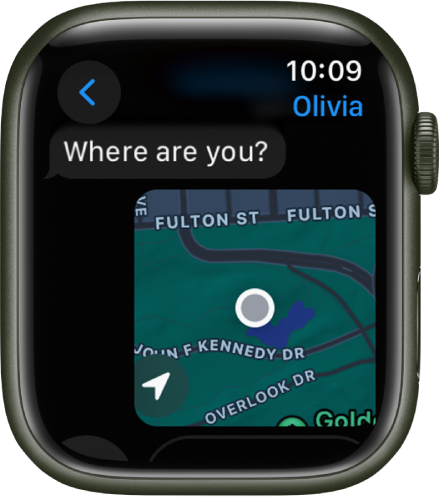
Share your live location
Meeting a friend? Apple Watch can let them know where you are and update your location automatically. Open the Messages app  , start a new message or open a conversation, tap
  , tap
, tap  , then start sharing your location.

Care to share?
You can share any photo on your Apple Watch—a favorite photo you’ve synced from iPhone or one of several images from a memory. Just select a photo, tap  , then share via Messages or Mail.
For more information, see Send messages from Apple Watch, Make phone calls, Share your location in Messages, and Share a photo.
Download this guide: PDF