Mac User Guide
- Welcome
- What’s new in macOS Sequoia
-
- Intro to Apple Intelligence
- Find the right words with Writing Tools
- Create original images with Image Playground
- Create your own emoji with Genmoji
- Use Apple Intelligence with Siri
- Summarize notifications and reduce interruptions
- Use ChatGPT with Apple Intelligence
- Apple Intelligence and privacy
- Block access to Apple Intelligence features
-
- Intro to Continuity
- Use AirDrop to send items to nearby devices
- Hand off tasks between devices
- Control your iPhone from your Mac
- Copy and paste between devices
- Stream video and audio with AirPlay
- Make and receive calls and text messages on your Mac
- Use your iPhone internet connection with your Mac
- Share your Wi-Fi password with another device
- Use iPhone as a webcam
- Insert sketches, photos, and scans from iPhone or iPad
- Unlock your Mac with Apple Watch
- Use your iPad as a second display
- Use one keyboard and mouse to control Mac and iPad
- Sync music, books, and more between devices
-
- Control what you share
- Set up your Mac to be secure
- Allow apps to see the location of your Mac
- Use Private Browsing
- Keep your data safe
- Understand passwords
- Change weak or compromised passwords
- Keep your Apple Account secure
- Use Mail Privacy Protection
- Use Sign in with Apple for apps and websites
- Find a missing device
- Resources for your Mac
- Resources for your Apple devices
- Copyright

What’s new in macOS Sequoia

Use your iPhone from your Mac
Control your iPhone right from your desktop. See iPhone notifications alongside the ones from your Mac, and interact with iPhone apps using your Mac keyboard, trackpad, or mouse.
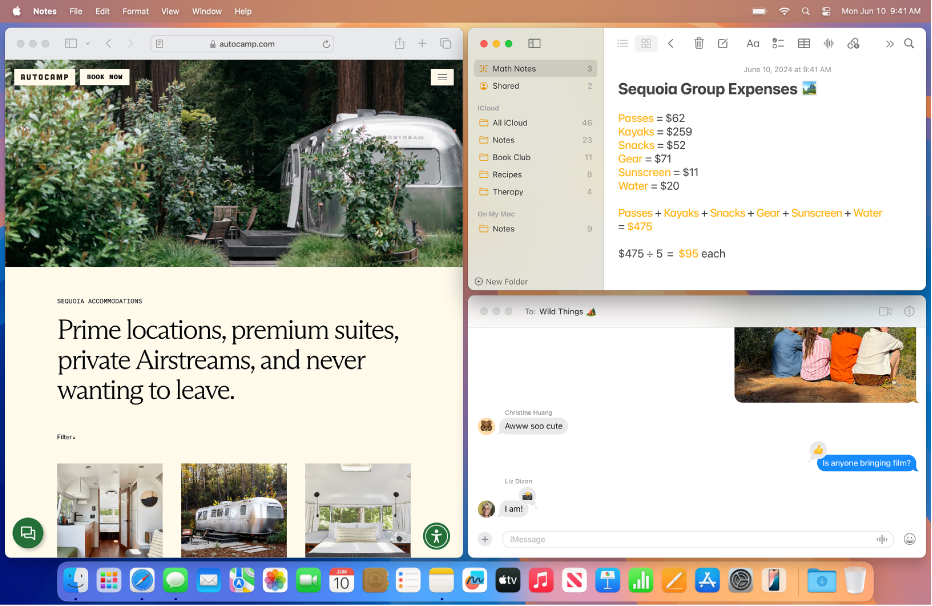
Arrange windows in tiles
Keep more in view with window tiling—simply drag windows to the edge of your screen to arrange them side by side on your desktop.

Video conference with ease
Use Presenter Preview to see what you’re going to share before displaying it to everyone. Choose a virtual background to hide what’s behind you—or to let the people on your call know where you’d rather be.

Keep all your passwords in one place
Use the Passwords app to safely store your passwords, passkeys, verification codes, and more. Your passwords are securely synced across your Mac, iPhone, iPad, Apple Vision Pro, and Windows devices.

Schedule messages
Remember someone’s birthday the day before? Schedule a birthday message to send at just the right time.

And even more
See what else macOS Sequoia can do: Add formatting to notes and solve math problems; view reminders right in Calendar; easily find pictures and videos of specific groups of people in Photos; and more.