iPod touch User Guide
- Welcome
- Your iPod touch
- What’s new in iOS 15
-
- Calculator
-
- Set up FaceTime
- Make and receive calls
- Create a FaceTime link
- Take a Live Photo
- Use other apps during a call
- Make a Group FaceTime call
- View participants in a grid
- Use SharePlay to watch and listen together
- Share your screen
- Change the video settings
- Change the audio settings
- Add camera effects
- Leave a call or switch to Messages
- Block unwanted callers
-
- View maps
-
- Search for places
- Find nearby attractions, restaurants, and services
- Get information about places
- Mark places
- Share places
- Rate places
- Save favorite places
- Explore new places with Guides
- Organize places in My Guides
- Get traffic and weather info
- Delete significant locations
- Quickly find your Maps settings
-
- Use Siri, Maps, and the Maps widget to get directions
- Select other route options
- Things you can do while following a route
- Get driving directions
- Report traffic incidents in Maps on iPod touch
- Get cycling directions
- Get walking directions
- Get transit directions
- Delete recent directions
- Use Maps on your Mac to get directions
- Get rides
-
- View photos
- Play videos and slideshows
- Delete and hide photos and videos
- Edit photos and videos
- Trim video length and adjust slow motion
- Edit Live Photos
- Make photo albums
- Edit and organize albums
- Filter and sort photos in an album
- Search in Photos
- Share photos and videos
- View photos and videos shared with you
- Watch memories
- Personalize memories
- Find people in Photos
- Show a person or place less often
- Browse photos by location
- Use iCloud Photos
- Share photos with iCloud Shared Albums
- Import photos and videos
- Print photos
-
- Browse the web
- Customize your Safari settings
- Change the layout
- Search for websites
- Use tabs in Safari
- Bookmark favorite webpages
- Save pages to a Reading List
- View links shared with you
- Automatically fill in forms
- Get extensions
- Hide ads and distractions
- Browse the web privately
- Clear your cache
- Use Hide My Email
- Shortcuts
- Stocks
- Tips
-
- Make and receive phone calls
- Hand off tasks between devices
- Wirelessly stream video, photos, and audio to Mac
- Cut, copy, and paste between iPod touch and other devices
- Connect iPod touch and your computer with a cable
- Sync iPod touch with your computer
- Transfer files between iPod touch and your computer
-
- Get started with accessibility features
-
-
- Turn on and practice VoiceOver
- Change your VoiceOver settings
- Learn VoiceOver gestures
- Operate iPod touch using VoiceOver gestures
- Control VoiceOver using the rotor
- Use the onscreen keyboard
- Write with your finger
- Use VoiceOver with an Apple external keyboard
- Use a braille display
- Type onscreen braille
- Customize gestures and keyboard shortcuts
- Use VoiceOver with a pointer device
- Use VoiceOver for images and videos
- Use VoiceOver in apps
- Zoom
- Display & Text Size
- Motion
- Spoken Content
- Audio Descriptions
-
-
- Use built-in security and privacy protections
-
- Keep your Apple ID secure
- Sign in with Apple
- Automatically fill in strong passwords
- Change weak or compromised passwords
- View your passwords and related information
- Share passwords securely with AirDrop
- Make your passwords available on all your devices
- Automatically fill in verification codes
- Manage two-factor authentication for your Apple ID
-
- Control access to information in apps
- Control access to hardware features
- Control app tracking permissions on iPod touch
- Control the location information you share
- Turn on iCloud Private Relay
- Create and manage Hide My Email addresses
- Use a private network address
- Control how Apple delivers advertising to you
- Copyright
Get apps in the App Store on iPod touch
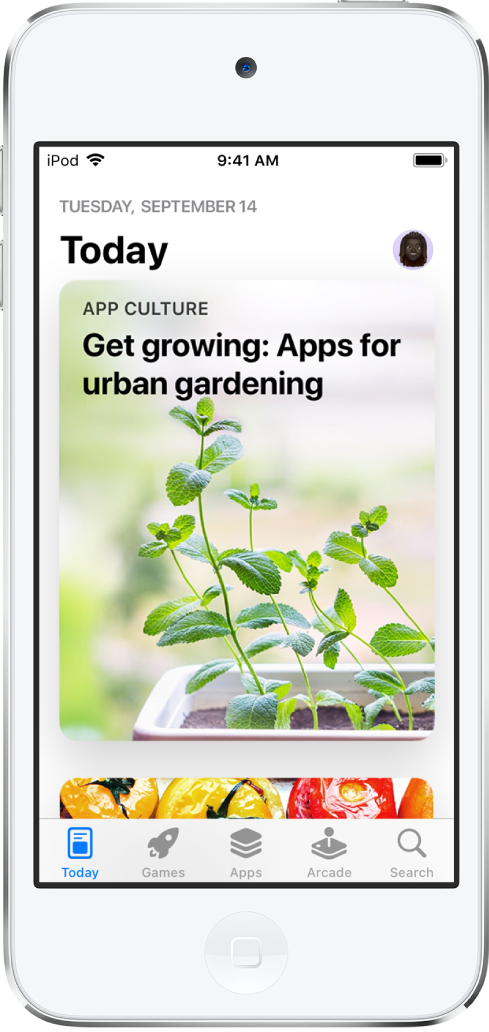
In the App Store app  , you can discover new apps, featured stories, tips and tricks, and in-app events.
Note: You need an internet connection and an Apple ID to use the App Store. The availability of the App Store and Apple Arcade varies by country or region. See the Apple Support article Availability of Apple Media Services.
Find apps
To discover apps, games, and in-app events, tap any of the following:
Today: Browse featured stories, apps, and in-app events.
Games: Find your next game across dozens of categories including action, adventure, racing, puzzles, and more.
Apps: Explore new releases, see the top charts, or browse by category.
Arcade: Enjoy the curated collection of premium games from Apple Arcade (subscription required) without ads or in-app purchases.
Search: Enter what you’re looking for, then tap Search on the keyboard.
Siri: You can also say something like: “Search the App Store for cooking apps” or “Get the Minecraft app.” Learn how to ask Siri.
Get more info about an app
Tap an app to see the following information and more:
Screenshots or previews
In-app events
Ratings and reviews
Supported languages
Game Center and Family Sharing support
Compatibility with other Apple devices
File size
Privacy information; see Review the privacy practices of apps
Buy and download an app
Tap the price. If the app is free, tap Get.
If you see
 instead of a price, you already purchased the app, and you can download it again for free.
If required, authenticate your Apple ID with your passcode to complete your purchase.
You can find the app in the Recently Added category in App Library. While the app is downloading, a progress indicator appears on the app icon. See Find your apps in App Library on iPod touch and Change where new apps get downloaded.
Get the App Store widget
See stories, collections, and in-app events right on your Home Screen. See Add widgets on iPod touch.
Share or give an app
Tap the app to see its details.
Tap
 , then choose a sharing option or tap Gift App (not available for all apps).
Redeem or send an Apple Gift Card
Tap
 or your profile picture at the top right.
Tap one of the following:
Redeem Gift Card or Code
Send Gift Card by Email