iPhone User Guide
- Welcome
- What’s new in iOS 14
-
- Wake and unlock
- Adjust the volume
- Change sounds and vibrations
- Access features from the Lock Screen
- Open apps
- Take a screenshot or screen recording
- Change or lock the screen orientation
- Change the wallpaper
- Set a Live Photo as wallpaper
- Make screen items more reachable
- Search with iPhone
- Use AirDrop to send items
- Perform quick actions
- Use and customize Control Center
- Add widgets
- Charge and monitor the battery
- Learn the meaning of the status icons
- Travel with iPhone
-
- Calculator
- Compass
-
- Collect health and fitness information
- Maintain a health profile
- View health and fitness information
- Track your menstrual cycle
- Track headphone and environmental sound-level exposure
- Share health and fitness data
- Download health records
- Create and share your Medical ID
- Manage health with the Health Checklist
- Register as an organ donor
- Back up your Health data
-
- View maps
-
- Use Siri, Maps, and widgets to get directions
- Choose your preferred type of travel
- Get driving directions
- Report traffic incidents
- Find your parked car
- Get cycling directions
- Find places to stop
- Get walking directions
- Get transit directions
- See an overview of your route or its directions in a list
- Change audio settings for turn-by-turn directions
- Select other route options
- Get directions between places other than your current location
- Delete recently viewed directions
- Use Maps on your Mac to get directions
- Help correct and improve Maps
- Get rides
-
- View photos and videos
- Delete and hide photos and videos
- Edit photos and videos
- Edit Live Photos
- Edit Portrait mode photos
- Organize photos in albums
- Search in Photos
- Share photos and videos
- View Memories
- Find people in Photos
- Browse photos by location
- Use iCloud Photos
- Share photos with iCloud Shared Albums
- Use My Photo Stream
- Import photos and videos
- Print photos
- Shortcuts
- Stocks
- Tips
- Translate
- Weather
-
- Set up Family Sharing
- Download family members’ purchases
- Stop sharing purchases
- Turn on Ask To Buy
- Set up Apple Cash Family
- Share Apple Card
- Share subscriptions and iCloud storage
- Share photos, a calendar, and more with family members
- Locate a family member’s missing device
- Set up Screen Time through Family Sharing
-
- Charging cable
- Power adapters
- MagSafe chargers and battery packs
- MagSafe cases and sleeves
- Qi-certified wireless chargers
-
- Set up AirPods
- Charge AirPods
- Start and stop audio playback
- Change the AirPods volume
- Make and answer calls with AirPods
- Switch AirPods between devices
- Use Siri with AirPods
- Listen and respond to messages
- Share audio with AirPods and Beats headphones
- Change noise control modes
- Control spatial audio
- Restart AirPods
- Change the name of your AirPods and other settings
- Use other Bluetooth headphones
- Use EarPods
- Check headphone sound levels
- Apple Watch
- HomePod and other wireless speakers
- External storage devices
- Magic Keyboard
- Printers
-
- Share your internet connection
- Allow phone calls on your iPad, iPod touch, and Mac
- Hand off tasks between iPhone and your Mac
- Cut, copy, and paste between iPhone and other devices
- Connect iPhone and your computer with a cable
- Sync iPhone with your computer
- Transfer files between iPhone and your computer
-
- Intro to CarPlay
- Connect to CarPlay
- Use Siri
- Use your vehicle’s built-in controls
- Get turn-by-turn directions
- Report traffic incidents
- Change the map view
- Make phone calls
- Play music
- View your calendar
- Send and receive text messages
- Play podcasts
- Play audiobooks
- Listen to news stories
- Control your home
- Use other apps with CarPlay
- Rearrange icons on CarPlay Home
- Change settings in CarPlay
-
- Get started with accessibility features
-
-
- Turn on and practice VoiceOver
- Change your VoiceOver settings
- Learn VoiceOver gestures
- Operate iPhone using VoiceOver gestures
- Control VoiceOver using the rotor
- Use the onscreen keyboard
- Write with your finger
- Use VoiceOver with an Apple external keyboard
- Use a braille display
- Type onscreen braille
- Customize gestures and keyboard shortcuts
- Use VoiceOver with a pointer device
- Use VoiceOver in apps
- Zoom
- Magnifier
- People detection
- Display & Text Size
- Motion
- Spoken Content
- Audio Descriptions
-
-
- Important safety information
- Important handling information
- Get information about your iPhone
- View or change cellular data settings
- Find more resources for software and service
- FCC compliance statement
- ISED Canada compliance statement
- Ultra Wideband information
- Class 1 Laser information
- Apple and the environment
- Disposal and recycling information
- Copyright
Get a report of your device use on iPhone
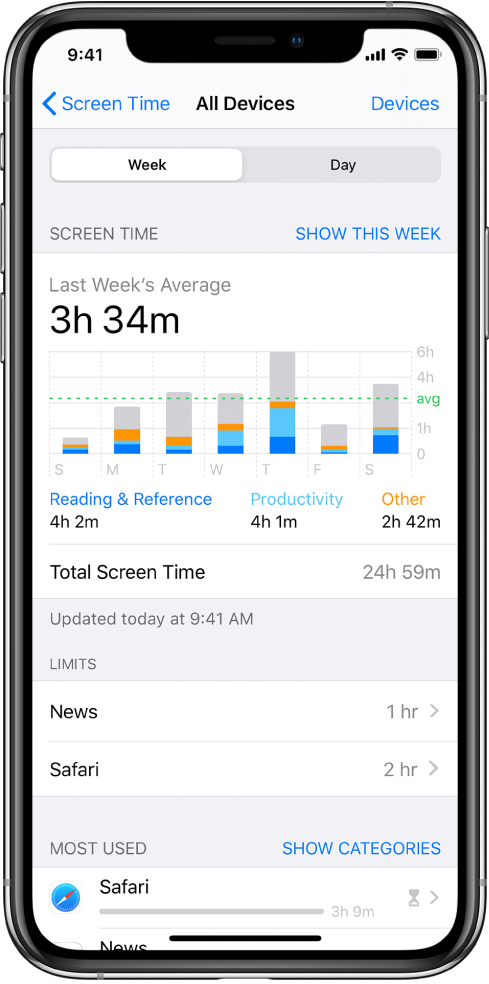
When you have Screen Time set up, you can get a report of your device use.
Go to Settings
 > Screen Time.
Tap See All Activity, then do any of the following:
Tap Week to see a summary of your weekly use.
Tap Day to see a summary of your daily use.
You can also view your summary by tapping a Screen Time Weekly Report notification when it appears on your screen. (If the notification disappears, you can find it in Notification Center. Alternatively, you can add a widget for Screen Time to Today View.)
ನಿಮ್ಮ ಫೀಡ್ಬ್ಯಾಕ್ಗಾಗಿ ಧನ್ಯವಾದಗಳು.