iPhone User Guide
- Welcome
- What’s new in iOS 12
-
- Wake and unlock
- Learn basic gestures
- Learn gestures for iPhone X and later
- Use 3D Touch for previews and shortcuts
- Explore the Home screen and apps
- Change the settings
- Take a screenshot
- Adjust the volume
- Change the sounds and vibrations
- Search for content
- Use and customize Control Center
- View and organize Today View
- Access features from the Lock screen
- Travel with iPhone
- Set screen time, allowances, and limits
- Sync iPhone using iTunes
- Charge and monitor the battery
- Learn the meaning of the status icons
-
- Accessories included with iPhone
- Connect Bluetooth devices
- Stream audio and video to other devices
- Control audio on multiple devices
- AirPrint
- Use Apple EarPods
- Apple Watch
- Use Magic Keyboard
- Wireless charging
- Handoff
- Use Universal Clipboard
- Make and receive Wi-Fi calls
- Use iPhone as a Wi-Fi hotspot
- Share your iPhone Internet connection
- Transfer files with iTunes
-
-
- Get started with accessibility features
- Accessibility shortcuts
-
-
- Turn on and practice VoiceOver
- Change your VoiceOver settings
- Learn VoiceOver gestures
- Operate iPhone using VoiceOver gestures
- Control VoiceOver using the rotor
- Use the onscreen keyboard
- Write with your finger
- Control VoiceOver with Magic Keyboard
- Type onscreen braille using VoiceOver
- Use a braille display
- Use VoiceOver in apps
- Speak selection, speak screen, typing feedback
- Zoom in on the screen
- Magnifier
- Display settings
- Face ID and attention
-
- Guided Access
-
- Important safety information
- Important handling information
- Get information about your iPhone
- View or change cellular settings
- Learn more about iPhone software and service
- FCC compliance statement
- ISED Canada compliance statement
- Class 1 Laser information
- Apple and the environment
- Disposal and recycling information
- Copyright
Share documents from apps on iPhone
On iPhone, you can share a document from any app that supports sharing, although the sharing methods can vary by app.
Share a document from an app
In many apps, you can share a document as described below. (The Files app is an exception.)
Open the document, then tap Share or
 .
.If you don’t see Share or
, tap  or another button in the app for accessing sharing options.
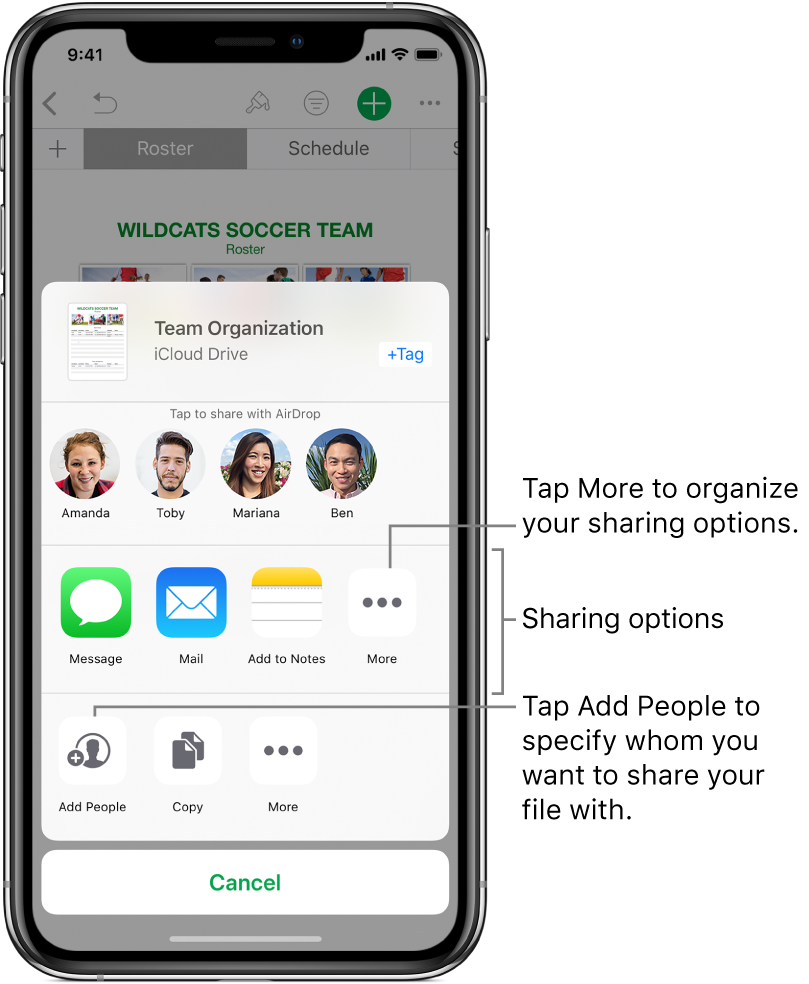
Choose an option for sharing—Message, Mail, and so on.
Options vary by app and may include choices from apps you’ve downloaded. For example, if you download Pinterest, it becomes another option for sharing. See Install and manage app extensions on iPhone.
Share documents from the Files app
You can share a copy of any document in Files with other people.
Tap the Files app
 on the Home screen, then tap Browse at the bottom of the screen.
To locate the document you want to share, do one of the following:
Browse for the document: Tap items below Locations, Favorites, or Tags and open folders to locate the document. (If you don’t see Locations, tap Browse again.)
Search for the document: Type part or all of the document name in the search field near the top of the screen.
Touch and hold the document, then tap Share.
Choose an option for sending the document (for example, Message, Mail, and so on).
See also Share files from iCloud Drive on iPhone.
Organize your sharing options
You can rearrange your sharing options to make it easier to access the ones you use most often.
While sharing a document, tap
 .
.Touch and drag
 to move items to new positions.