Apple Watch User Guide
- Welcome
- Your Apple Watch
- What’s new
-
- Get started
- Apple Watch gestures
- Set up and pair your Apple Watch with iPhone
- The Apple Watch app
- Charge Apple Watch
- Turn on and wake Apple Watch
- Lock or unlock Apple Watch
- Change language and orientation on Apple Watch
- Remove, change, and fasten Apple Watch bands
- Stay fit with Apple Watch
- Track important health information with Apple Watch
- Stay connected with Apple Watch
-
- Apps on Apple Watch
- Open apps
- Organize apps
- Get more apps
- Tell time
- Status icons
- Control Center
- Use Focus
- Adjust brightness, text size, sounds, and haptics
- See and respond to notifications
- Change notification settings
- Manage your Apple ID
- Use shortcuts
- Create an emergency Medical ID
- Manage fall detection
- Set up Handwashing
- Connect Apple Watch to a Wi-Fi network
- Connect to Bluetooth headphones or speakers
- Hand off tasks from Apple Watch
- Unlock your Mac with Apple Watch
- Unlock iPhone with Apple Watch
- Use Apple Watch without its paired iPhone
- Use your Apple Watch with a cellular network
-
- All about Apple Fitness+
- Subscribe to Apple Fitness+
- Set up Apple Fitness+ on Apple TV
- Browse Fitness+ workouts and Meditations
- Start a Fitness+ workout
- Pause and resume a Fitness+ workout
- End and review a Fitness+ workout
- Work out together using SharePlay
- Change what’s on the screen during a Fitness+ workout
- Download a Fitness+ workout
-
- Alarms
- Blood Oxygen
- Calculator
- Calendar
- Camera Remote
- Compass
- Contacts
- Cycle Tracking
- ECG
- Heart Rate
- Memoji
- News
- Now Playing
- Reminders
- Sleep
- Stocks
- Stopwatch
- Timers
- Tips
- Voice Memos
- Walkie-Talkie
-
- About Wallet
- Apple Pay
- Set up Apple Pay
- Make purchases
- Send, receive, and request money with Apple Watch (U.S. only)
- Manage Apple Cash (U.S. only)
- Use Wallet for passes
- Use rewards cards
- Pay with Apple Watch on Mac
- Ride transit
- Use your driver’s license or state ID
- Use digital keys
- Use COVID-19 vaccination cards
- Weather
- World Clock
- Copyright
Reply to messages on Apple Watch
Reply to a message
Turn the Digital Crown to scroll to the bottom of the message, then choose how to reply.
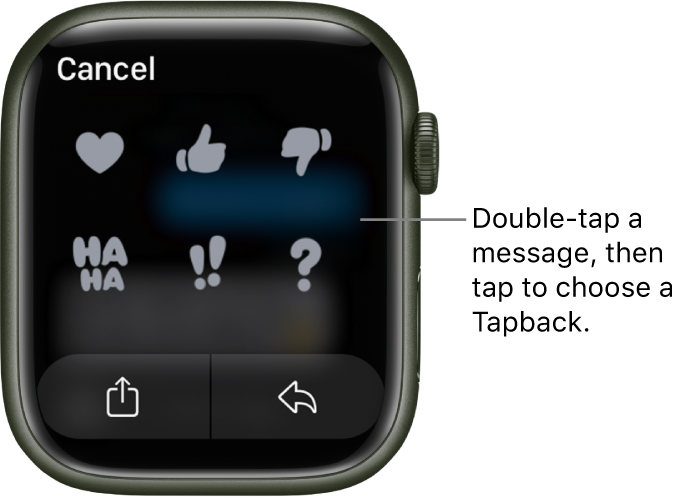
To quickly respond with a Tapback, touch and hold a specific message in a conversation, then choose a Tapback—like thumbs-up or a heart.
Reply directly to one message in a conversation
In a group conversation, you can respond to a specific message inline to help keep conversations organized.
In a Messages conversation, touch and hold a specific message to reply to, then tap
 .
.Create your response, then tap Send.
Only the person you reply to sees the message.
Share a message

Friends often include information and sentiments in their messages that you want to share with others. To share a message, follow these steps:
In a Messages conversation, touch and hold a specific message, then tap
 .
.Choose people you often exchange messages with, or tap Messages or Mail.
If you’ve chosen Messages or Mail, add contacts and, if you’re sending an email, a subject.
Tap Send.
Download this guide: Apple Books | PDF