
Add mathematical equations in Keynote on iPhone
You can add mathematical expressions and equations as floating objects on a slide. To add an equation, you compose it in the Keynote equation dialog using LaTeX commands or MathML elements, then insert it into your presentation.
You can also add equations inline with the text inside text boxes and shapes.
Add an equation with LaTeX or MathML
Go to the Keynote app
 on your iPhone.
Open a presentation, then do one of the following:
Place the equation inline with text: Place the insertion point in a text box or shape, or select the text you want the equation to replace.
Place the equation so it can be moved freely: Tap outside the slide to make sure nothing is selected.
Tap
 in the toolbar, tap
  , then tap Add Equation.
Enter a LaTeX or MathML equation using the keyboard and the symbols above the keyboard.
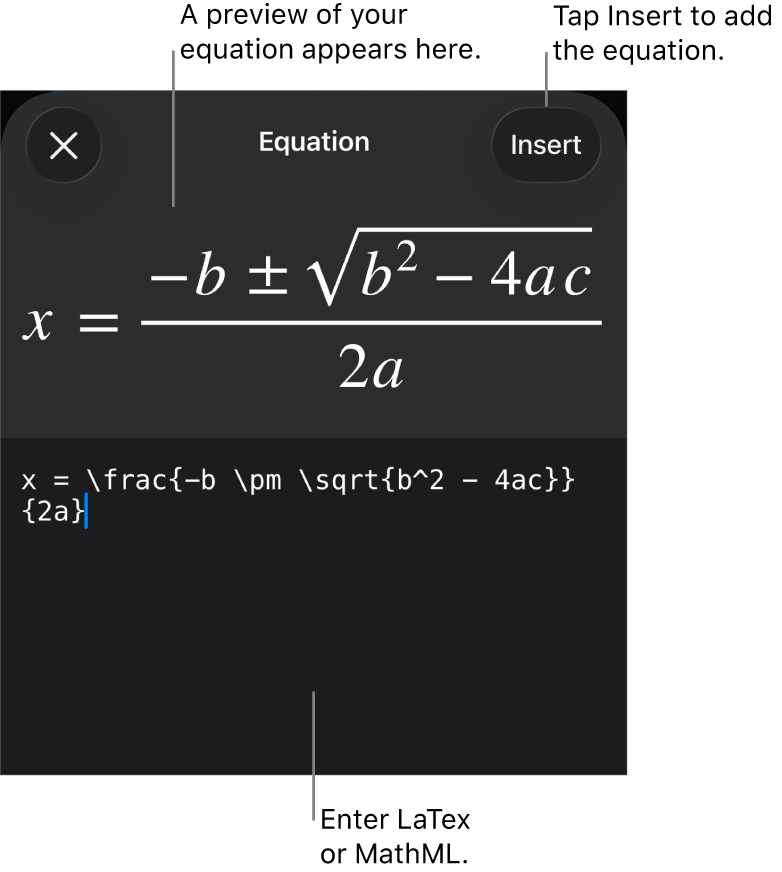
Tap Insert.
Drag the equation to reposition it on the slide.
Edit, delete, or move an equation with LaTeX or MathML
After you add an equation, you can modify it.
Edit an equation: Double-tap the equation, make your changes, then tap Update.
Move an equation: Tap the equation, then drag it to a new location on the slide or in the text.
Change the size or color of an equation: Tap the equation, tap
 , then tap the Style or Arrange tab. You can also tap a handle around the equation and drag to change its size.
Copy an equation: Tap the equation, tap Copy, tap where you want the equation, then tap Paste.
Delete an equation: Tap the equation, then tap Delete.
Move a floating equation inline with text: Cut and paste the equation on the slide into a text box or shape. See Place objects inside a text box or shape.