iPhone User Guide
- Welcome
- What’s new in iOS 12
-
- Wake and unlock
- Learn basic gestures
- Learn gestures for iPhone X and later
- Use 3D Touch for previews and shortcuts
- Explore the Home screen and apps
- Change the settings
- Take a screenshot
- Adjust the volume
- Change the sounds and vibrations
- Search for content
- Use and customize Control Center
- View and organize Today View
- Access features from the Lock screen
- Travel with iPhone
- Set screen time, allowances, and limits
- Sync iPhone using iTunes
- Charge and monitor the battery
- Learn the meaning of the status icons
-
- Accessories included with iPhone
- Connect Bluetooth devices
- Stream audio and video to other devices
- Control audio on multiple devices
- AirPrint
- Use Apple EarPods
- Apple Watch
- Use Magic Keyboard
- Wireless charging
- Handoff
- Use Universal Clipboard
- Make and receive Wi-Fi calls
- Use iPhone as a Wi-Fi hotspot
- Share your iPhone Internet connection
- Transfer files with iTunes
-
-
- Get started with accessibility features
- Accessibility shortcuts
-
-
- Turn on and practice VoiceOver
- Change your VoiceOver settings
- Learn VoiceOver gestures
- Operate iPhone using VoiceOver gestures
- Control VoiceOver using the rotor
- Use the onscreen keyboard
- Write with your finger
- Control VoiceOver with Magic Keyboard
- Type onscreen braille using VoiceOver
- Use a braille display
- Use VoiceOver in apps
- Speak selection, speak screen, typing feedback
- Zoom in on the screen
- Magnifier
- Display settings
- Face ID and attention
-
- Guided Access
-
- Important safety information
- Important handling information
- Get information about your iPhone
- View or change cellular settings
- Learn more about iPhone software and service
- FCC compliance statement
- ISED Canada compliance statement
- Class 1 Laser information
- Apple and the environment
- Disposal and recycling information
- Copyright
Send animated effects in Messages on iPhone
In the Messages app  , you can animate a single message with a bubble effect or fill the entire message screen with a full-screen effect (for example, balloons or confetti). You can even send a personal message with invisible ink that remains blurred until the recipient swipes to reveal it.
Send a handwritten message
Use your finger to write a message. The recipient sees the message animate, just as ink flows on paper.
In a conversation, rotate iPhone to landscape orientation.
Tap
 on the keyboard.
Write a message with your finger or choose a saved message at the bottom, then tap Done.
Tap
 to send your message or
  to cancel.
After you create and send a handwritten message, the message is saved at the bottom of the handwriting screen. To use the saved messages again, tap it. To delete the saved message, touch and hold it until the messages jiggle, then tap  .
.
Use a bubble effect
After you type a message, press
(touch and hold on models without 3D Touch).Tap the choices to preview different bubble effects.
Tip: Want to send a personal message? When you use invisible ink, the message remains blurred until the recipient swipes to reveal it.
Choose the effect you want, then tap
to send your message.
Use a full-screen effect
After you type a message, press
(touch and hold on models without 3D Touch).Tap Screen, then swipe left or right to preview different screen effects.
Choose the effect you want, then tap
to send the message or to cancel.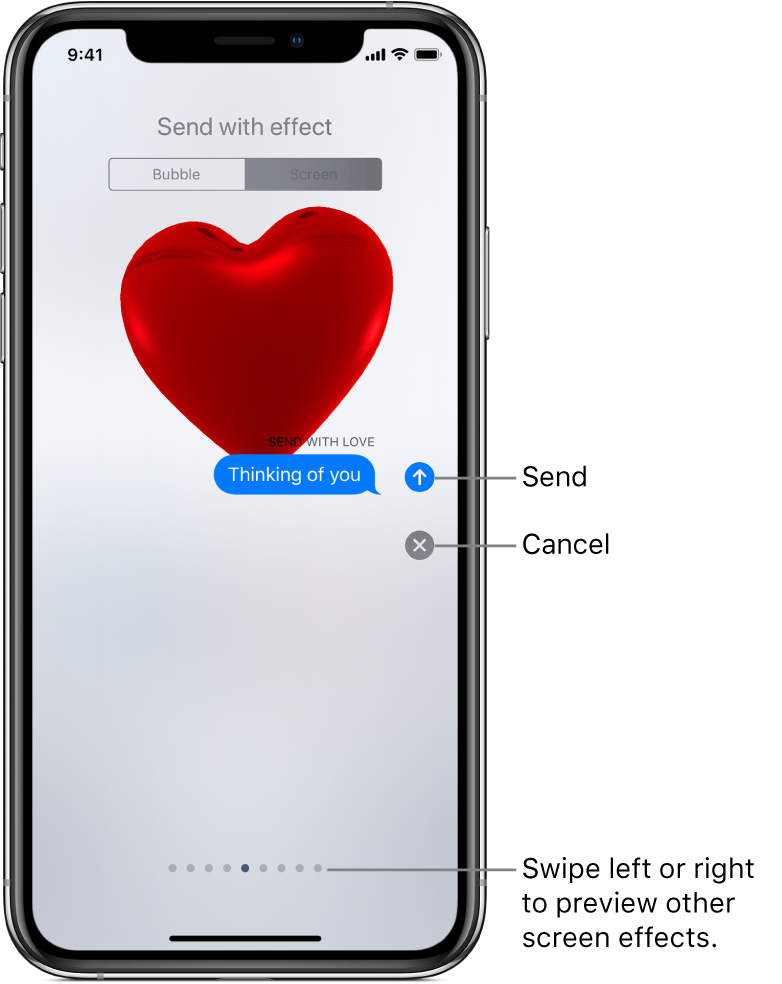
iMessage automatically uses the following screen effects for specific text strings:
Balloons for “Happy birthday”
Confetti for “Congratulations”
Fireworks for “Happy New Year”