Apple TV 4K User Guide
- Welcome
- What’s new in tvOS 26
-
-
- Stream audio and video to Apple TV 4K
- Use HomePod or AirPlay-enabled speakers with Apple TV 4K
- Use AirPods or Beats with Apple TV 4K
- Connect Bluetooth devices
- Use your iPhone, iPad, or Apple Watch as a remote
- Manage incoming iPhone calls
- Use your iPhone or iPad as a keyboard
- Use your iPhone or iPad as a camera
- Use Siri on other devices to control Apple TV 4K
-
-
- TV app at a glance
- Navigate the Apple TV app
- Subscribe to Apple TV or a channel
- Start watching on the Home screen
- Control video playback
- Search in the Apple TV app
- Watch Apple Originals
- Watch MLS
- Watch Formula 1
- Buy or rent movies and TV shows
- View movies and TV shows in your library
- Manage recommendations
- Adjust TV app settings
-
- Music app at a glance
- Subscribe to Apple Music
- Start listening on the Home screen
- Control music playback
- Search for songs, artists, and albums
- Discover new music
- About Apple Music Sing
- Play music together using SharePlay
- Listen to radio stations
- Watch music videos
- Browse music in your library
- See what your friends are listening to
- Manage recommendations
- Adjust Music app settings
- Sing
-
- Fitness app at a glance
- Connect your Apple Watch or iPhone
- Subscribe to Apple Fitness+
- Start working out in the For You screen
- View workout details and control playback
- Browse or search for workouts
- Save workouts for later
- Combine workouts with Stacks
- View and manage Fitness+ plans
- Work out together using SharePlay
- App Store
- Search
-
- Copyright and trademarks
Navigate Control Center on Apple TV 4K
Control Center gives you quick access to settings and controls for switching profiles, playing music, putting Apple TV 4K to sleep, and more.
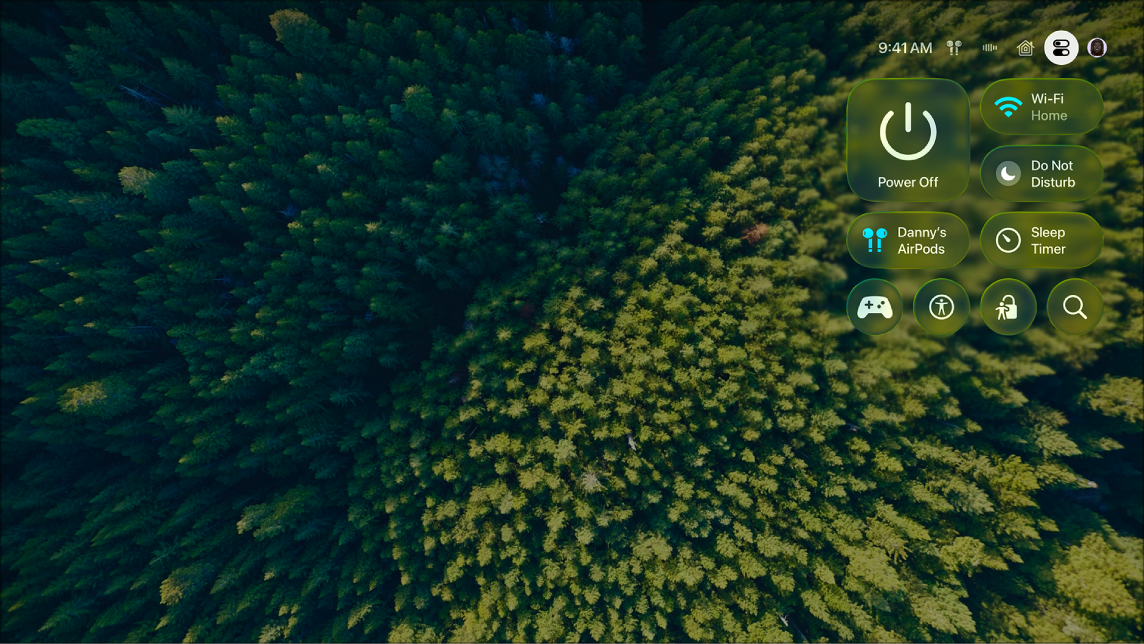
Press and hold
 on your remote to open Control Center.
The general settings tab
 opens. See Adjust general settings in Control Center on Apple TV 4K.
Navigate left and right to access additional tabs.
The tabs available depend on which features are currently active. See Tab icons in Apple TV 4K Control Center.
Press
 or
or  on your remote to close Control Center.
Thanks for your feedback.