iPad User Guide
- Welcome
-
-
- iPad models compatible with iPadOS 18
- iPad mini (5th generation)
- iPad mini (6th generation)
- iPad mini (A17 Pro)
- iPad (7th generation)
- iPad (8th generation)
- iPad (9th generation)
- iPad (10th generation)
- iPad (A16)
- iPad Air (3rd generation)
- iPad Air (4th generation)
- iPad Air (5th generation)
- iPad Air 11-inch (M2)
- iPad Air 13-inch (M2)
- iPad Air 11-inch (M3)
- iPad Air 13-inch (M3)
- iPad Pro 11-inch (1st generation)
- iPad Pro 11-inch (2nd generation)
- iPad Pro 11-inch (3rd generation)
- iPad Pro 11-inch (4th generation)
- iPad Pro 11-inch (M4)
- iPad Pro 12.9-inch (3rd generation)
- iPad Pro 12.9-inch (4th generation)
- iPad Pro 12.9-inch (5th generation)
- iPad Pro 12.9-inch (6th generation)
- iPad Pro 13-inch (M4)
- Setup basics
- Make your iPad your own
- Keep in touch with friends and family
- Customize your workspace
- Do more with Apple Pencil
- Customize iPad for your child
-
- What’s new in iPadOS 18
-
- Change or turn off sounds
- Create a custom Lock Screen
- Change the wallpaper
- Use and customize Control Center
- Adjust the screen brightness and color balance
- Keep the iPad display on longer
- Customize the text size and zoom setting
- Change the name of your iPad
- Change the date and time
- Change the language and region
- Change the default apps
- Change your default search engine on iPad
- Rotate your iPad screen
- Customize sharing options
-
-
- Create and edit events in Calendar
- Send invitations
- Reply to invitations
- Change how you view events
- Search for events
- Change Calendar settings
- Schedule or display events in a different time zone
- Keep track of events
- Use multiple calendars
- Use reminders in Calendar
- Use the Holidays calendar
- Share iCloud calendars
-
- Get started with FaceTime
- Create a FaceTime link
- Take a Live Photo
- Turn on Live Captions
- Use other apps during a call
- Make a Group FaceTime call
- View participants in a grid
- Use SharePlay to watch, listen, and play together
- Share your screen in a FaceTime call
- Request or give remote control in a FaceTime call
- Collaborate on a document in a FaceTime call
- Use video conferencing features
- Hand off a FaceTime call to another Apple device
- Change the FaceTime video settings
- Change the FaceTime audio settings
- Change your appearance
- Leave a call or switch to Messages
- Block a FaceTime call and report it as spam
-
- Get started with Freeform
- Create a Freeform board
- Draw or handwrite
- Solve handwritten math problems
- Add text in sticky notes, shapes, and text boxes
- Add shapes, lines, and arrows
- Add diagrams
- Add photos, videos, and other files
- Apply consistent styles
- Position items on a board
- Navigate and present scenes
- Send a copy or PDF
- Print a board
- Share boards and collaborate
- Search Freeform boards
- Delete and recover boards
- Change Freeform settings
-
- Intro to Home
- Upgrade to the new version of Apple Home
- Set up accessories
- Control accessories
- Control your home using Siri
- Use Grid Forecast to plan your energy usage
- View electricity usage and rates
- Set up HomePod
- Control your home remotely
- Create and use scenes
- Use automations
- Set up security cameras
- Use Face Recognition
- Configure a router
- Invite others to control accessories
- Add more homes
-
- Set up Messages
- About iMessage
- Send and reply to messages
- Schedule a text message to send later
- Unsend and edit messages
- Keep track of messages
- Search
- Forward and share messages
- Group conversations
- Watch, listen, or play together using SharePlay
- Share screens
- Collaborate on projects
- Use iMessage apps
- Take and edit photos or videos
- Share photos, links, and more
- Send stickers
- Create and send Memoji
- React with Tapbacks
- Style and animate messages
- Draw and handwrite messages
- Send and save GIFs
- Request, send, and receive payments
- Send and receive audio messages
- Share your location
- Turn read receipts on or off
- Change notifications
- Block, filter, and report messages
- Delete messages and attachments
- Recover deleted messages
-
- Get music
- Customize Music
-
-
- Play music
- Use the music player controls
- Use Siri to play music
- Play lossless audio
- Play Spatial Audio
- Listen to radio
- Play music together using SharePlay
- Play music together in the car
- Adjust the sound
- Queue up your music
- Shuffle or repeat songs
- Apple Music Sing
- Show song credits and lyrics
- Tell Apple Music what you enjoy
-
- Get started with News
- Get News notifications and newsletters
- Use News widgets
- See news stories chosen just for you
- Read and share stories
- Follow your favorite teams with My Sports
- Search for channels, topics, stories, or recipes
- Save stories in News
- Clear your reading history in News
- Customize the News tab bar
- Subscribe to individual news channels
-
- Get started with Notes
- Create and format notes
- Use Quick Notes
- Add drawings and handwriting
- Enter formulas and equations
- Add photos, video, and more
- Record and transcribe audio
- Scan text and documents
- Work with PDFs
- Add links
- Search notes
- Organize in folders
- Organize with tags
- Use Smart Folders
- Share and collaborate
- Export or print notes
- Lock notes
- Add or remove accounts
- Change the Notes view
- Change Notes settings
- Use keyboard shortcuts
-
- Use passwords on iPad
- Find your password for a website or app
- Change the password for a website or app
- Remove a password
- Recover a deleted password
- Create a password for a website or app
- Show passwords in large text
- Use passkeys to sign in to websites and apps
- Sign in with Apple
- Share passwords
- Automatically fill in strong passwords
- See websites excluded from AutoFill
- Change weak or compromised passwords
- View your passwords and related information
- Find your Wi-Fi password
- Share passwords securely with AirDrop
- Make your passwords available on all your devices
- Automatically fill in verification codes
- Sign in with fewer CAPTCHA challenges
- Use two-factor authentication
- Use security keys
-
- Get started with Photos
- View photos and videos
- See photo and video information
- Customize the Photos app
- Filter and sort the photo library
- Back up and sync your photos with iCloud
- Delete or hide photos and videos
- Search for photos and videos
- Get wallpaper suggestions
- Make stickers from your photos
- Duplicate and copy photos and videos
- Merge duplicate photos
- Import and export photos and videos
- Print photos
-
- Get started with Podcasts
- Find podcasts
- Listen to podcasts
- View podcast transcripts
- Follow your favorite podcasts
- Use the Podcasts widget
- Select your favorite Podcasts categories and channels
- Organize your podcast library
- Download, save, remove, and share podcasts
- Subscribe to podcasts
- Listen to subscriber-only content
- Change download settings
-
- Get started with Reminders
- Set reminders
- Make a grocery list
- Add details
- Complete and remove items
- Edit and organize a list
- Search your lists
- Organize multiple lists
- Tag items
- Use Smart Lists
- Share and collaborate
- Print a list
- Work with templates
- Add or remove accounts
- Change Reminders settings
- Use keyboard shortcuts
-
- Browse the web
- Search for websites
- See highlights
- Customize your Safari settings
- Change the layout
- Create multiple Safari profiles
- Use Siri to listen to a webpage
- Bookmark a website
- Bookmark a website as a favorite
- Save pages to a Reading List
- Find links shared with you
- Download a PDF
- Annotate and save a webpage as a PDF
- Automatically fill in forms
- Get extensions
- Clear your cache and cookies
- Enable cookies
- Shortcuts
- Tips
-
- Intro to Apple Intelligence
- Find the right words with Writing Tools
- Create original images with Image Playground
- Create your own emoji with Genmoji
- Use Image Wand with Apple Intelligence
- Use Apple Intelligence with Siri
- Summarize notifications and reduce interruptions
- Use ChatGPT with Apple Intelligence
- Apple Intelligence and privacy
- Block access to Apple Intelligence features
-
- Get started with Screen Time
- Protect your vision health with Screen Distance
- Create, manage, and keep track of a Screen Time passcode
- Set schedules with Screen Time
- Block apps, app downloads, websites, and purchases
- Block calls and messages with Screen Time
- Check for sensitive images and videos
- Set up Screen Time for a family member
-
- Power adapter and charge cable
- Use headphone audio-level features
-
- Apple Pencil compatibility
- Pair and charge Apple Pencil (1st generation)
- Pair and charge Apple Pencil (2nd generation)
- Pair and charge Apple Pencil (USB-C)
- Pair and charge Apple Pencil Pro
- Enter text with Scribble
- Draw with Apple Pencil
- Take and mark up a screenshot with Apple Pencil
- Quickly write notes
- HomePod and other wireless speakers
- External storage devices
- Connect Bluetooth accessories
- Play audio from your iPad on a Bluetooth accessory from your iPad
- Apple Watch with Fitness+
- Printers
- Polishing cloth
-
- Intro to Continuity
- Use AirDrop to send items to nearby devices
- Hand off tasks between devices
- Copy and paste between devices
- Stream video or mirror the screen of your iPad
- Allow phone calls and text messages on your iPad
- Share your internet connection with Personal Hotspot
- Use your iPad as a webcam for Apple TV
- Insert sketches, photos, and scans on Mac
- Use your iPad as a second display
- Use one keyboard and mouse to control Mac and iPad
- Connect iPad and your computer with a cable
- Transfer files between devices
-
- Get started with accessibility features
- Use accessibility features during setup
- Change Siri accessibility settings
- Quickly turn accessibility features on or off
-
- Overview of accessibility features for vision
- Zoom in
- View a larger version of text you’re reading or typing
- Change display colors
- Make text easier to read
- Reduce onscreen motion
- Use iPad more comfortably while riding in a vehicle
- Customize per-app visual settings
- Hear what’s on the screen or typed
- Hear audio descriptions
-
- Turn on and practice VoiceOver
- Change your VoiceOver settings
- Use VoiceOver gestures
- Operate iPad when VoiceOver is on
- Control VoiceOver using the rotor
- Use the onscreen keyboard
- Write with your finger
- Keep the screen off
- Use VoiceOver with an external keyboard
- Use a braille display
- Type braille on the screen
- Customize gestures and keyboard shortcuts
- Use VoiceOver with a pointer device
- Get live descriptions of your surroundings
- Use VoiceOver in apps
-
- Overview of accessibility features for mobility
- Use AssistiveTouch
- Use an adjustable onscreen trackpad on iPad
- Control iPad with the movement of your eyes
- Adjust how iPad responds to your touch
- Auto-answer calls
- Change Face ID and attention settings
- Use Voice Control commands
- Adjust the top or Home button
- Use Apple TV Remote buttons
- Adjust pointer settings
- Adjust keyboard settings
- Control iPad with an external keyboard
- Adjust AirPods settings
- Adjust double tap and squeeze settings for Apple Pencil
-
- Overview of accessibility features for hearing
- Use hearing devices
- Use Live Listen
- Use sound recognition
- Set up and use RTT
- Flash the indicator light for notifications
- Adjust audio settings
- Play background sounds
- Display subtitles and captions
- Show transcriptions for Intercom messages
- Get live captions of spoken audio
-
- Control what you share
- Turn on Lock Screen features
- Keep your Apple Account secure
- Create and manage Hide My Email addresses
- Protect your web browsing with iCloud Private Relay
- Use a private network address
- Use Advanced Data Protection
- Use Lockdown Mode
- Receive warnings about sensitive content
- Use Contact Key Verification
-
- Important safety information
- Important handling information
- Find more resources for software and service
- FCC compliance statement
- ISED Canada compliance statement
- Apple and the environment
- Class 1 Laser information
- Disposal and recycling information
- Unauthorized modification of iPadOS
- ENERGY STAR compliance statement
- Copyright and trademarks
Get started with Photos on iPad
Use Photos on your iPad to find your photos, enjoy your memories, and share your best shots. Here’s how to get started.

Browse the photos in your library
To get started viewing your photos and videos, go to the Photos app. Swipe down on the photo grid to browse through your library. The most recent photos are at the bottom; keep swiping down to go back in time. Pinch the screen to zoom in or out.

Enjoy your memories
Relive your favorite memories with personalized collections of photos and videos that are set to music and play like a movie. In the sidebar, tap Memories. Each memory features photos from your library curated around a theme—like a person, pet, place, event, or activity.
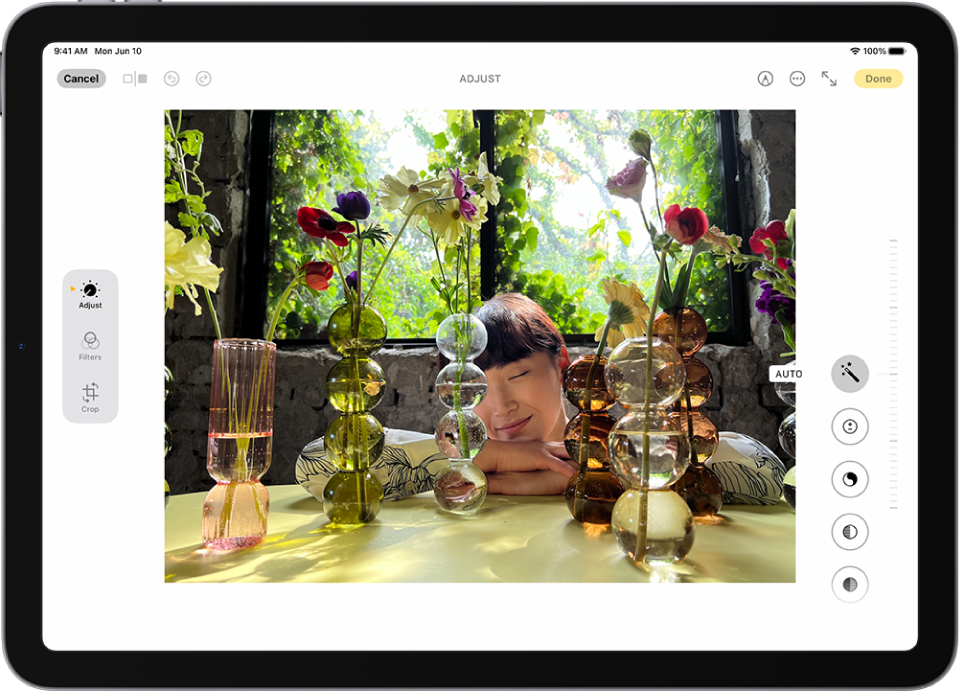
Edit your photos
To make your photos stand out, adjust light and color, crop, rotate, add a filter, and more. Open a photo or video, then tap  to start editing.

Share your photos
Open a photo or video, tap  , then choose a share option like Mail, Messages, or AirDrop. To share all the photos and videos in a collection, tap
  , then tap Share Photos.
Want to learn more?