Keynote User Guide for iPhone
- Welcome
- What’s new
-
- Get started with Keynote
- Intro to images, charts, and other objects
- Create a presentation
- Choose how to navigate your presentation
- Open a presentation
- Save and name a presentation
- Find a presentation
- Print a presentation
- Copy text and objects between apps
- Basic touchscreen gestures
- Create a presentation using VoiceOver
- Change Keynote privacy and analytics settings
-
- Send a presentation
- Intro to collaboration
- Invite others to collaborate
- Collaborate on a shared presentation
- See the latest activity in a shared presentation
- Change a shared presentation’s settings
- Stop sharing a presentation
- Shared folders and collaboration
- Use Box to collaborate
- Create an animated GIF
- Post your presentation in a blog
- Copyright

Use object styles in Keynote on iPhone
A quick way to change how an object looks is to apply an object style to it. Every theme includes object styles—sets of attributes like colors, borders, and shadows—that are designed to look good with the theme.
After applying a style to an object, you can further change its look by choosing your own options for border or color, for example.
To use object styles with tables, see Use table styles. To use object styles with charts, see Use chart styles.
Apply a style to an object
Go to the Keynote app
 on your iPhone.
Open a presentation, then tap an image, shape, text box, line, arrow, or video to select it, or select multiple objects.
Tap
 in the toolbar, tap Style, then tap a style to apply it.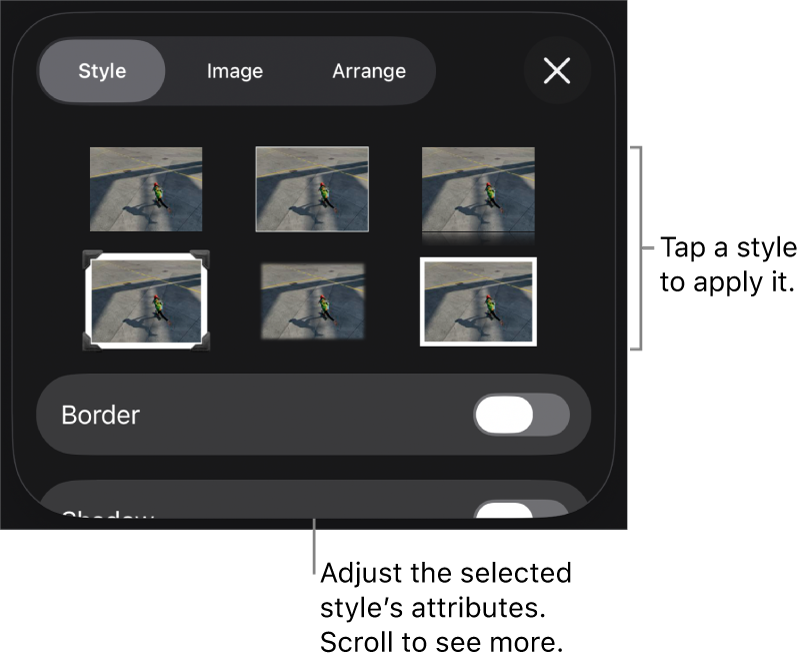
See alsoChange object transparency in Keynote on iPhoneFill shapes and text boxes with color or an image in Keynote on iPhoneAdd a border to an object in Keynote on iPhoneApply a slide layout in Keynote on iPhone
Thanks for your feedback.