Apple Watch User Guide
- Welcome
- What’s new
-
- Apps on Apple Watch
- Open apps
- Organize apps
- Get more apps
- Tell time
- Status icons
- Control Center
- Use Focus
- Adjust brightness, text size, sounds, and haptics
- See and respond to notifications
- Change notification settings
- Manage your Apple ID
- Use shortcuts
- Set up Handwashing
- Connect Apple Watch to a Wi-Fi network
- Connect to Bluetooth headphones or speakers
- Hand off tasks from Apple Watch
- Unlock your Mac with Apple Watch
- Unlock your iPhone with Apple Watch
- Use Apple Watch without its paired iPhone
- Use your Apple Watch with a cellular network
-
- Alarms
- Blood Oxygen
- Calculator
- Calendar
- Camera Remote
- Compass
- Contacts
- ECG
- Medications
- Memoji
- News
- Now Playing
- Reminders
- Stocks
- Stopwatch
- Timers
- Tips
- Voice Memos
- Walkie-Talkie
-
- About Wallet
- Apple Pay
- Set up Apple Pay
- Make purchases
- Send, receive, and request money with Apple Watch (U.S. only)
- Manage Apple Cash (U.S. only)
- Use Wallet for passes
- Use rewards cards
- Pay with Apple Watch on Mac
- Ride transit
- Use your driver’s license or state ID
- Use digital keys
- Use COVID-19 vaccination cards
- Weather
- World Clock
-
- VoiceOver
- Set up Apple Watch using VoiceOver
- Apple Watch basics with VoiceOver
- Apple Watch Mirroring
- Control nearby devices
- AssistiveTouch
- Use a braille display
- Use a Bluetooth keyboard
- Zoom
- Tell time with haptic feedback
- Adjust text size and other visual settings
- Adjust motor skills settings
- Set up and use RTT
- Accessibility audio settings
- Use accessibility features with Siri
- The Accessibility Shortcut
- Copyright
Set timers on Apple Watch
The Timers app  on Apple Watch can help you keep track of time. You can set multiple timers that track time for up to 24 hours.
Siri: Say something like: “Set a timer for 20 minutes.”
Quickly set a timer
Open the Timers app
on your Apple Watch.To quickly start a timer, tap a duration (like 1, 3, or 5 minutes) or tap a timer you’ve recently used below Recents. To create a custom timer, swipe down, then tap Custom.
When a timer goes off, you can tap  to start a timer of the same duration.

Pause or end a timer
With a timer running, open the Timers app
on your Apple Watch.Tap
 to pause, tap
  to resume, or tap
  to end.
Create a custom timer
Open the Timers app
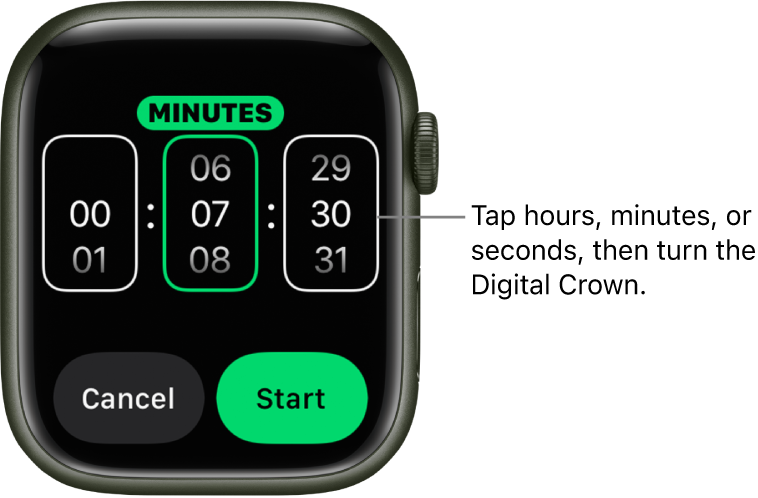
on your Apple Watch.Scroll to the top of the screen, then tap Custom.
Tap hours, minutes, or seconds; turn the Digital Crown to adjust.
Tap Start.
Create multiple timers

Open the Timers app
on your Apple Watch.Create and start a timer.
Tip: To assign a label such as “Pizza” to a timer, use Siri to create the timer. Raise your Apple Watch, then say something like “Set a 12 minute pizza timer.”
Tap < to return to the Timers screen, then create and start another timer.
All your running timers appear on the Timers screen. Tap to pause a timer, and tap to resume.
To delete a running or paused timer that appears on the Timers screen, swipe left, then tap X.
Save a timer as a favorite
Open the Timers app
on your Apple Watch.Swipe left on a recent timer, then tap
 .
.The timer appears under the Favorites heading.
Download this guide: Apple Books | PDF