Apple Watch User Guide
- Welcome
- What’s new
- Run with Apple Watch
-
- Alarms
- App Store
- Blood Oxygen
- Calculator
- Calendar
- Camera Remote
- ECG
- Medications
- Memoji
- Music Recognition
- News
- Now Playing
- Reminders
- Remote
- Shortcuts
- Siren
- Stocks
- Stopwatch
- Tides
- Timers
- Use the Tips app
- Translate
- Vitals
- Voice Memos
- Walkie-Talkie
- World Clock
-
- VoiceOver
- Set up Apple Watch using VoiceOver
- Apple Watch basics with VoiceOver
- Apple Watch Mirroring
- Control nearby devices
- AssistiveTouch
- Use a braille display
- Use a Bluetooth keyboard
- Zoom
- Tell time with haptic feedback
- Adjust text size and other visual settings
- Adjust motor skills settings
- Set up and use RTT
- Accessibility audio settings
- Type to speak
- Automatically open the focused app
- Use accessibility features with Siri
- The Accessibility Shortcut
- Copyright and trademarks
Play audiobooks on Apple Watch
You can use the Audiobooks app to play audiobooks from Apple Books on your paired iPhone, paired Bluetooth headphones or speakers, or the Apple Watch speaker (supported on Apple Watch Series 10 and Apple Watch Ultra 2). See Choose an audio destination on Apple Watch.

Play audiobooks stored on Apple Watch
Go to the Audiobooks app
 on your Apple Watch.
Turn the Digital Crown to browse.
Tap an audiobook to play it.
Stream audiobooks from your library on iPhone
You can stream audiobooks from your audiobooks library to your Apple Watch if it’s near your iPhone, connected to a Wi-Fi network, or connect to a cellular network (available on Apple Watch with cellular).
Go to the Audiobooks app
on your Apple Watch.Tap
 to go to the Audiobooks screen.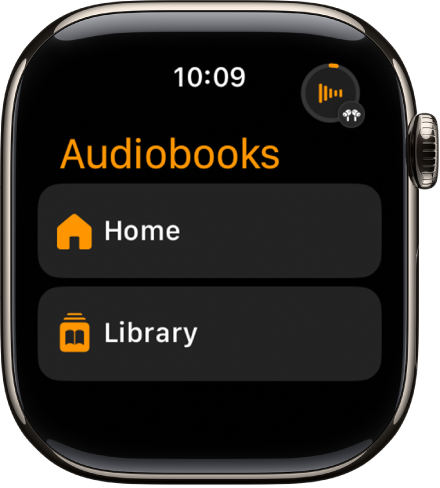
Tap Library, then tap an audiobook to play it.
Use Siri to play an audiobook in your library
Siri: Say something like: “Play the audiobook ‘First Lie Wins.’”
Control playback

Go to the Audiobooks app
on your Apple Watch.While playing an audiobook, turn the Digital Crown to adjust the volume.
Use any of the following controls:

Play the audiobook.

Pause playback.

Skip ahead 15 seconds.

Skip back 15 seconds.
To hide the controls, tap the display.
Choose an audio destination, select chapters, and adjust the playback speed
Go the Audiobooks app
on your Apple Watch.While playing an audiobook, tap
 , then do any of the following:
Choose an audio destination: Tap AirPlay, then choose a device.
Select a chapter: Tap Tracks.
Adjust the playback speed: Tap
 and
and  to choose a playback speed—.75x, 1x, 1.25x, 1.5x, 1.75x, or 2x.