Modifying this control will update this page automatically
iPhone User Guide
- Welcome
- What’s new in iOS 12
-
- Wake and unlock
- Learn basic gestures
- Learn gestures for iPhone X and later
- Use 3D Touch for previews and shortcuts
- Explore the Home screen and apps
- Change the settings
- Take a screenshot
- Adjust the volume
- Change the sounds and vibrations
- Search for content
- Use and customize Control Center
- View and organize Today View
- Access features from the Lock screen
- Travel with iPhone
- Set screen time, allowances, and limits
- Sync iPhone using iTunes
- Charge and monitor the battery
- Learn the meaning of the status icons
-
- Accessories included with iPhone
- Connect Bluetooth devices
- Stream audio and video to other devices
- Control audio on multiple devices
- AirPrint
- Use Apple EarPods
- Apple Watch
- Use Magic Keyboard
- Wireless charging
- Handoff
- Use Universal Clipboard
- Make and receive Wi-Fi calls
- Use iPhone as a Wi-Fi hotspot
- Share your iPhone Internet connection
- Transfer files with iTunes
-
-
- Get started with accessibility features
- Accessibility shortcuts
-
-
- Turn on and practice VoiceOver
- Change your VoiceOver settings
- Learn VoiceOver gestures
- Operate iPhone using VoiceOver gestures
- Control VoiceOver using the rotor
- Use the onscreen keyboard
- Write with your finger
- Control VoiceOver with Magic Keyboard
- Type onscreen braille using VoiceOver
- Use a braille display
- Use VoiceOver in apps
- Speak selection, speak screen, typing feedback
- Zoom in on the screen
- Magnifier
- Display settings
- Face ID and attention
-
- Guided Access
-
- Important safety information
- Important handling information
- Get information about your iPhone
- View or change cellular settings
- Learn more about iPhone software and service
- FCC compliance statement
- ISED Canada compliance statement
- Class 1 Laser information
- Apple and the environment
- Disposal and recycling information
- Copyright
Switch between apps on iPhone
Open the App Switcher to quickly switch from one app to another on your iPhone. When you switch back, you can pick up right where you left off.
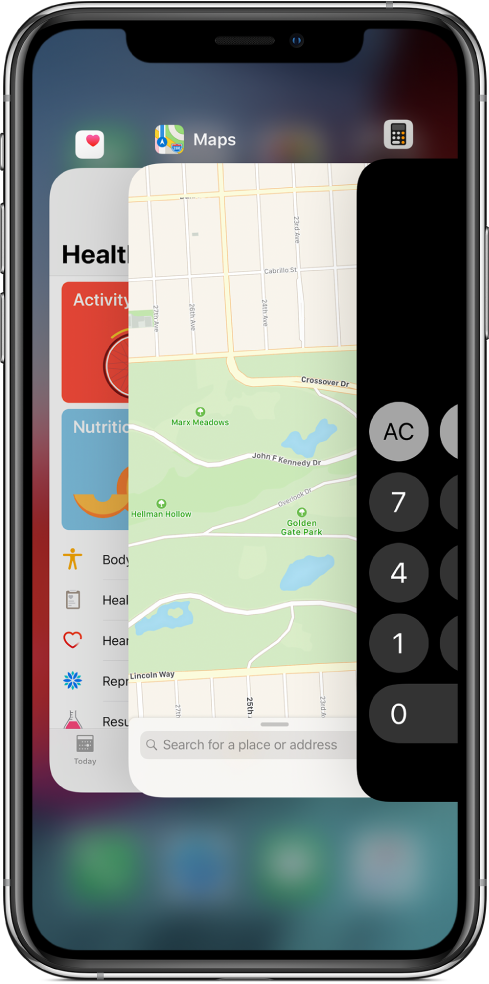
Use the App Switcher
To see all your open apps in the App Switcher, do the following:
iPhone X and later: Swipe up from the bottom edge and pause in the center of the screen.
Other models: Double-click the Home button.
To browse the open apps, swipe right, then tap the app you want to use.
Switch between open apps
On iPhone X and later, to quickly switch between open apps, swipe left or right along the bottom edge of the screen.
Thanks for your feedback.