Apple Watch User Guide
- Welcome
- What’s new
- Run with Apple Watch
-
- Alarms
- Audiobooks
- Blood Oxygen
- Calculator
- Calendar
- Camera Remote
- ECG
- Medications
- Memoji
- Music Recognition
- News
- Now Playing
- Remote
- Shortcuts
- Siren
- Stocks
- Stopwatch
- Tides
- Timers
- Use the Tips app
- Translate
- Vitals
- Voice Memos
- Walkie-Talkie
- World Clock
- Copyright and trademarks
Get apps in the App Store on Apple Watch
Apple Watch includes apps for a variety of communication, health, fitness, and timekeeping tasks. You can also choose to install third-party apps you have on your iPhone and get new apps from the App Store.
Discover and find apps
Go to the App Store app
 on your Apple Watch.
Do any of the following:
Browse apps and collections: Scroll down or turn the Digital Crown.
Search: Tap
 , enter what you’re looking for, then tap Search. You can search by app name, category, developer, and more.
Get information about an app
Go to the App Store app
on your Apple Watch.Tap an app’s name or icon to see the following details:
Screenshots or previews
Ratings and reviews
In-app events and offers
Developer
Game Center and Family Sharing support
Supported accessibility features
Privacy information
More information—such as the file size, compatibility with other Apple devices, supported languages, and age rating
Buy and download an app
Note: When using Apple Watch with cellular service, cellular data charges may apply.
Go to the App Store app
on your Apple Watch.Navigate to the app you want, then tap Get (if the app is free) or the price.
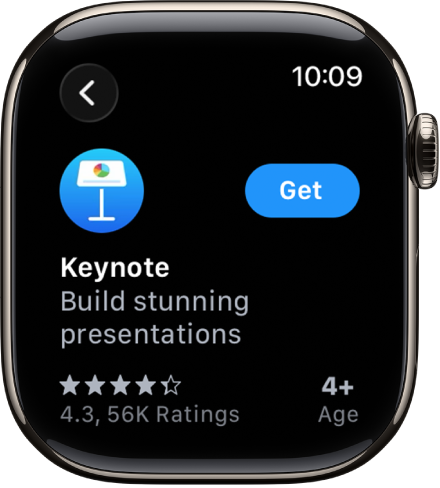
If you see
 instead of a price, you’ve already purchased the app and you can download it again without a charge. Some apps require that you also have the iOS version of the app on your iPhone.
Double-click the side button to complete your purchase.
Purchases are made with the payment method associated with your Apple Account. See the Apple Support article If you need to change or update your Apple Account payment method.
Install apps you already have on iPhone
By default, Apple Watch automatically installs the watch-compatible versions of your iPhone apps (if available). To manually install specific apps instead, do the following:
Go to the Apple Watch app
 on your iPhone.
Tap My Watch, tap General, then turn off Automatic App Install.
Tap My Watch, then scroll down to Available Apps.
Tap Install next to the apps you want to install.
See your purchase history
Go to the App Store app
on your Apple Watch.Scroll to the bottom, tap Account, then tap Purchased.