Apple Watch User Guide
- Welcome
- What’s new
- Run with Apple Watch
-
- Alarms
- Audiobooks
- Blood Oxygen
- Calculator
- Calendar
- Camera Remote
- ECG
- Medications
- Memoji
- Music Recognition
- News
- Now Playing
- Remote
- Shortcuts
- Siren
- Stocks
- Stopwatch
- Tides
- Timers
- Use the Tips app
- Translate
- Vitals
- Voice Memos
- Walkie-Talkie
- World Clock
- Copyright and trademarks
Measure noise levels with Apple Watch
The Noise app measures the ambient sound levels in your environment using the microphone and duration of exposure. When Apple Watch detects that the decibel level has risen to a point where hearing could be affected, it can notify you with a tap on the wrist.
Note: The Noise app uses the microphone to sample and measure the sound levels in your environment. Your Apple Watch doesn’t record or save any sounds to measure these levels.
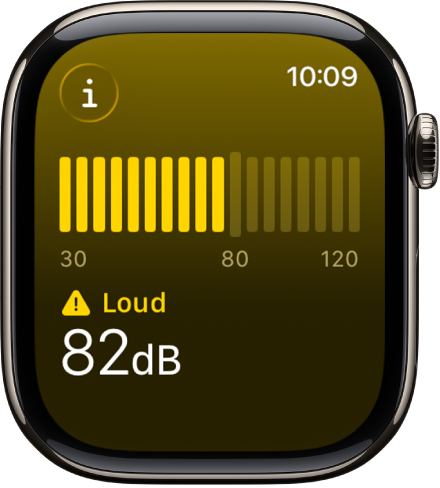
Set up the Noise app
Go to the Noise app
 on your Apple Watch.
Tap Enable to turn on monitoring.
To measure the environmental noise around you in the future, go to the Noise app or use the Noise complication.
Get noise notifications
Go to the Settings app
 on your Apple Watch.
Tap Noise, tap Noise Notifications, then choose a setting.
You can also go to the Apple Watch app on your iPhone, tap My Watch, then go to Noise > Noise Threshold.
Turn off noise measuring
Go to the Settings app
on your Apple Watch.Tap Noise, then tap Environmental Sound Measurements.
Turn off Measure Sounds.
You can also go to the Apple Watch app on your iPhone, tap My Watch, tap Noise, then turn off Environmental Sound Measurements.