Apple Watch User Guide
- Welcome
- What’s new
- Run with Apple Watch
-
- Alarms
- Audiobooks
- Blood Oxygen
- Calculator
- Calendar
- Camera Remote
- ECG
- Medications
- Memoji
- Music Recognition
- News
- Now Playing
- Remote
- Shortcuts
- Siren
- Stocks
- Stopwatch
- Tides
- Timers
- Use the Tips app
- Translate
- Vitals
- Voice Memos
- Walkie-Talkie
- World Clock
- Copyright and trademarks
Use buttons and gestures to interact with Apple Watch
You can interact with Apple Watch using the Digital Crown, side button, Action button, and gestures.
You can also practice these gestures in the Tips app. See Use the Tips app.
Press or turn the Digital Crown
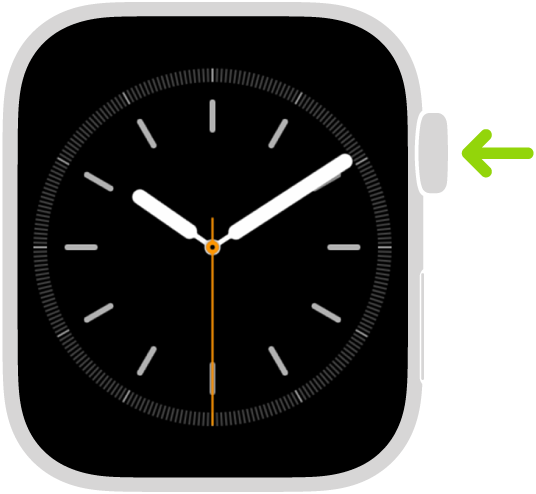
Press to see the watch face or Home Screen.
Double-click to open the App Switcher.
Press and hold to use Siri.
Turn to zoom, scroll, or adjust what’s on the screen.
For example, on the watch face, turn to open the Smart Stack or see notifications.
Press and hold to unlock the screen after a water workout.
Press the side button

Press to use Control Center.
Press and hold to use Emergency SOS.
Double-click to use Apple Pay.
Press and hold to turn your Apple Watch on and off.
Press the Action button (Apple Watch Ultra models)
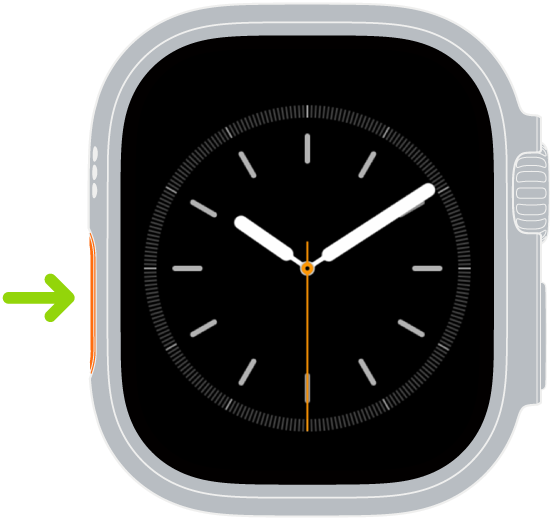
Press to access the function you chose.
Press and hold to quickly switch the selected function.
Continue to press and hold to activate the siren.
Use gestures
Tap: Briefly touch the screen to select a button or item. On Apple Watch models with Keep your watch face visible, a tap brings the screen to full brightness.
Touch and hold: Press the screen and keep your finger in place to change the watch face, see options in an app, and more.
Swipe: Move one finger across the screen—up, down, left, or right. For example, you can browse photos, pan and zoom in a map, and more.
Drag: Move an item across the screen without lifting your finger. For example, you can rearrange your apps in grid view.
Cover to mute: Cover the display with the palm of your hand to quickly silence alerts.
Double tap: On supported models, tap your index finger and thumb together twice to answer a call, reply to a message, see and scroll through your Smart Stack, scroll through supported apps, and more.
Wrist flick: On supported models, quickly turn your wrist away from you and back to mute incoming calls, silence timers, dismiss notifications, and more.