Modifying this control will update this page automatically
iPad User Guide
- Welcome
-
- Supported models
- iPad Pro 12.9-inch (5th generation)
- iPad Pro 12.9-inch (4th generation)
- iPad Pro 12.9-inch (3rd generation)
- iPad Pro 11-inch (3rd generation)
- iPad Pro 11-inch (2nd generation)
- iPad Pro 11-inch (1st generation)
- iPad Pro 12.9-inch (1st and 2nd generation)
- iPad Pro 10.5-inch
- iPad Pro 9.7-inch
- iPad Air (4th generation)
- iPad Air (3rd generation)
- iPad Air 2
- iPad (8th generation)
- iPad (7th generation)
- iPad (6th generation)
- iPad (5th generation)
- iPad mini (5th generation)
- iPad mini 4
- What’s new in iPadOS 14
-
- Wake and unlock
- Adjust the volume
- Change or turn off sounds
- Access features from the Lock Screen
- Open apps
- Take a screenshot or screen recording
- Change or lock the screen orientation
- Change the wallpaper
- Zoom an app to fill the screen
- Drag and drop
- Search with iPad
- Use AirDrop to send items
- Perform quick actions
- Use and customize Control Center
- Add widgets
- Charge and monitor the battery
- Learn the meaning of the status icons
- Travel with iPad
-
-
- View maps
-
- Use Siri, Maps, and the Maps widget to get directions
- Choose your preferred type of travel
- Get driving directions
- Report traffic incidents
- Get cycling directions
- Find places to stop
- Get walking directions
- Get transit directions
- See an overview of your route or its directions in a list
- Change audio settings for turn-by-turn directions
- Select other route options
- Get directions between places other than your current location
- Delete recently viewed directions
- Use Maps on your Mac to get directions
- Help correct and improve Maps
-
- View photos and videos
- Delete and hide photos and videos
- Edit photos and videos
- Edit Live Photos
- Edit Portrait mode photos
- Organize photos in albums
- Search in Photos
- Share photos and videos
- View Memories
- Find people in Photos
- Browse photos by location
- Use iCloud Photos
- Share photos with iCloud Shared Albums
- Use My Photo Stream
- Import photos and videos
- Print photos
- Shortcuts
- Stocks
- Tips
-
- Set up Family Sharing
- Download family members’ purchases
- Stop sharing purchases
- Turn on Ask To Buy
- Set up Apple Cash Family
- Share Apple Card
- Share subscriptions and iCloud storage
- Share photos, a calendar, and more with family members
- Locate a family member’s missing device
- Set up Screen Time through Family Sharing
-
- Accessories included with iPad
-
- Set up AirPods
- Charge AirPods
- Start and stop audio playback
- Change the AirPods volume
- Make and answer calls with AirPods
- Switch AirPods between devices
- Use Siri with AirPods
- Listen and respond to messages
- Share audio with AirPods and Beats headphones
- Change noise control modes
- Control spatial audio
- Restart AirPods
- Change the name of your AirPods and other settings
- Use other Bluetooth headphones
- Use EarPods
- Check headphone sound levels
- HomePod and other wireless speakers
- External storage devices
- Apple Watch with Fitness+
- Cases and covers
- Printers
-
- Share your internet connection
- Make and receive phone calls
- Use iPad as a second display for Mac
- Hand off tasks between iPad and Mac
- Cut, copy, and paste between iPad and other devices
- Connect iPad and your computer with a cable
- Sync iPad with your computer
- Transfer files between iPad and your computer
-
- Get started with accessibility features
-
-
- Turn on and practice VoiceOver
- Change your VoiceOver settings
- Learn VoiceOver gestures
- Operate iPad using VoiceOver gestures
- Control VoiceOver using the rotor
- Use the onscreen keyboard
- Write with your finger
- Use VoiceOver with an Apple external keyboard
- Use a braille display
- Type onscreen braille
- Customize gestures and keyboard shortcuts
- Use VoiceOver with a pointer device
- Use VoiceOver in apps
- Zoom
- Magnifier
- People detection
- Display & Text Size
- Motion
- Spoken Content
- Audio Descriptions
-
-
- Important safety information
- Important handling information
- Get information about your iPad
- View or change cellular data settings
- Find more resources for software and service
- FCC compliance statement
- ISED Canada compliance statement
- Apple and the environment
- Class 1 Laser information
- Disposal and recycling information
- ENERGY STAR compliance statement
- Copyright
Use Apple Pay in apps, App Clips, and Safari on iPad
You can make purchases using Apple Pay in apps, in App Clips, and on the web using Safari wherever you see the Apple Pay button.
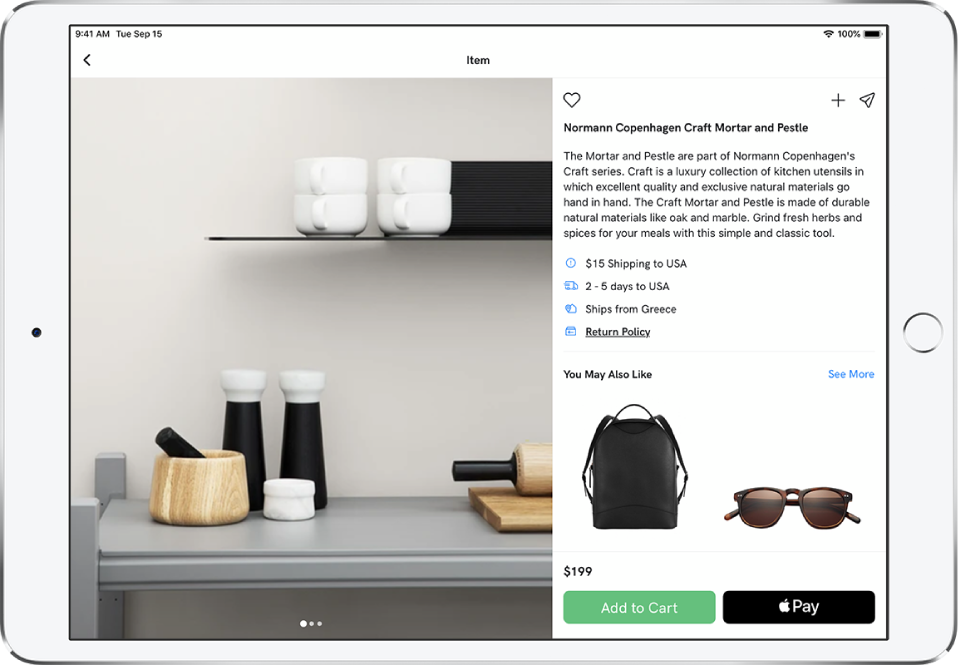
Pay in an app, in an App Clip, or on the web
During checkout, tap the Apple Pay button.
Review the payment information.
You can change the credit card, shipping address, and contact information.
Complete the payment:
On an iPad with Touch ID: Authenticate with Touch ID or enter your passcode.
On an iPad with Face ID: Double-click the top button, then glance at iPad to authenticate with Face ID, or enter your passcode.
Change your default shipping and contact information
Go to Settings
 > Wallet & Apple Pay.
Set any of the following:
Shipping address
Email
Phone
Thanks for your feedback.