Apple Watch User Guide
- Welcome
- What’s new
- Run with Apple Watch
-
- Alarms
- Audiobooks
- Blood Oxygen
- Calculator
- Calendar
- Camera Remote
- ECG
- Medications
- Memoji
- Music Recognition
- News
- Now Playing
- Remote
- Shortcuts
- Siren
- Stocks
- Stopwatch
- Tides
- Timers
- Use the Tips app
- Translate
- Vitals
- Voice Memos
- Walkie-Talkie
- World Clock
- Copyright and trademarks
Translate messages on Apple Watch
With Apple Intelligence* on your paired iPhone, you can use Live Translation for text messages on Apple Watch. Live Translation is integrated into the Messages app and uses Apple-built models that run entirely on device, so your personal conversations stay private.
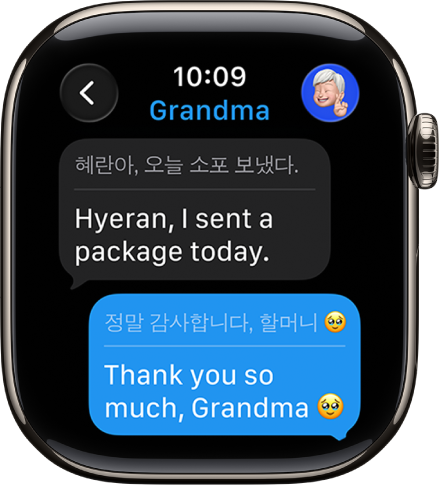
Note: Live Translation in Messages is available in Apple Intelligence-supported languages on supported models when paired with an Apple Intelligence-enabled iPhone. Apple Intelligence is not available on all iPhone models or in all languages or regions.**
Download languages
Before using Live Translation features in the Messages app, you need to download the input and output languages.
Note: When using Apple Watch with cellular service, cellular data charges may apply.
Translate messages
Translations automatically appear inline when you’ve turned Apple Intelligence on your paired iPhone and receive a text in another language.
Go to the Messages app
 on your Apple Watch.
In a Messages conversation, when you receive a message in a different language, you receive a prompt to turn on Live Translation.
To view the original text, tap the language at the bottom of the conversation, then choose to see the original text in addition to the translated text.
Choose a different language
Go to the Messages app
on your Apple Watch.Tap a conversation, then tap the contact icon at the top right.
Scroll down, then tap Translate From or Translate To.
Turn off Live Translation for the conversation
Go to the Messages app
on your Apple Watch.Tap a conversation, then tap the language at the bottom of the conversation.
Tap Stop Translating.
To start translating again, tap the contact icon at the top right, scroll down, then turn on Auto-translate.
For more information on Apple Intelligence and privacy, see Apple Intelligence and privacy on iPhone.