iPhone User Guide
- Welcome
-
-
- iPhone models compatible with iOS 18
- iPhone XR
- iPhone XS
- iPhone XS Max
- iPhone 11
- iPhone 11 Pro
- iPhone 11 Pro Max
- iPhone SE (2nd generation)
- iPhone 12 mini
- iPhone 12
- iPhone 12 Pro
- iPhone 12 Pro Max
- iPhone 13 mini
- iPhone 13
- iPhone 13 Pro
- iPhone 13 Pro Max
- iPhone SE (3rd generation)
- iPhone 14
- iPhone 14 Plus
- iPhone 14 Pro
- iPhone 14 Pro Max
- iPhone 15
- iPhone 15 Plus
- iPhone 15 Pro
- iPhone 15 Pro Max
- iPhone 16
- iPhone 16 Plus
- iPhone 16 Pro
- iPhone 16 Pro Max
- iPhone 16e
- Setup basics
- Make your iPhone your own
- Take great photos and videos
- Keep in touch with friends and family
- Share features with your family
- Use iPhone for your daily routines
- Expert advice from Apple Support
-
- What’s new in iOS 18
-
- Adjust the volume
- Turn the iPhone flashlight on or off
- Silence iPhone
- Multitask with Picture in Picture
- Access features from the Lock Screen
- Use the Dynamic Island
- Perform quick actions
- Search on iPhone
- Get information about your iPhone
- Manage storage on iPhone
- View or change cellular data settings
- Travel with iPhone
-
- Change sounds and vibrations
- Use and customize the Action button
- Create a custom Lock Screen
- Change the wallpaper
- Use and customize Control Center
- Adjust the screen brightness and color balance
- Keep the iPhone display on longer
- Use StandBy
- Customize the text size and zoom setting
- Change the name of your iPhone
- Change the date and time
- Change the language and region
- Change the default apps
- Change your default search engine
- Rotate your iPhone screen
- Customize sharing options
-
- Use the Camera Control
- Use the Camera Control to open another app
- Adjust the shutter volume
- Adjust HDR camera settings
- Record videos
- Take spatial photos and record spatial videos for Apple Vision Pro
- Change sound recording options
- Record ProRes videos
- Record videos in Cinematic mode
- Change video recording settings
- Save camera settings
- Customize the Main and Fusion camera lens
- Change advanced camera settings
- View, share, and print photos
- Use Live Text
- Scan a QR code
-
-
- Create and edit events in Calendar
- Send invitations
- Reply to invitations
- Change how you view events
- Search for events
- Change Calendar settings
- Schedule or display events in a different time zone
- Keep track of events
- Use multiple calendars
- Use reminders
- Use the Holidays calendar
- Share iCloud calendars
- Compass
-
- Get started with FaceTime
- Create a FaceTime link
- Take a Live Photo
- Record and transcribe an audio call
- Turn on Live Captions in a FaceTime call
- Use other apps during a call
- Make a Group FaceTime call
- View participants in a grid
- Use SharePlay to watch, listen, and play together
- Share your screen in a FaceTime call
- Request or give remote control in a FaceTime call
- Collaborate on a document in FaceTime
- Use video conferencing features
- Hand off a FaceTime call to another Apple device
- Change the FaceTime video settings
- Change the FaceTime audio settings
- Change your appearance
- Leave a call or switch to Messages
- Block and silence FaceTime calls from unknown callers
- Report a call as spam
-
- Get started with Freeform
- Create a Freeform board
- Draw or handwrite
- Solve handwritten math problems
- Add text in sticky notes, shapes, and text boxes
- Add shapes, lines, and arrows
- Add diagrams
- Add photos, videos, and other files
- Apply consistent styles
- Position items on a board
- Navigate and present scenes
- Send a copy or PDF
- Print a board
- Share boards and collaborate
- Search Freeform boards
- Delete and recover boards
- Change Freeform settings
-
- Intro to Home
- Upgrade to the new version of Apple Home
- Set up accessories
- Control accessories
- Control your home using Siri
- Use Grid Forecast to plan your energy usage
- View electricity usage and rates
- Set up HomePod
- Control your home remotely
- Create and use scenes
- Use automations
- Set up security cameras
- Use Face Recognition
- Unlock your door with a home key on iPhone or Apple Watch
- Configure a router
- Invite others to control accessories
- Add more homes
-
- Get started with Maps
- Set your location and map view
-
- Set your home, work, or school address
- Ways to get travel directions
- Get driving directions
- Set up electric vehicle routing
- View a route overview or a list of turns
- Change or add stops to your route
- Get directions to your parked car
- Get walking directions
- Save walks or hikes
- Get transit directions
- Get cycling directions
- Book rides
- Download offline maps
- Clear location history
- Delete recent directions
- Report an issue with Maps
-
- Set up Messages
- About iMessage
- Send and reply to messages
- Text via satellite
- Schedule a text message to send later
- Unsend and edit messages
- Keep track of messages
- Search
- Forward and share messages
- Group conversations
- Share screens
- Collaborate on projects
- Use iMessage apps
- Take and edit photos or videos
- Share photos, links, and more
- Send stickers
- Create and send Memoji
- React with Tapbacks
- Style and animate messages
- Draw and handwrite messages
- Send and save GIFs
- Request, send, and receive payments
- Send and receive audio messages
- Share your location
- Turn read receipts on or off
- Change notifications
- Block, filter, and report messages
- Delete messages and attachments
- Recover deleted messages
-
- Get music
-
-
- Play music
- Use the music player controls
- Use Siri to play music
- Play lossless audio
- Play Spatial Audio
- Listen to radio
- Play music together using SharePlay
- Play music together in the car
- Adjust the sound
- Queue up your music
- Shuffle or repeat songs
- Sing along with Apple Music
- Show song credits and lyrics
- Tell Apple Music what you enjoy
-
- Get started with News
- Get News notifications and newsletters
- Use News widgets
- See news stories chosen just for you
- Read and share stories
- Follow your favorite teams with My Sports
- Listen to Apple News Today
- Search for channels, topics, stories, or recipes
- Save stories in News
- Clear your reading history in News
- Subscribe to individual news channels
-
- Get started with Notes
- Create and format notes
- Use Quick Notes
- Add drawings and handwriting
- Enter formulas and equations
- Add photos, video, and more
- Record and transcribe audio
- Scan text and documents
- Work with PDFs
- Add links
- Search notes
- Organize in folders
- Organize with tags
- Use Smart Folders
- Share and collaborate
- Export or print notes
- Lock notes
- Add or remove accounts
- Change the Notes view
- Change Notes settings
-
- Use passwords
- Find your password for a website or app
- Change the password for a website or app
- Remove a password
- Recover a deleted password
- Create a password for a website or app
- Show passwords in large text
- Use passkeys to sign in to websites and apps
- Sign in with Apple
- Share passwords
- Automatically fill in strong passwords
- See websites excluded from AutoFill
- Change weak or compromised passwords
- View your passwords and related information
- Find and share your Wi-Fi password
- Share passwords securely with AirDrop
- Make your passwords available on all your devices
- Automatically fill in verification codes
- Automatically fill in SMS passcodes
- Sign in with fewer CAPTCHA challenges
- Use two-factor authentication
- Use security keys
-
- Make a call
- Record and transcribe a call
- Change your Phone settings
- View and delete the call history
- Answer or decline incoming calls
- While on a call
- Have a conference or three-way call
- Set up voicemail
- Check voicemail
- Change voicemail greeting and settings
- Select ringtones and vibrations
- Make calls using Wi-Fi
- Set up call forwarding
- Set up call waiting
- Block or avoid unwanted calls
-
- Get started with Photos
- View photos and videos
- See photo and video information
- Customize the Photos app
- Filter and sort the photo library
- Back up and sync your photos with iCloud
- Delete or hide photos and videos
- Search for photos and videos
- Get wallpaper suggestions
- Make stickers from your photos
- Duplicate and copy photos and videos
- Merge duplicate photos and videos
- Import and export photos and videos
- Print photos
-
- Find podcasts
- Listen to podcasts
- View podcast transcripts
- Follow your favorite podcasts
- Use the Podcasts widget
- Select your favorite Podcasts categories and channels
- Organize your podcast library
- Download, save, remove, and share podcasts
- Subscribe to podcasts
- Listen to subscriber-only content
- Change download settings
-
- Browse the web
- Search for websites
- See highlights
- Customize your Safari settings
- Change the layout
- Create multiple Safari profiles
- Use Siri to listen to a webpage
- Bookmark a website
- Save pages to a Reading List
- Find links shared with you
- Download a PDF
- Annotate and save a webpage as a PDF
- Automatically fill in forms
- Get extensions
- Clear your cache and cookies
- Enable cookies
- Shortcuts
- Tips
-
- Intro to Apple Intelligence
- Find the right words with Writing Tools
- Create original images with Image Playground
- Create your own emoji with Genmoji
- Use Image Wand with Apple Intelligence
- Use Apple Intelligence with Siri
- Use visual intelligence
- Summarize notifications and reduce interruptions
- Use ChatGPT with Apple Intelligence
- Apple Intelligence and privacy
- Block access to Apple Intelligence features
-
- Get started with Screen Time
- Protect your vision health with Screen Distance
- Create, manage, and keep track of a Screen Time passcode
- Set schedules with Screen Time
- Block apps, app downloads, websites, and purchases
- Block calls and messages with Screen Time
- Check for sensitive images and videos
- Set up Screen Time for a family member
-
- Intro to Continuity
- Use AirDrop to send items to nearby devices
- Hand off tasks between devices
- Control your iPhone from your Mac
- Copy and paste between devices
- Stream video and audio from your iPhone
- Allow phone calls and text messages on your iPad and Mac
- Share your internet connection
- Use iPhone as a webcam
- Insert sketches, photos, and scans on Mac
- Start SharePlay instantly
- Connect iPhone and your computer with a cable
- Transfer files between devices
-
- Intro to CarPlay
- Connect to CarPlay
- Use Siri
- Use your vehicle’s built-in controls
- Get turn-by-turn directions
- Report traffic incidents
- Change the map view
- Make phone calls
- Play music
- View your calendar
- Send and receive text messages
- Announce incoming text messages
- Play podcasts
- Play audiobooks
- Listen to news stories
- Control your home
- Use other apps with CarPlay
- Rearrange icons on CarPlay Home
- Change settings in CarPlay
-
- Get started with accessibility features
- Use accessibility features during setup
- Change Siri accessibility settings
- Quickly turn accessibility features on or off
-
- Overview of accessibility features for vision
- Zoom in
- View a larger version of text you’re reading or typing
- Change display colors
- Make text easier to read
- Reduce onscreen motion
- Use iPhone more comfortably while riding in a vehicle
- Customize per-app visual settings
- Hear what’s on the screen or typed
- Hear audio descriptions
- Adjust CarPlay settings
-
- Turn on and practice VoiceOver
- Change your VoiceOver settings
- Use VoiceOver gestures
- Operate iPhone when VoiceOver is on
- Control VoiceOver using the rotor
- Use the onscreen keyboard
- Write with your finger
- Keep the screen off
- Use VoiceOver with an external keyboard
- Use a braille display
- Type braille on the screen
- Customize gestures and keyboard shortcuts
- Use VoiceOver with a pointer device
- Get live descriptions of your surroundings
- Use VoiceOver in apps
-
- Overview of accessibility features for mobility
- Use AssistiveTouch
- Adjust how iPhone responds to your touch
- Back tap
- Use Reachability
- Auto-answer calls
- Turn off vibration
- Change Face ID and attention settings
- Use Voice Control
- Use Voice Control commands with CarPlay
- Adjust the side or Home button
- Adjust Camera Control settings
- Use Apple TV Remote buttons
- Adjust pointer settings
- Adjust keyboard settings
- Control iPhone with an external keyboard
- Adjust AirPods settings
- Turn on Apple Watch Mirroring
- Control a nearby Apple device
- Control iPhone with the movement of your eyes
-
- Overview of accessibility features for hearing
- Use hearing devices
- Use Live Listen
- Use sound recognition
- Set up and use RTT and TTY
- Flash the indicator light for notifications
- Adjust audio settings
- Play background sounds
- Display subtitles and captions
- Show transcriptions for Intercom messages
- Get live captions of spoken audio
- Play music as taps, textures, and more
- Get notified about car horns and sirens in CarPlay
-
- Control what you share
- Turn on Lock Screen features
- Keep your Apple Account secure
- Create and manage Hide My Email addresses
- Protect your web browsing with iCloud Private Relay
- Use a private network address
- Use Advanced Data Protection
- Use Lockdown Mode
- Use Stolen Device Protection
- Receive warnings about sensitive content
- Use Contact Key Verification
-
- Important safety information
- Important handling information
- Find more resources for software and service
- FCC compliance statement
- ISED Canada compliance statement
- Ultra Wideband information
- Class 1 Laser information
- Apple and the environment
- Disposal and recycling information
- Unauthorized modification of iOS
- Copyright and trademarks
Get webpage summaries with Apple Intelligence on iPhone
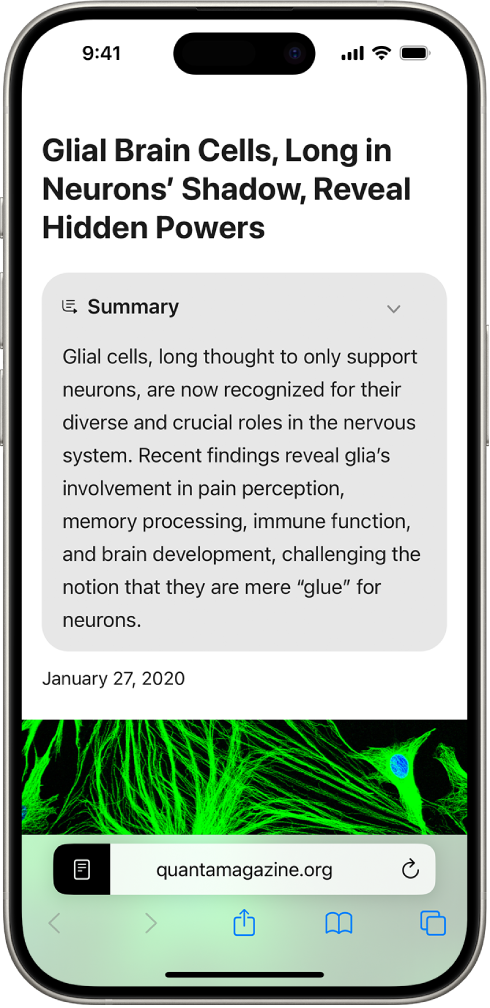
With Apple Intelligence,* you can generate summaries of webpages in the Safari app.
Note: Apple Intelligence is not available on all iPhone models or in all languages or regions.** To access the most recent available features, make sure you’re using the latest version of iOS and have Apple Intelligence turned on.
Summarize a webpage
Go to the Safari app
 on your iPhone.
Tap
 , then tap Show Reader.
Tap Summarize at the top of the page.
To return to the normal view, tap
 , then tap Hide Reader.
You can also use Writing Tools to summarize webpages. See Use Writing Tools with Apple Intelligence.
Thanks for your feedback.