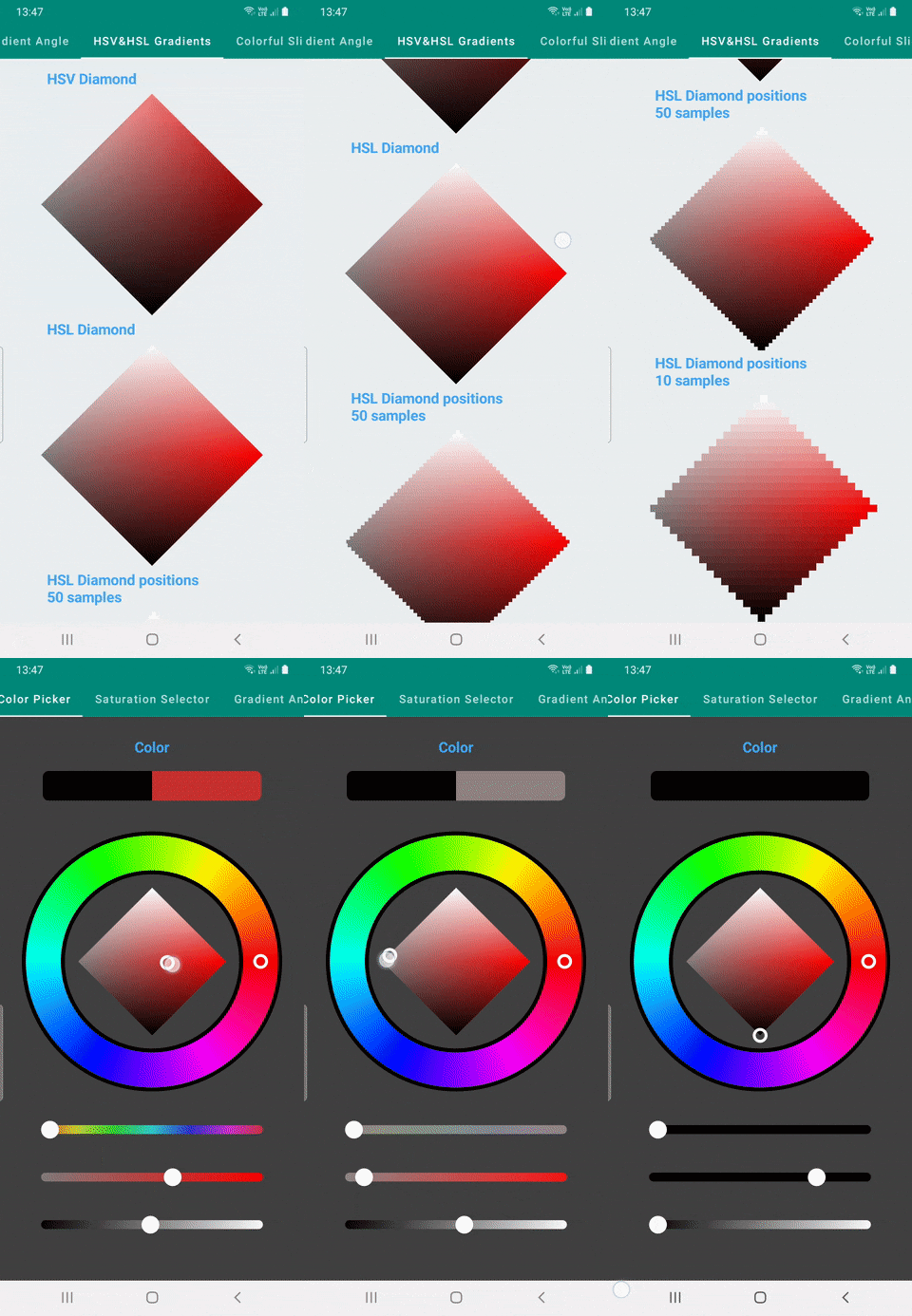
I'm building a Color picker with Jetpack Compose and trying to implement Saturation and Lightness picker rhombus(rectangle rotated 45 degrees) as can be seen in images but couldn't able to find a good method to display colors as they supposed to look like


I can get positions in rhombus and draw circles with, image on the left, since those are circle they don't look good. Also tried drawing small paths but it slows the app significantly.
/**
 * Get each point and saturation and lightness of the point. This function is for
 * creating points to draw like gradient effect for HSL color
 */
fun getPointsInRhombus(length: Float): MutableList<ColorPoint> {

    val step = length.toInt() / 50
    val colorPoints = mutableListOf<ColorPoint>()

    for (yPos in 0..length.toInt() step step) {
        val range = getIntRangeInLength(length = length, yPos.toFloat())
        for (xPos in range step step) {

            val path = rhombusPath(Size(10f, 10f))
            path.translate(Offset(xPos.toFloat() - 5, yPos.toFloat()))
            val saturation = xPos / length
            val lightness = 1 - (yPos / length)
            val colorPoint =
                ColorPoint(Offset(xPos.toFloat(), yPos.toFloat()), saturation, lightness, path)
            colorPoints.add(colorPoint)
        }
    }
    return colorPoints
}


 colorPoints.forEach { colorPoint: ColorPoint ->
        drawCircle(
            Color.hsl(hue, colorPoint.saturation, colorPoint.lightness),
            center = colorPoint.point,
            radius = 10f
        )
    }
Also tried creating to shapes one for lightness and other for Saturation and tried to blend them in but it doesn't work as can be seen in image on the right.
 with(drawContext.canvas.nativeCanvas) {
        val checkPoint = saveLayer(null, null)

        // Destination lightness top to bottom
        drawPath(
            rhombusPath, Brush.verticalGradient(
                colors = listOf(
                    Color.hsl(
                        hue,
                        saturation = .5f,
                        lightness = 1f,
                        alpha = 1f
                    ),
                    Color.hsl(
                        hue,
                        saturation = .5f,
                        lightness = 0f,
                        alpha = 1f
                    )
                )
            )
        )

        // Source saturation left to right
        drawPath(
            rhombusPath,
            Brush.horizontalGradient(
                colors = listOf(
                    Color.hsl(
                        hue,
                        saturation = 0f,
                        lightness = .5f,
                        alpha = 1f
                    ),
                    Color.hsl(
                        hue,
                        saturation = 1f,
                        lightness = .5f,
                        alpha = 1f
                    )
                )
            ),
            blendMode = BlendMode.SrcIn
        )

        restoreToCount(checkPoint)
    }
What i need is the colors from first image to be applied to a rhombus like image on the right without drawing circles or paths. I think this can be solved with one gradient or multiple gradients or blending them but can't find out how.
Checked this question in c# for reference but couldn't figure out how to apply it to Compose Brush