A minimalistic JSON viewer built using open-source components!

Currently anyone can sideload this extension on Google Chrome or Microsoft Edge by downloading the zip file of the latest release
Adapted from How to install Chrome extensions manually from GitHub | dev.to
-
Download and unzip the zip file of the latest release
-
Visit chrome://extensions and turn on "Developer mode"

-
Click "Load unpacked" button and navivigate to the folder you downloaded from GitHub


Update the extension: Navigate to chrome://extensions, and then select Reload to update your extension.
Remove the extension from your browser: Navigate to chrome://extensions, and then select Remove on your extension.
That's it 🎉
Adapted from Sideload an extension | Microsoft Edge documentation
-
Download and unzip the zip file of the latest release
-
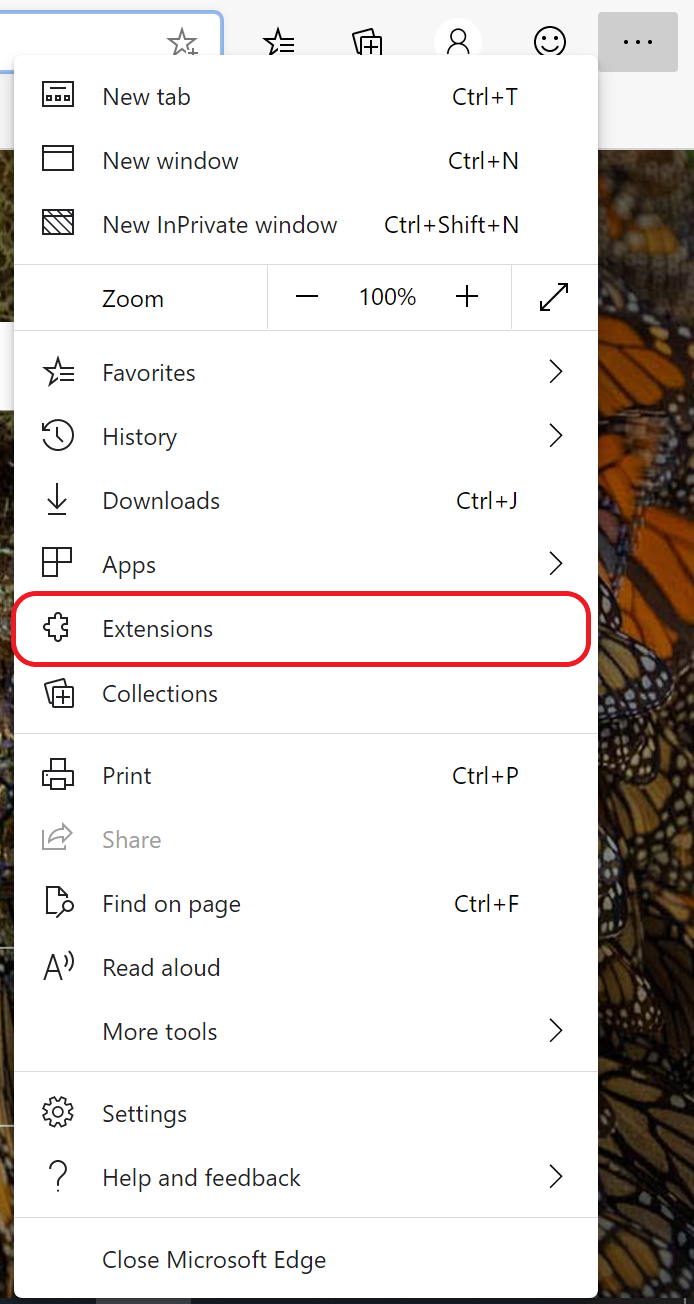
Open the edge://extensions page by choosing the three dots at the top of your browser, and then selecting Extensions
-
On the extension management page at edge://extensions, turn on Developer mode using the toggle at the bottom left of the page.

-
When installing your extension for the first time, choose Load Unpacked. You'll be prompted for the directory with your extension source files. Your extension is installed in your browser, similar to extensions installed from the store.


Update the extension: Navigate to edge://extensions, and then select Reload to update your extension.
Remove the extension from your browser: Navigate to edge://extensions, and then select Remove on your extension.
That's it 🎉
- Monaco Editor: The code editor that powers VS Code
- Keyboard CSS: A library of ready-to-use, cross-browser compatible keyboard like button UI
Monaco JSON Viewer is licensed under the MIT license