generates a JSON-parser for Java-objects at compile-time
Compile-time JSON-parser supports both non-private variables and properties.
The generated JSON-parser uses org.json:json.
- Download and install Maven
- Download the sources
- Run
mvn clean installin the directory of Compile-time JSON-parser - Create a Maven Project in IntelliJ where you want to use Compile-time JSON-parser
- Add the following dependency to the
pom.xmlof the project where you want to use Compile-time JSON-parser (replaceVERSIONwith the version from)
<dependency>
    <groupId>io.github.danthe1st</groupId>
    <artifactId>compile-time-json-parser</artifactId>
    <version>VERSION</version>
</dependency>- If you wish to use JPMS, also add the annotation processor to the
maven-compiler-plugin
<plugin>
	<artifactId>maven-compiler-plugin</artifactId>
	<version>3.8.1</version>
	<configuration>
		<release>11</release>
		<annotationProcessorPaths>
			<annotationProcessorPath>
				<groupId>io.github.danthe1st</groupId>
				<artifactId>compile-time-json-parser</artifactId>
				<version>VERSION</version>
			</annotationProcessorPath>
		</annotationProcessorPaths>
	</configuration>
</plugin>- Enable annotation processing for this project under
Settings>Build, Execution, Deployment>Compiler>Annotation Processors>Enable Annotation Processing
- Create a data class and annotate it with
@GenerateJSONlike this:
import io.github.danthe1st.json_compile.api.GenerateJSON;
@GenerateJSON
public class TestClass {
  public int someInt;
  private String someString;
  private int[][] someArray;

  public String getSomeString() {
    return someString;
  }

  public void setSomeString(String someString) {
    this.someString = someString;
  }

  public int[][] getSomeArray() {
    return someArray;
  }

  public void setSomeArray(int[][] someArray) {
    this.someArray = someArray;
  }

  @Override
  public String toString() {
    return "TestClass{" +
            "someInt=" + someInt +
            ", someString='" + someString + '\'' +
            ", someArray=" + Arrays.deepToString(someArray) +
            '}';
  }
}- When compiling the class, a class suffixed with
JSONLoadershould be automatically generated.
This class contains a method namedfromJSONthat creates an instance of the data class from aString:
String json= String.join("", Files.readAllLines(Path.of("testClass.json")));
TestClass obj = TestClassJSONLoader.fromJSON(json);
System.out.println(obj);
TestClass testObj=new TestClass();
testObj.setSomeString("test");
testObj.someInt=12345;
testObj.someArray=new int[][]{{1,2,3},{},null,{1,2,3,4,5,6}};
System.out.println(TestClassJSONLoader.toJSON(testObj));An example project can be found in the directory examples/maven-example.
- Import
Compile-time JSON-parserin IntelliJ as a maven project - Run
mvn clean installin that project - Expand the
examples/maven-exampledirectory - Right-click on the file
pom.xmlin that directory and selectAdd as a Maven Project - Make sure you set up your IDE correctly
- Run
TestClassinexamples/maven-example/src/main/java/io/github/danthe1st/json_compile/test/TestClass
Stringintlongfloatdoubleboolean- Enums
- Wrapper classes for supported primitive types
- Objects of classes annotated with
@GenerateJSON Collections if they are not part of other collections or arrays,Collectionsof classes annotated with@GenerateJSONthat contain collections are supported, however- Arrays
org.json.JSONObjectandorg.json.JSONArray
- It is not possible to create an array/collection of collections
- Objects annotated with
@GenerateJSONneed to have a no-args-constructor - Collections need to be initialized in the constructor
- Generic objects are not supported (except generic collections)
- Configuration is not supported
- Install the m2e-apt plugin
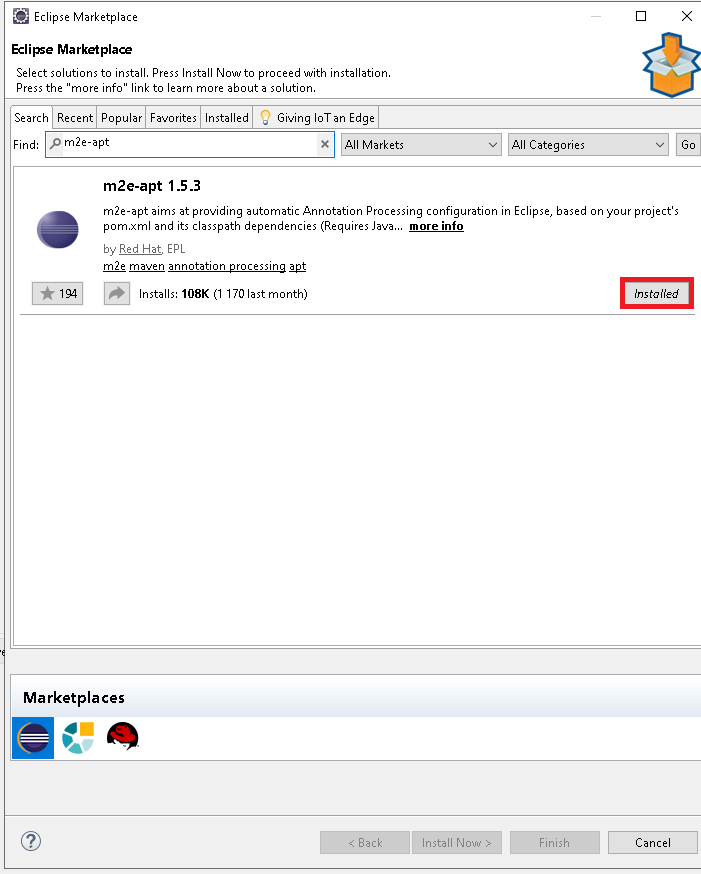
- Right-click the project, open
Properties>Java Compiler>Annotation Processing> and selectEnable Project Specific SettingsandEnable processing in Editor
- Enable annotation processing for this project under
Settings>Build, Execution, Deployment>Compiler>Annotation Processors>Maven default annotation processors profile>json-parser-maven-example>Enable Annotation Processing