Skip to content

Navigation Menu

Sign in
Appearance settings

Search code, repositories, users, issues, pull requests...

Provide feedback

We read every piece of feedback, and take your input very seriously.

Saved searches

Use saved searches to filter your results more quickly

Appearance settings

Adding functions to input custom image#142

Open
tianhaoxie wants to merge 6 commits intoXingangPan:mainXingangPan/DragGAN:mainfrom
tianhaoxie:maintianhaoxie/DragGAN:mainCopy head branch name to clipboard
Open

Adding functions to input custom image#142
tianhaoxie wants to merge 6 commits intoXingangPan:mainXingangPan/DragGAN:mainfrom
tianhaoxie:maintianhaoxie/DragGAN:mainCopy head branch name to clipboard

Conversation

@tianhaoxie
Copy link
Copy Markdown

Hi, I combined part of the PTI code into the visualizer so that custom image can be uploaded directly. It add some code and makes some change to the viz/renderer. Maybe after testing, it can be added as a branch.

@radames
Copy link
Copy Markdown

radames commented Jul 1, 2023

@tianhaoxie very cool! how do we change the base model? is the default the horse one?

@tianhaoxie
Copy link
Copy Markdown
Author

tianhaoxie commented Jul 1, 2023

@tianhaoxie very cool! how do we change the base model? is the default the horse one?

It follows the original way of DragGAN, default is lion and you can change it by changing checkpoints.

@radames
Copy link
Copy Markdown

radames commented Jul 1, 2023

sorry, I just notice that, testing! great it uses the selected checkpoint 👏 very cool!

@NandhaKishorM
Copy link
Copy Markdown

NandhaKishorM commented Jul 1, 2023

It is not working with stylegan_human_v2_1024, tried resize = (1024, 512) on L69 in inversion.py and also at L227 def train(self,img,w_plus=False):
resize = (1024,512)
if torch.is_tensor(img) == False:
transform = transforms.Compose(
[
transforms.Resize(resize, ),

                transforms.ToTensor(),
                transforms.Normalize([0.5, 0.5, 0.5], [0.5, 0.5, 0.5]),
            ]
        )

.... It will run, but wont make better results,

@tianhaoxie
Copy link
Copy Markdown
Author

It is not working with stylegan_human_v2_1024, tried resize = (1024, 512) on L69 in inversion.py and also at L227 def train(self,img,w_plus=False): resize = (1024,512) if torch.is_tensor(img) == False: transform = transforms.Compose( [ transforms.Resize(resize, ),

                transforms.ToTensor(),
                transforms.Normalize([0.5, 0.5, 0.5], [0.5, 0.5, 0.5]),
            ]
        )

.... It will run, but wont make better results,

It only supports the pre-trained models that you can download in the script. Since the GAN inversion is based on PTI, I'm not sure if it supports stylegan_human.

Copy link
Copy Markdown

Choose a reason for hiding this comment

The reason will be displayed to describe this comment to others. Learn more.

hi @tianhaoxie , you probably don't want to commit .pyc files here
please add it to
.gitignore on the main repo

__pycache__/
*.pyc

Copy link
Copy Markdown
Author

Choose a reason for hiding this comment

The reason will be displayed to describe this comment to others. Learn more.

Thanks for your suggestion!

Copy link
Copy Markdown

Choose a reason for hiding this comment

The reason will be displayed to describe this comment to others. Learn more.

Comment thread gan_inv/inversion.py
Comment on lines +265 to +266
generated_image = self.g_ema.synthesis(ws,noise_mode='const')
loss = self.cacl_loss(self.percept,generated_image,real_img)
Copy link
Copy Markdown

Choose a reason for hiding this comment

The reason will be displayed to describe this comment to others. Learn more.

hi @tianhaoxie I notice for some models, there is a dimension mismatch here between generated_image and real_img, do you know why the synthesis is not matching the self.g_ema.img_resolution ?
you can test with stylegan_human_v2_512

Copy link
Copy Markdown
Author

Choose a reason for hiding this comment

The reason will be displayed to describe this comment to others. Learn more.

yeah, stylegan2 human is different from others, which has 1024by512 resolution, whereas typically the H and W are same.

@radames
Copy link
Copy Markdown

radames commented Jul 8, 2023

hi @tianhaoxie , I also noticed that you might need to update the generator on the current model following this
danielroich/PTI#26 wdyt?

  tmp['G_ema'] = old_G.eval().requires_grad_(False).cpu()# copy.deepcopy(new_G).eval().requires_grad_(False).cpu()
  tmp['G'] = new_G.eval().requires_grad_(False).cpu() # copy.deepcopy(new_G).eval().requires_grad_(False).cpu()
  tmp['D'] = old_D
  tmp['training_set_kwargs'] = None
  tmp['augment_pipe'] = None

@631068264
Copy link
Copy Markdown

I follow the PTI and meet this danielroich/PTI#50 , I hope this pr can help me.

@zhaoxiong123
Copy link
Copy Markdown

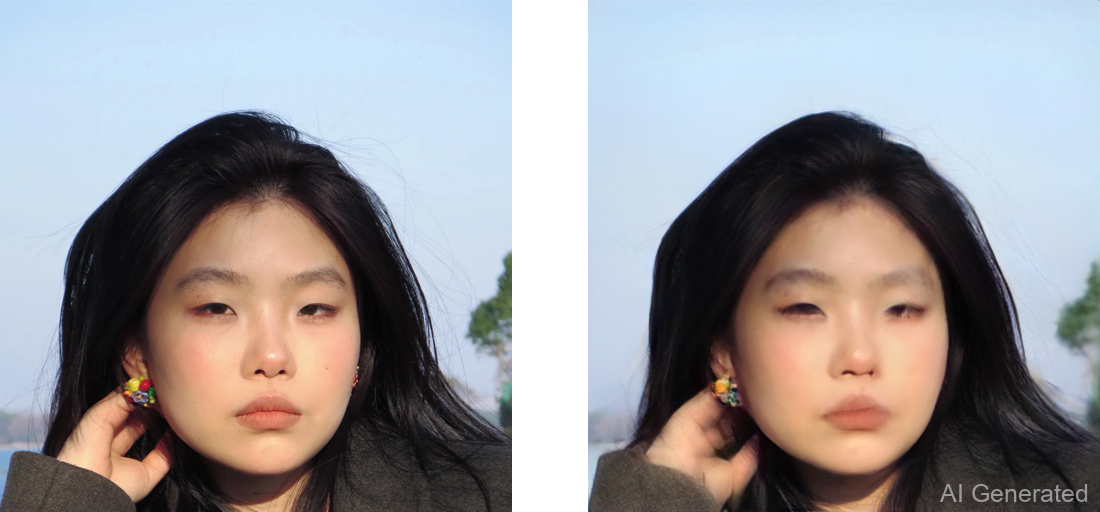
Hi, i got a picture when i run pti, but the picture is blurry。
173729
please help me, thanks
@tianhaoxie

@tianhaoxie
Copy link
Copy Markdown
Author

I follow the PTI and meet this danielroich/PTI#50 , I hope this pr can help me.

It's because the image resolution is depended on the stylegan checkpoint you selected. If the image you input is not exactly the resolution of the checkpoint, you need to crop and resize.

@tianhaoxie
Copy link
Copy Markdown
Author

Hi, i got a picture when i run pti, but the picture is blurry。 173729 please help me, thanks @tianhaoxie

It is normal for inversion to get results blurred and distorted.

@ghost
Copy link
Copy Markdown

ghost commented Jul 10, 2023

is there a possibility that in the future we can edit any image we add?

@MittalNeha
Copy link
Copy Markdown

@tianhaoxie I am trying to run the gradio visualizer from your github but it is not working! Can you possibly lay down the steps you followed to generate the gan_inv checkpoints and what all are the limitations for running this demo?
When I load the custom image, the gradio UI is stuck somewhere.

@tianhaoxie
Copy link
Copy Markdown
Author

@tianhaoxie I am trying to run the gradio visualizer from your github but it is not working! Can you possibly lay down the steps you followed to generate the gan_inv checkpoints and what all are the limitations for running this demo? When I load the custom image, the gradio UI is stuck somewhere.

Except for the stylegan human, all other checkpoints should work. Btw, you should upload your image by clicking 'inverse custom image', rather than drop it in the image box.

@ghost
Copy link
Copy Markdown

ghost commented Jul 13, 2023

@tianhaoxie I am trying to run the gradio visualizer from your github but it is not working! Can you possibly lay down the steps you followed to generate the gan_inv checkpoints and what all are the limitations for running this demo? When I load the custom image, the gradio UI is stuck somewhere.

Except for the stylegan human, all other checkpoints should work. Btw, you should upload your image by clicking 'inverse custom image', rather than drop it in the image box.

we have feature in draggan for edit any uploaded image?

@tianhaoxie
Copy link
Copy Markdown
Author

@tianhaoxie I am trying to run the gradio visualizer from your github but it is not working! Can you possibly lay down the steps you followed to generate the gan_inv checkpoints and what all are the limitations for running this demo? When I load the custom image, the gradio UI is stuck somewhere.

Except for the stylegan human, all other checkpoints should work. Btw, you should upload your image by clicking 'inverse custom image', rather than drop it in the image box.

we have feature in draggan for edit any uploaded image?

no, only the categories that the pre-trained checkpoints we have(i.e. horse, face).

@ghost
Copy link
Copy Markdown

ghost commented Jul 13, 2023

@tianhaoxie I am trying to run the gradio visualizer from your github but it is not working! Can you possibly lay down the steps you followed to generate the gan_inv checkpoints and what all are the limitations for running this demo? When I load the custom image, the gradio UI is stuck somewhere.

Except for the stylegan human, all other checkpoints should work. Btw, you should upload your image by clicking 'inverse custom image', rather than drop it in the image box.

we have feature in draggan for edit any uploaded image?

no, only the categories that the pre-trained checkpoints we have(i.e. horse, face).

if i good understand you have pre-trained categories e.g. face, horse.. and i can upload any photo where is face e.g. face of my sister and edit with draggan but i can't upload some category which is not trained e.g. cat?

@JanineCHEN
Copy link
Copy Markdown

@tianhaoxie I am trying to run the gradio visualizer from your github but it is not working! Can you possibly lay down the steps you followed to generate the gan_inv checkpoints and what all are the limitations for running this demo? When I load the custom image, the gradio UI is stuck somewhere.

Except for the stylegan human, all other checkpoints should work. Btw, you should upload your image by clicking 'inverse custom image', rather than drop it in the image box.

we have feature in draggan for edit any uploaded image?

no, only the categories that the pre-trained checkpoints we have(i.e. horse, face).

if i good understand you have pre-trained categories e.g. face, horse.. and i can upload any photo where is face e.g. face of my sister and edit with draggan but i can't upload some category which is not trained e.g. cat?

I believe so, the provided image should roughly belong to a data distribution approximated by any of the provided trained stylegan models.

@timchenxiaoyu
Copy link
Copy Markdown

looking forward

Sign up for free to join this conversation on GitHub. Already have an account? Sign in to comment

Labels

None yet

Projects

None yet

Development

Successfully merging this pull request may close these issues.

8 participants

Morty Proxy This is a proxified and sanitized view of the page, visit original site.