Revenue Recognition reports
Generate and export revenue reports using Stripe Revenue Recognition.
Stripe Revenue Recognition automatically generates reports that you can view in the Stripe Dashboard and export as CSV files. Use these reports to analyze revenue, deferred revenue and booked revenue across aggregate and detailed views, helping you validate data and prepare financial statements.
Caution
Revenue Recognition generates reports from transactions processed by Stripe. Expect a 4-hour delay before data displays in the Dashboard.
Integration requirements
Stripe Revenue Recognition requires specific configuration of your Stripe account:
- Model subscriptions using products and prices, and customers.
- Set taxes using the default_tax_rates attribute, not as line items.
- Set discounts using the discount object, not as invoice items.
Caution
Revenue recognition requirements vary based on several factors, including the location of your business and the goods and services that you sell. Make sure that you understand and comply with the requirements applicable to your business, and that you configure your Stripe account accordingly.
Dashboard
The Revenue Recognition overview in your Dashboard provides a high-level view of your business’s financial health. It includes charts for recognized revenue, deferred revenue, and booked revenue. You can also customize the overview to track the metrics you use most.
The Revenue Recognition section is also where you can manage your integration, including uploading your revenue data, defining custom rules on how to treat your revenue, and mapping to the chart of accounts that you use in your general ledger.
Caution
All report information is accessible after you import the data.
Revenue graphs
The revenue overview displays charts that give you a high-level view of your business over time. By default, the overview shows the following charts:
- Recognized revenue — Your net recognized revenue.
- Deferred revenue — Your ending balance of deferred revenue per month.
- Booked revenue — Revenue recorded when an invoice is finalized, including monthly totals for revenue that’s been booked but not necessarily recognized.
You can add any of the following additional charts to your overview:
- Top products by net recognized revenue — The products that contributed most to your net recognized revenue.
- Top customers by net recognized revenue — The customers that contributed most to your net recognized revenue.
- Top products by booked revenue — The products that contributed most to your booked revenue.
- Top customers by booked revenue — The customers that contributed most to your booked revenue.
- AR aging trend — Outstanding invoice amounts over time, grouped by how long they’ve been unpaid.
The value shown under each chart title reflects the most recent period in the selected range.
Monthly and daily charts use color to differentiate between open and closed accounting periods. Figures in open periods continue to change until the period closes. Daily view shows a day-by-day breakdown of revenue for the selected month. Additional charts listed above don’t support daily data.
Note
Revenue from usage-based billing is recognized in full when invoices finalize or when the accounting period closes.
Customize your overview
You can customize which charts appear in your overview and in what order:
- Select Add to open the chart catalog and choose additional charts to display.
- Select Edit to enter edit mode, where you can drag charts to reorder them or remove individual charts, including the defaults. Select Done when finished.
- Select Reset in edit mode to restore the default chart order of recognized revenue, deferred revenue, and booked revenue.
Your chart selections and order persist across sessions. If you belong to multiple accounts, you can save separate chart configurations for each account.
Recognized revenue breakdown
The recognized revenue breakdown chart in the Dashboard shows how your recognized revenue breaks down by source, with adjustments for refunds, disputes, and contra revenue.
Revenue waterfall
The revenue waterfall, sometimes called a revenue schedule chart, displays expected recognizable revenue over time. Use this to understand how activity from each period affects revenue in future periods.
This report shows expected revenue amounts based on historical billings. It doesn’t model future billings and it doesn’t predict future revenue from those potential billings. The expected future revenue amounts change as you add future billings.
Statements and CSV reports
Use the Statements tab to access all key financial reports associated with revenue recognition in Stripe. You can view summaries and detailed breakdowns, download financial documents, and share feedback on the reports.
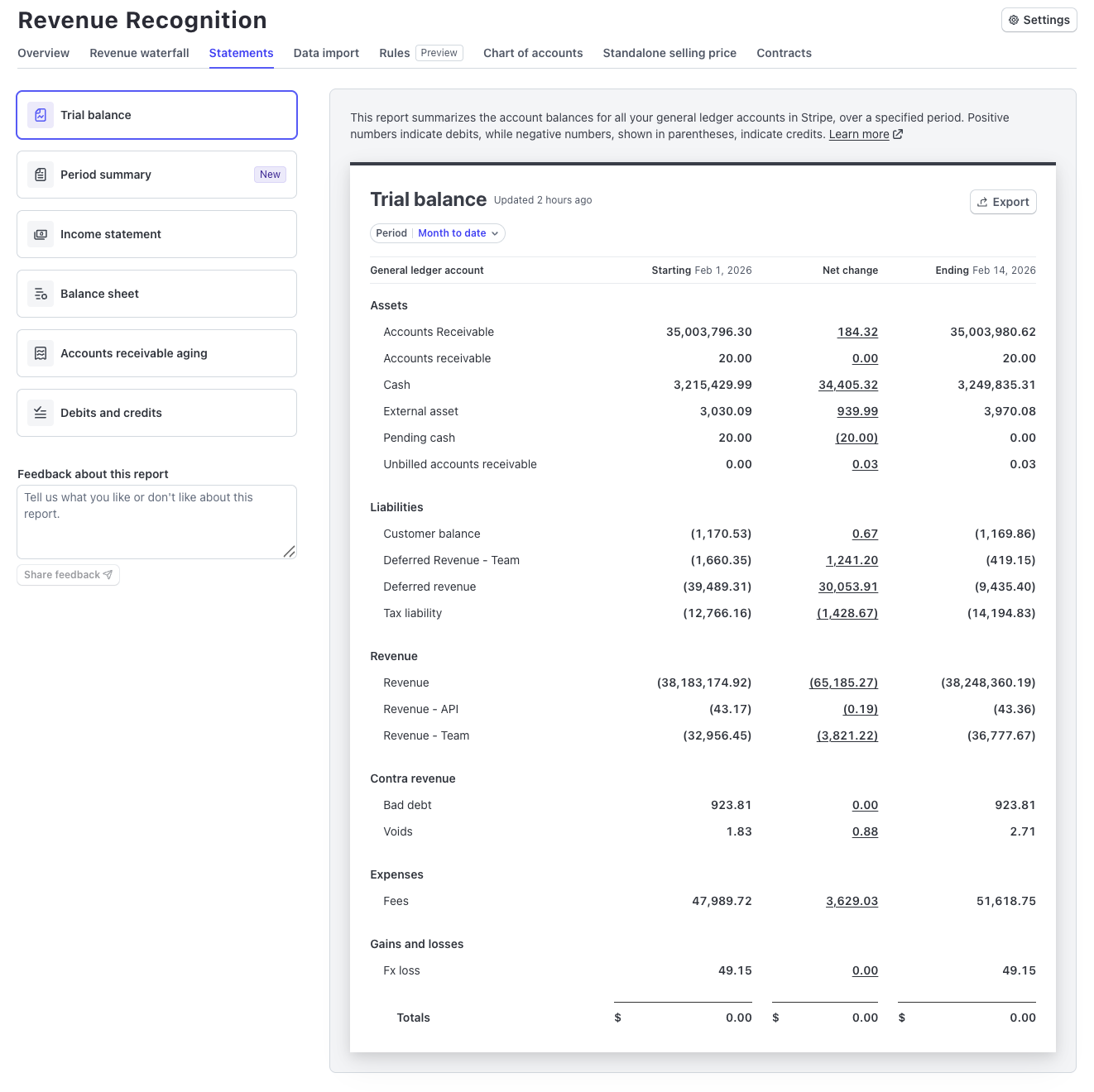
Statements overview
In the Statements tab, access:
| Report Type | Description |
|---|---|
| Trial balance | Prepare for book closing and make sure all debit and credit account balances are equal to confirm balanced books. Select Net change amounts to audit detailed transaction activity. |
| Period summary | Review your billing activity, revenue recognition, and deferred revenue changes to understand net revenue impact and book journal entries. |
| Income statement | Analyze your revenue, expenses, and net income to understand financial performance over a specific period. |
| Balance sheet | Review your business’s assets and liabilities at a specific time to gauge overall financial stability. |
| Accounts receivable aging | Monitor outstanding invoices categorized by age to evaluate customer payment behavior and manage credit risk. |
| Debits and credits | Examine detailed transaction entries to uphold accurate bookkeeping and aid in the reconciliation of accounts. Use the Entries filter to view all transactions or isolate corrections. |
Reports available in the Statements tab integrate with other financial management tools in Stripe, helping ensure consistency and facilitate financial processing.
Available CSV export formats
Download any accounting report or statement you’re viewing by selecting Download. Each format provides different levels of detail and grouping:
| Report format | Description |
|---|---|
| Summary | Summary of revenue recognition on your account for the selected period. |
| Product | Revenue recognition organized by product. |
| Price | Revenue recognition organized by price, including pricing metadata and intervals. |
| Customer | Revenue recognition organized by customer, including customer name, email, and address. |
| Invoice | Revenue recognition organized by invoice, including charges, refunds, and dispute IDs. |
| Line item | Revenue recognition organized by line item, including charges, refunds, and dispute IDs at the line item level. |
| Metadata | Customized summary grouped by the selected metadata object type and key. Supports grouping by charge, customer, invoice, invoice item, product, or subscription metadata. Learn more about metadata. |
| Event type | Available in the debits and credits reports. Revenue recognition organized by event type, with descriptions of recorded events to help you understand each journal entry. |
| Invoice event type | Available in the debits and credits reports. Revenue recognition organized by invoice and event type, including charges, refunds, and dispute IDs. |
| Line item event type | Available in the debits and credits reports. Revenue recognition organized by line item and event type, including charges, refunds, and dispute IDs at the line item level. |
| QuickBooks format | Available in the debits and credits report, import this CSV directly into QuickBooks Online. Stripe groups entries by accounting period and currency, and nets debit and credit amounts by account. See Download in QuickBooks format. |
Feedback and customization
The Statements tab lets you provide feedback on each report. Your feedback helps us improve the reports and develop tailored solutions based on your needs.
Activity breakdown
The activity breakdown provides detailed, transaction-level insights into the activity that affects specific accounts in your Revenue Recognition system. Access this view by selecting Net change amounts in the trial balance to audit the underlying transactions that contribute to account balances and changes.